
Veeam One
Veeam One is a monitoring and analytics platform that provides visibility, alerting, and capacity planning for backup, virtual infrastructure, and data protection environments.
Use Cases the Adapter Solves
- Backup Coverage Visibility: Identify virtual machines and physical computers that are protected by Veeam backup jobs, enabling you to detect unprotected assets and ensure comprehensive backup coverage across your infrastructure.
- Last Protected Date Tracking: Monitor when devices were last successfully backed up to identify stale backups, detect backup failures, and ensure recovery point objectives (RPOs) are being met.
Asset Types Fetched
- Devices
Data Retrieved through the Adapter
The following data can be fetched by the adapter:
Devices: Fields such as Name, Hostname, Device Type, Last Seen (Last Protected Date), Network Interfaces (IP Addresses), VM UID in VBR,
Before You Begin
Required Ports
TCP port 1239 (HTTPS)
Authentication Methods
OAuth 2.0 Password Grant
APIs
Axonius uses the Veeam ONE REST API v2.3. The following endpoints are called:
POST /api/tokenGET /api/v2.3/protectedData/virtualMachinesGET /api/v2.3/protectedData/computers
Required Permissions
The user account provided for the adapter must have one of the following roles assigned in Veeam ONE:
- Veeam ONE Administrator (Recommended)
- Veeam ONE Read-Only User
- Veeam ONE Power User
All three roles have sufficient read permissions to retrieve protected data via the REST API. The Read-Only User role provides the minimum required access for the adapter to function.
Supported From Version
Supported from Axonius version 8.0.12.0
Connecting the Adapter in Axonius
Navigate to the Adapters page, search for Veeam One, and click on the adapter tile.
Click Add Connection.
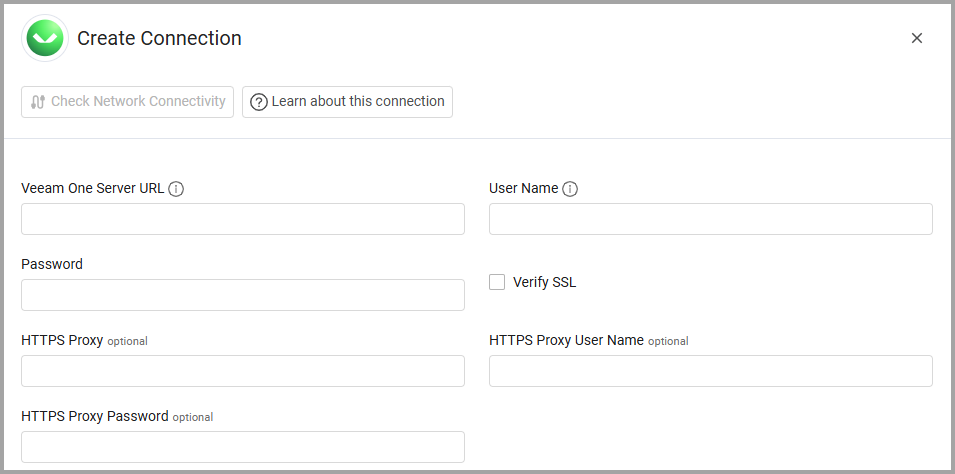
To connect the adapter in Axonius, provide the following parameters:
Required Parameters
- Veeam One Server URL - The base URL for the Veeam ONE REST API. Example:
https://veeam-one-server:1239 - User Name - User account with Veeam ONE Administrator, Read-Only User, or Power User role.
- Password - Password for the user account.
Optional Parameters
- Verify SSL - Select whether to verify the SSL certificate of the server against the CA database inside of Axonius. For more details, see SSL Trust & CA Settings.
- HTTPS Proxy - Connect the adapter to a proxy instead of directly connecting it to the domain.
- HTTPS Proxy User Name - The user name to use when connecting to the value supplied in Veeam One Server URL via the value supplied in HTTPS Proxy.
- HTTPS Proxy Password - The password to use when connecting to the server using the HTTPS Proxy.
To learn more about common adapter connection parameters and buttons, see Adding a New Adapter Connection.
Updated 8 months ago