
Chat History
The AI Companion saves every conversation you have. Conversations are stored per user, so your history is private to your account and is not visible to other users.
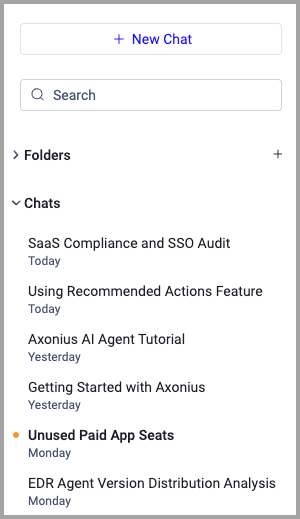
Each conversation is automatically titled based on the content of its first message. You will see this title in the sidebar. You can rename conversations.
Viewing Past Conversations
Chat history is accessible from the AI Companion's sidebar:
- In the side panel — Click the Chat History icon (a clock icon) in the panel header to open the history list.
- In full-page view — All conversations are listed in the chat side panel in your custom folders or in the Chat folder.
The list shows your past conversations in reverse chronological order, with the most recent at the top. Each entry shows the conversation title and the date of the last message.
Resuming a Past Conversation
To resume a past conversation, click its title in the list. The conversation loads in the main chat area, including the full message thread, all the agent's responses, and any tool steps that ran during that session.
Once a past conversation is loaded, you can continue typing new messages in the input field. The agent resumes the conversation and maintains context from the earlier messages.
To rename, pin, or delete conversations, see Managing Chats.
Updated 17 days ago