
Mashery (Boomi Cloud API Management)
Mashery is an API management platform that provides API lifecycle management, access control, security monitoring, and analytics for enterprise APIs and connected applications.
Use Cases the Adapter Solves
- API Security Governance: Monitor API access controls, identify package keys with excessive permissions, and track API usage across your organization.
- API Lifecycle Management: Track API services, versions, and configurations to ensure consistency and identify deprecated or outdated API implementations.
Asset Types Fetched
- Application Services, Business Applications, Organizational Units, Secrets, Security Roles, URLs, Users, Application Settings
Data Retrieved through the Adapter
Users - fields such as: Username, Email, Display Name, Company
Security Roles - fields such as: Name, Role ID
Secrets - fields such as: API Key, Status, Rate Limit Ceiling, QPS Limit Ceiling
Business Applications - fields such as: Name, Description, Application Type, Owner Username
Application Services - fields such as: Name, Description, Version, QPS Limit Overall
URLs - fields such as: Domain, Status
Organizational Units - fields such as: Name
Before You Begin
Required Ports
- TCP port 443 (HTTPS)
Authentication Methods
OAuth 2.0 Password Grant
APIs
Axonius uses the Mashery v3 API. The following endpoints are called:
POST /v3/token- Authenticates and retrieves OAuth 2.0 access tokenGET /v3/rest/members- Fetches portal members (users)GET /v3/rest/roles- Fetches rolesGET /v3/rest/packageKeys- Fetches API package keys (secrets)GET /v3/rest/applications- Fetches registered applicationsGET /v3/rest/services- Fetches API servicesGET /v3/rest/domains- Fetches API domainsGET /v3/rest/organizations- Fetches organizations
Required Permissions
The following are required to connect the adapter:
Mashery Portal Administrator or API User
The user account must have access to:
- Read portal members and their associated roles
- Read API keys (package keys)
- Read registered applications
- Read API services and their configurations
- Read domains
- Read organizations
Note: The exact permission names should be confirmed with your Mashery administrator or Mashery support, as the API documentation does not include detailed permission information.
Supported From Version
Supported from Axonius version 9.0.5
Connecting the Adapter in Axonius
- Navigate to the Adapter Catalog, search for Mashery, and select the adapter.
- Click Add Connection.
- Provide the following parameters.
Required Parameters
- Domain - Mashery API base URL. Use
https://api.mashery.comfor cloud deployments. Don't include a trailing slash or endpoint path. Example:https://api.mashery.com - API Key - OAuth2 client ID (API Key) obtained from the Mashery developer portal.
- API Secret - OAuth2 client secret (API Secret) corresponding to the API Key.
- User Name - Portal username for authentication. Example:
[email protected] - Password - Portal password for authentication. Example:
your-password-here
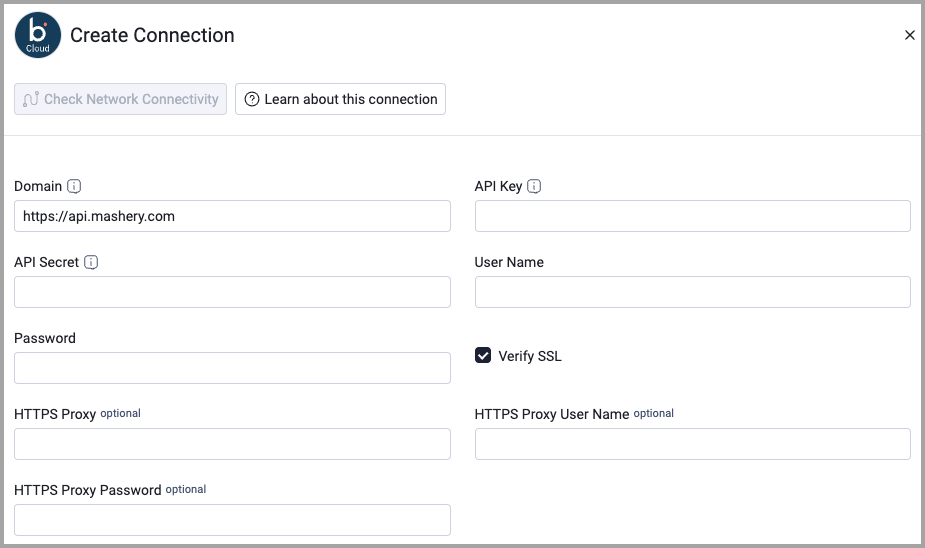
Optional Parameters
- Verify SSL - Select whether to verify the SSL certificate of the server against the CA database inside of Axonius. For more details, see SSL Trust & CA Settings.
- HTTPS Proxy - Connect the adapter to a proxy instead of directly connecting it to the domain.
- HTTPS Proxy User Name - The user name to use when connecting to the value supplied in Domain via the value supplied in HTTPS Proxy.
- HTTPS Proxy Password - The password to use when connecting to the server using the HTTPS Proxy.
To learn more about common adapter connection parameters and buttons, see Adding a New Adapter Connection.
Advanced Settings
Note
Advanced settings can either apply to all connections for this adapter, or to a specific connection. Refer to Advanced Configuration for Adapters.
To learn more about Adapter Configuration tab advanced settings, see Adapter Advanced Settings.
Updated 6 days ago