
Fastly
Fastly is an edge cloud platform that provides content delivery, network acceleration, API security, DDoS protection and web application firewall services to process, deliver and secure traffic.
Use Cases the Adapter Solves
- Unified Certificate Management: Centralize visibility of TLS certificates across your edge infrastructure alongside certificates from other platforms (AWS, F5, etc.), enabling comprehensive certificate lifecycle management and expiration tracking..
Asset Types Fetched
- Certificates
Data Retrieved through the Adapter
The following data can be fetched by the adapter:
Certificates - Fields such as: Name, Serial Number, Issued To, Begins On, Expires On
Before You Begin
Required Ports
- TCP port 443 (HTTPS)
Authentication Methods
API Token Authentication
APIs
Axonius uses the Fastly API. The following endpoints are called:
GET /tls/certificates- Retrieve TLS certificates
Required Permissions
The API Token must have the following permissions:
- TLS viewer role (minimum required)
- global:read scope
Supported From Version
Supported from Axonius version 8.0.16.0
Setting Up Fastly to Work with Axonius
To create an API token for use with Axonius:
- Log in to the Fastly control panel.
- Navigate to Account > API tokens > Personal tokens.
- Click Create token.
- When prompted, enter your password to re-authenticate.
- In the Name field, enter a descriptive name (e.g., "Axonius Integration").
- From the Scope options, select global:read to grant read-only access.
- From the Access options, select all services or limit to specific services as needed.
- Set the Expiration timeframe (default is 90 days, or set to never expire based on your security policies).
- Click Create Token.
- Copy the API token string immediately and store it securely. This is the only time it will be visible.
Connecting the Adapter in Axonius
Navigate to the Adapters page, search for Fastly, and click on the adapter tile.
Click Add Connection.
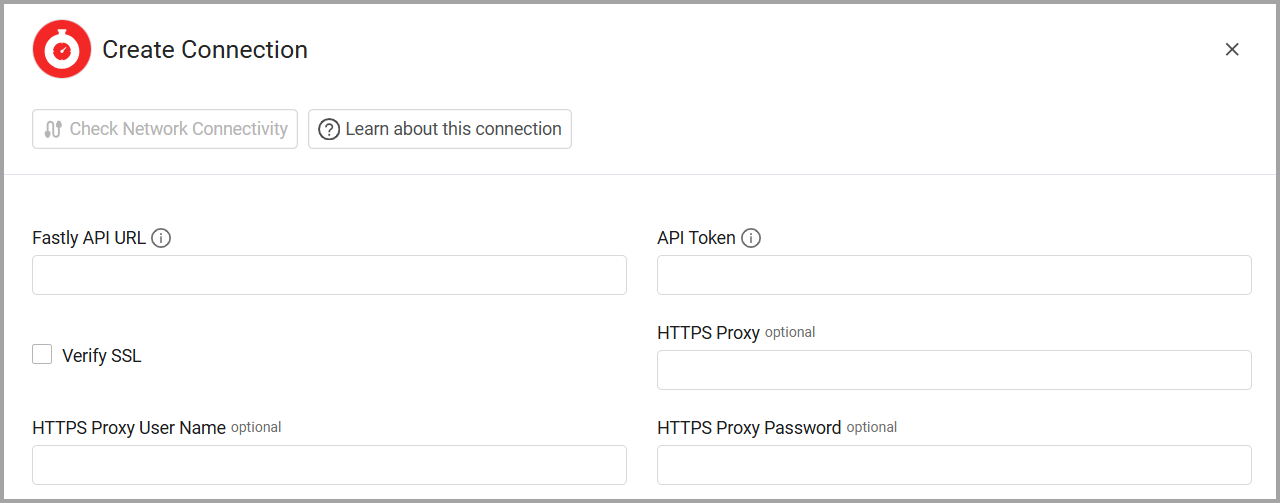
To connect the adapter in Axonius, provide the following parameters:
Required Parameters
- Fastly API URL - The base URL for the Fastly API. Example:
https://api.fastly.com - API Token - The Fastly API token. This token is generated from the Fastly control panel.
Optional Parameters
- Verify SSL - Select whether to verify the SSL certificate of the server against the CA database inside of Axonius. For more details, see SSL Trust & CA Settings.
- HTTPS Proxy - Connect the adapter to a proxy instead of directly connecting it to the domain.
- HTTPS Proxy User Name - The user name to use when connecting to the value supplied in Fastly API URL via the value supplied in HTTPS Proxy.
- HTTPS Proxy Password - The password to use when connecting to the server using the HTTPS Proxy.
To learn more about common adapter connection parameters and buttons, see Adding a New Adapter Connection.
Updated 8 months ago