
HPE Intelligent Management Center (IMC)
HPE Intelligent Management Center (IMC) is a networking solution that delivers management across campus core and data center networks.
Types of Assets Fetched
This adapter fetches the following types of assets:
- Devices
- Users
- Networks
Parameters
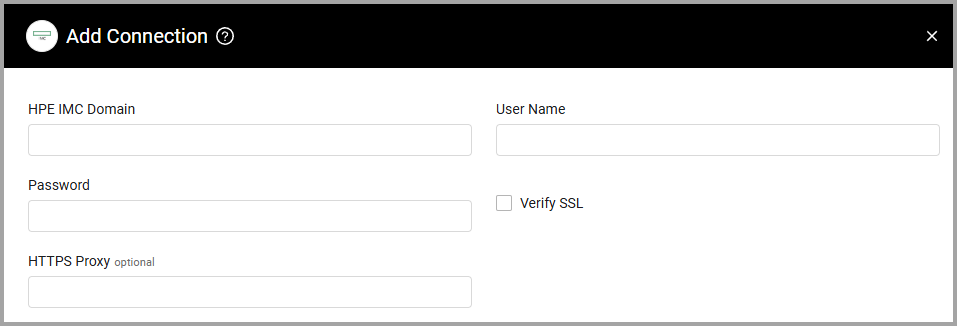
- HPE IMC Domain (required) - The hostname or IP address of the HPE IMC server.
- User Name and Password (required) - The credentials for a user account that has the Required Permissions to fetch assets.
- Verify SSL - Select whether to verify the SSL certificate of the server against the CA database inside of Axonius. For more details, see SSL Trust & CA Settings.
- HTTPS Proxy (optional) - Connect the adapter to a proxy instead of directly connecting it to the domain.
To learn more about common adapter connection parameters and buttons, see Adding a New Adapter Connection.
Advanced Settings
Note:
- Advanced settings can apply to either all connections of this adapter, or to a specific connection. For more detailed information, see Advanced Configuration for Adapters.
- For more general information about advanced settings, see Adapter Advanced Settings.
These settings are located under Endpoints Config.
- Enrich Devices with Device VLANs (default: disabled) - Select this option to enrich Device assets with the VLAN count and VLAN list reported by HPE IMC.
- Fetch Networks from Global VLANs (default: disabled) - Select this option to fetch HPE IMC global VLANs as Network assets. Each Network includes the VLAN name, VLAN ID, segment type, and whether the VLAN has VLAN interfaces.
APIs
Axonius uses the HPE IMC Extended API.
GET /imcrs/plat/res/device- Fetch devicesGET /imcrs/user- Fetch usersGET /imcrs/vlan/vlanDevice- Fetch VLAN membership for devices (when Enrich Devices with Device VLANs is enabled)GET /imcrs/globalvlan- Fetch global VLANs as Network assets (when Fetch Networks from Global VLANs is enabled)
Required Permissions
The value supplied in User Name must have read access to devices.
The specified user must be a member of the default administrator group, or a group with administrator rights and with the RESTful Web Services Call option selected.
(862).png)
Version Matrix
This adapter has only been tested with the versions marked as supported, but may work with other versions. Please contact Axonius Support if you have a version that is not listed and it is not functioning as expected.
| Version | Supported | Notes |
|---|---|---|
| HPE IMC v5.1 or later | Yes |
Updated 10 days ago