
CyberArk Certificate Manager - SaaS
CyberArk Certificate Manager - SaaS is a certificate lifecycle management platform that discovers, monitors, and manages TLS/SSL certificates across networks to prevent outages and security exposures.
Use Cases the Adapter Solves
- Monitor certificate status: Use certificate status and expiration information to identify certificates that need attention.
- Maintain machine visibility: Review managed and unmanaged machine discovery status alongside machine details.
- Review user access context: Analyze user account status, sign-in settings, and assigned system roles.
Asset Types Fetched
- Certificates
- Devices
- Users
Data Retrieved through the Adapter
Certificates - fields such as: Certificate ID, Serial Number, Status, Expires On
Devices - fields such as: Device ID, Name, Machine Status, Discovery Status
Users - fields such as: Username, Email Address, User Status, System Roles
Before You Begin
Required Ports
- TCP port 443 (HTTPS)
Authentication Methods
The adapter supports API key authentication and bearer token authentication. Select an authentication method and provide the corresponding credential.
APIs
Axonius uses the CyberArk Certificate Manager - SaaS API. The following endpoints are called:
POST /outagedetection/v1/certificatesearch- Retrieves certificate records.POST /v1/machinesearch- Retrieves machine records.GET /v1/users- Retrieves user records.
Required Permissions
Confirm that the API key or bearer token can access the certificate, machine, and user API endpoints listed above.
Supported From Version
Supported from Axonius version 9.0.8
Connecting the Adapter in Axonius
- Navigate to the Adapter Catalog, search for CyberArk Certificate Manager - SaaS, and select the adapter.
- Click Add Connection.
- Provide the following parameters.
Required Parameters
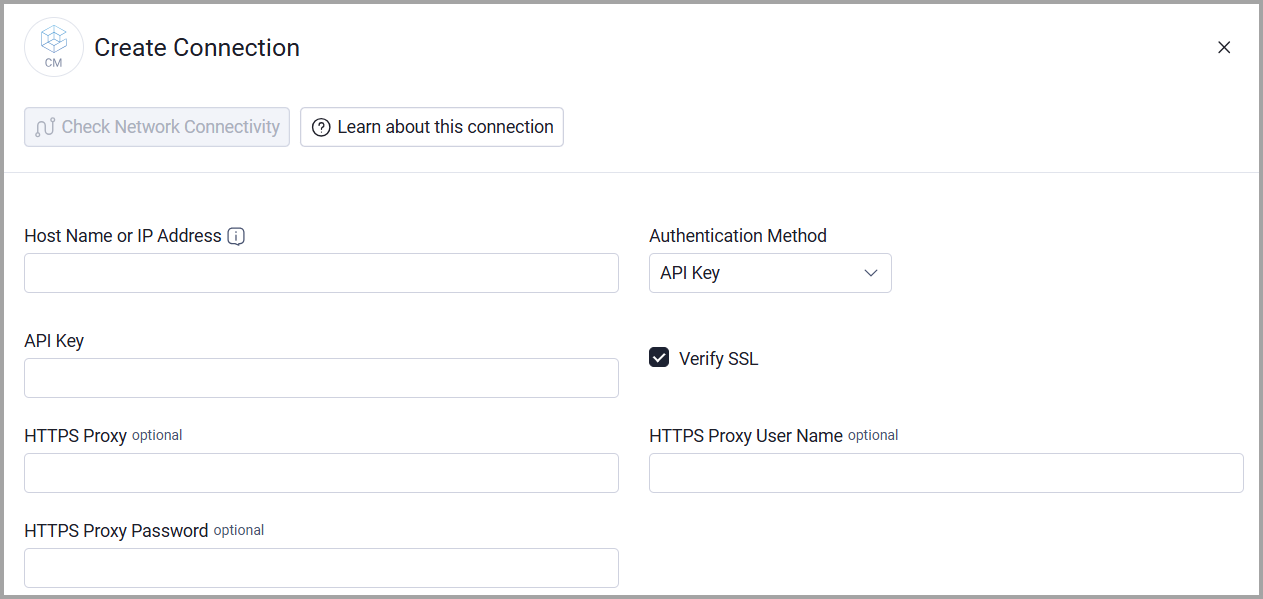
- Host Name or IP Address - Enter the base domain for the API, including http:// or https://, without a specific endpoint.
- Authentication Method - Select API Key or Bearer Token. The default is API Key.
- API Key or Bearer Token - Enter the credential that matches the selected Authentication Method.
Optional Parameters
- Verify SSL - Select whether to verify the SSL certificate of the server against the CA database inside of Axonius. For more details, see SSL Trust & CA Settings.
- HTTPS Proxy - Connect the adapter to a proxy instead of directly connecting it to the domain.
- HTTPS Proxy User Name - The user name to use when connecting to the value supplied in Host Name or IP Address via the value supplied in HTTPS Proxy.
- HTTPS Proxy Password - The password to use when connecting to the server using the HTTPS Proxy.
To learn more about common adapter connection parameters and buttons, see Adding a New Adapter Connection.
Updated 20 days ago