
GlobalSign GCC (GlobalSign Certificate Center)
GlobalSign GCC is a certificate management platform that provides SSL certificate ordering, issuance, and lifecycle query capabilities through a SOAP-based web service API.
Use Cases the Adapter Solves
- Certificate Lifecycle Management: Track SSL certificate orders and their status across your infrastructure to ensure proper certificate management and prevent service disruptions.
- Certificate Expiration Monitoring: Monitor certificate expiration dates to proactively renew certificates before they expire and cause outages.
Asset Types Fetched
- Certificates
Data Retrieved through the Adapter
Certificates
For example:
- Order ID, Domain Name, Common Name
Before You Begin
Required Ports
- TCP port 443 (HTTPS)
Authentication Methods
Username and Password Authentication
The adapter authenticates using basic authentication with a username and password provided in the SOAP request. The credentials are sent in the AuthToken element of each SOAP method call to the GlobalSign GCC API.
APIs
Axonius uses the GlobalSign GCC SOAP API. The following endpoints are called:
SOAP GetOrderByDateRange- Retrieves certificate orders within a specified date range, including order details and certificate information
Required Permissions
The API user must have permissions to access the GlobalSign GCC SOAP API and query certificate orders.
Note: The exact permission names should be confirmed with your GlobalSign administrator or GlobalSign support, as the API documentation is not publicly available.
Supported From Version
Supported from Axonius version 9.0.4
Setting Up GlobalSign GCC to Work with Axonius
- Log in to your GlobalSign account
- Navigate to the account settings or API access section
- Ensure you have valid API credentials (username and password) with access to the MSMService SOAP API
- Note the base URL of your GlobalSign GCC service (e.g.,
https://system.globalsign.com)
Connecting the Adapter in Axonius
Navigate to the Adapters page, search for GlobalSign GCC, and click on the adapter tile.
Click Add Connection.
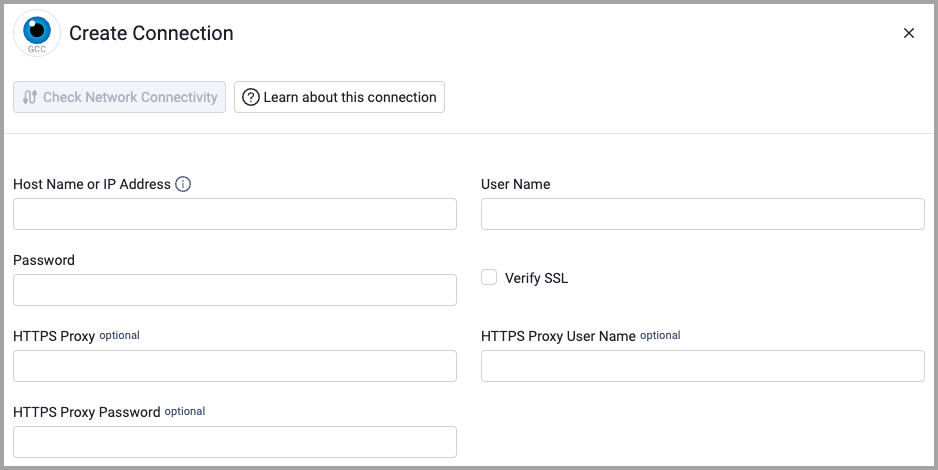
To connect the adapter in Axonius, provide the following parameters:
Required Parameters
- Host Name or IP Address - Base URL of the GlobalSign GCC service. Example:
https://system.globalsign.com - User Name - The username for accessing the GlobalSign GCC SOAP API.
- Password - The password for accessing the GlobalSign GCC SOAP API.
- Verify SSL - Select whether to verify the SSL certificate of the server against the CA database inside of Axonius. For more details, see SSL Trust & CA Settings.
Optional Parameters
- HTTPS Proxy - Connect the adapter to a proxy instead of directly connecting it to the domain.
- HTTPS Proxy User Name - The user name to use when connecting to the value supplied in Host Name or IP Address via the value supplied in HTTPS Proxy.
- HTTPS Proxy Password - The password to use when connecting to the server using the HTTPS Proxy.
To learn more about common adapter connection parameters and buttons, see Adding a New Adapter Connection.
Advanced Settings
NoteAdvanced settings can either apply to all connections for this adapter, or to a specific connection. Refer to Advanced Configuration for Adapters.
To learn more about Adapter Configuration tab advanced settings, see Adapter Advanced Settings.
The GlobalSign GCC adapter has the following advanced configuration settings:
- From Date - Start date for certificate order query (ISO 8601 format). Defaults to yesterday. This setting controls the date range for retrieving certificate orders.
Updated 12 days ago