
SNMP
Integrate SNMP with the Axonius Asset Management Platform. SNMP is a management information base that provides standardized definitions to monitor and retrieve hardware and software component details of network devices.
SNMP is a network management protocol that allows for the monitoring and management of network devices.
The SNMP adapter enables Axonius to discover and inventory physical components of network infrastructure devices using the industry-standard SNMP protocol.
Use Cases the Adapter Solves
- Network Device Discovery: Discover and inventory network infrastructure devices (routers, switches, firewalls) across your network using SNMP.
- Neighbor Device Visibility: Identify devices connected to your network infrastructure through ARP table analysis to detect unmanaged endpoints.
- Network Topology Mapping: Build comprehensive network topology maps by correlating device interfaces, IP addresses, and MAC addresses from SNMP data.
Asset Types Fetched
- Devices (Network Devices)
Data Retrieved through the Adapter
Devices
- Host Name, Device Name, Serial Number
- Object ID, Contact, Location
- Device Type, Discovery Protocol, Uptime
- Network Interfaces (MAC addresses, IP addresses, interface status)
Before You Begin
Required Ports
- UDP port 161 (SNMP)
Authentication Methods
The SNMP adapter supports three authentication methods:
SNMPv1/v2c Authentication
Uses community string-based authentication. The adapter authenticates using a read community string configured on the target device.
SNMPv3 Authentication
Uses username-based authentication with optional authentication and privacy (encryption) protocols. Supports multiple authentication algorithms (MD5, SHA, SHA224, SHA256, SHA384, SHA512) and privacy algorithms (DES, DES3, AES128, AES192, AES256).
APIs
Axonius uses the SNMP protocol to query network devices. The following MIB objects are queried:
GET SNMPv2-MIB::sysDescr- System descriptionGET SNMPv2-MIB::sysName- System nameGET SNMPv2-MIB::sysContact- System contact informationGET SNMPv2-MIB::sysLocation- System physical locationGET SNMPv2-MIB::sysObjectID- Vendor identificationGET SNMPv2-MIB::sysUpTime- System uptimeGETBULK IF-MIB::ifTable- Network interface informationGETBULK IP-MIB::ipNetToPhysicalTable- ARP table for neighbor discoveryGETBULK IP-MIB::ipNetToMediaTable- Legacy ARP table (for older devices)
Required Permissions
The SNMP adapter requires read-only access to the device's SNMP agent. In addition, aach SNMP version has different requirements:
For SNMPv1/v2c:
- Configure a read community string on the target device.
- Ensure the community has read access to system and interface MIBs.
For SNMPv3:
- Create a user account on the target device's SNMP agent.
- Grant read access to system and interface MIBs.
- Configure appropriate authentication and privacy settings.
Attention
The exact permission configuration varies by device vendor and model. Consult your network device documentation for SNMP configuration instructions.
Supported from Version
Supported from Axonius version 6.1.0
Setting Up SNMP to Work with Axonius
Note
These are general guidelines based on SNMP best practices. Configuration steps vary by device vendor.
The SNMP protocol must be enabled on your network devices before connecting to Axonius. Configuration steps vary by device vendor:
- Enable SNMP agent on the target network device.
- Configure authentication credentials:
- For SNMPv1/v2c: Set a read community string (for example,
publicor a custom string). - For SNMPv3: Create a user with authentication and privacy settings.
- For SNMPv1/v2c: Set a read community string (for example,
- Allow SNMP access from the Axonius instance's IP address (configure ACLs if needed),
- Verify the connectivity by testing SNMP queries from the Axonius instance to the target device on UDP port 161.
Connecting the Adapter in Axonius
- Navigate to the Adapters page, search for SNMP, and click on the adapter tile.
- Click Add Connection.
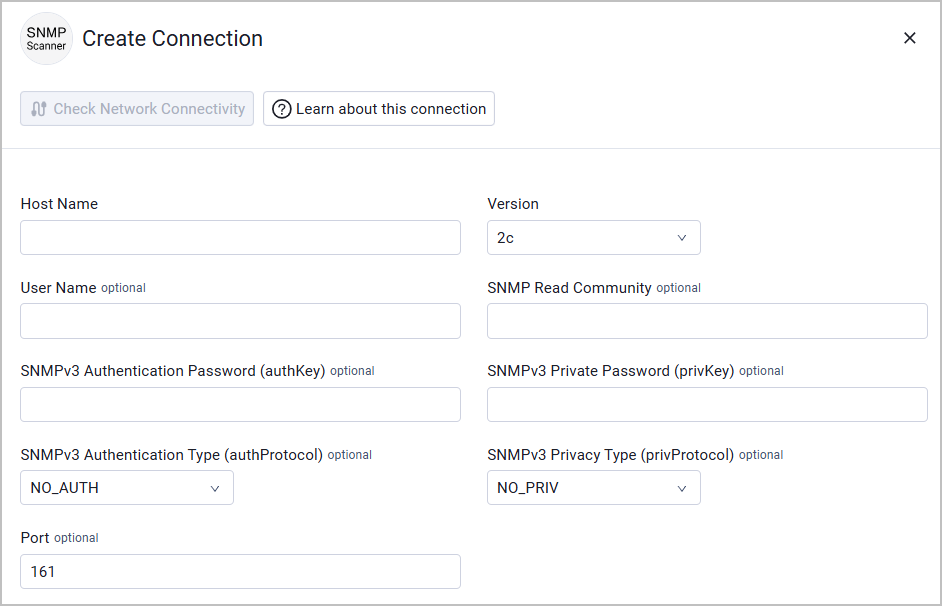
To connect the adapter in Axonius, provide the following parameters:
Required Parameters
- Host Name, CIDR, or IP range - The hostname, IP address, CIDR (e.g.
192.168.1.0/24), or IP rangee.g. 192.168.1.1-192.168.1.50) of the SNMP device(s) the adapter queries. When entering an IP range, you can discover and fetch data from multiple SNMP devices in a single adapter connection instead of creating separate connections for each device. - Version - The SNMP protocol version to use. Options:
1(SNMPv1),2c(SNMPv2c; default), or3(SNMPv3).
Required parameters for SNMPv1/v2c:
- SNMP Read Community - The read-only community string configured on the target device. Example:
public
Required fields for SNMPv3:
- User Name - The SNMPv3 username configured on the device.
- SNMPv3 Authentication Type (authProtocol) - Select the uthentication algorithm. Options:
NO_AUTH(default),MD5,SHA,SHA224,SHA256,SHA384,SHA512. - SNMPv3 Authentication Password (authKey) - Password for SNMPv3 authentication (required only if the Authentication Type is not NO_AUTH).
- SNMPv3 Privacy Type (privProtocol) - Select the privacy (encryption) algorithm. Options:
NO_PRIV(default),DES,DES3,AES128,AES192_CISCO,AES256_CISCO,AES192,AES256. - SNMPv3 Private Password (privKey) - Password for SNMPv3 privacy encryption (required only if Privacy Type is not NO_PRIV).
Optional Parameters
- Port - The UDP port for SNMP communication. Default:
161
To learn more about common adapter connection parameters and buttons, see Adding a New Adapter Connection.
Updated 12 days ago