
ConnectWise Asio
ConnectWise Asio is a cloud-native platform that offers remote monitoring and management (RMM) solutions for IT service providers and managed service providers (MSPs).
Use Cases the Adapter Solves
- Endpoint Visibility: Gain comprehensive visibility into all endpoints managed through ConnectWise Asio, including workstations, servers, and laptops across your managed client environments.
- Patch Compliance Monitoring: Track patch compliance status, missing patches, and pending reboots across all managed devices to ensure security and compliance requirements are met.
Asset Types Fetched
- Devices, Software, SaaS Applications
Data Retrieved through the Adapter
The following data can be fetched by the adapter
Devices - Fields such as System Name, Friendly Name, Serial Number, Operating System
Software - Fields such as Name, Version, Publisher, Install Date
Before You Begin
Required Ports
- TCP port 443 (HTTPS)
Authentication Methods
OAuth 2.0 Client Credentials
APIs
Axonius uses the ConnectWise Asio Platform API v1. The following endpoints are called:
POST /v1/tokenGET /api/platform/v1/device/endpointsGET /api/platform/v1/device/endpoints/{endpoint_id}GET /api/platform/v1/patching/{endpoint_id}/patches
Required Permissions
The API user must have the following scopes attached:
-
Platform - Devices - Read
-
Platform - Patching - Read
Supported From Version
Supported from Axonius version 8.0
Connecting the Adapter in Axonius
Navigate to the Adapters page, search for ConnectWise Asio, and click on the adapter tile.
Click Add Connection.
To connect the adapter in Axonius, provide the following parameters:
Required Parameters
- Host Name or IP Address - Base URL of the ConnectWise Asio API. Example:
https://api.asio.connectwise.com - Client ID - OAuth 2.0 Client ID from the ConnectWise Asio API Access page.
- Client Secret - OAuth 2.0 Client Secret from the ConnectWise Asio API Access page.
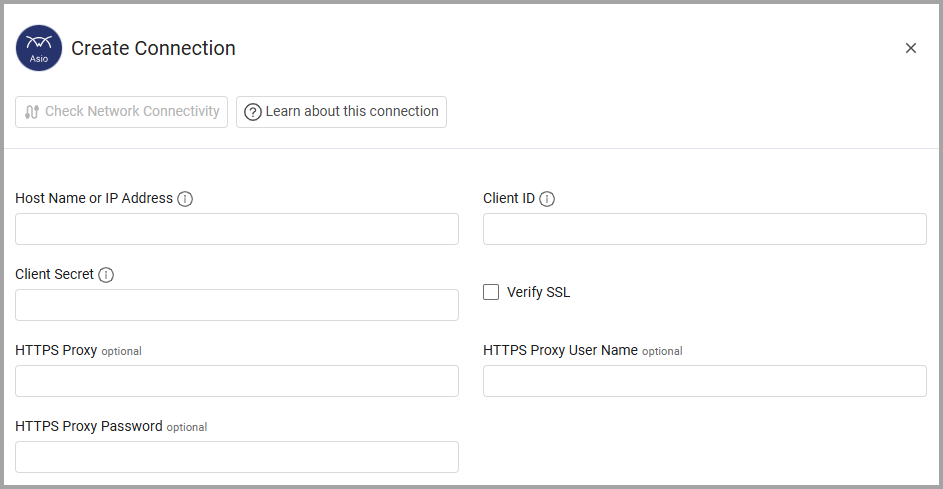
Optional Parameters
- Verify SSL - Select whether to verify the SSL certificate of the server against the CA database inside of Axonius. For more details, see SSL Trust & CA Settings.
- HTTPS Proxy - Connect the adapter to a proxy instead of directly connecting it to the domain.
- HTTPS Proxy User Name - The user name to use when connecting to the value supplied in Host Name or IP Address via the value supplied in HTTPS Proxy.
- HTTPS Proxy Password - The password to use when connecting to the server using the HTTPS Proxy.
To learn more about common adapter connection parameters and buttons, see Adding a New Adapter Connection.
Advanced Settings
Note:
Advanced settings can either apply to all connections for this adapter, or to a specific connection. Refer to Advanced Configuration for Adapters.
To learn more about Adapter Configuration tab advanced settings, see Adapter Advanced Settings.
The ConnectWise Asio adapter includes the following optional advanced settings:
- Enrich Device Endpoints with Installed Software - Select this option to retrieve detailed information about installed software on each device.
- Enrich Device Endpoints with Drives - Select this option to retrieve information about hard drives and storage devices on each device.
- Enrich Device Endpoints with Patches - Select this option to retrieve patch compliance information, missing patches, and installed patches for each device.
Updated 14 days ago