
Asset Business Context
Axonius Business Context establishes a centralized, multi-dimensional "source of truth" for device states.
Organizations often struggle with a "fog of war" - the inability to quickly distinguish between device lifecycle states (active vs. retired), management postures (managed vs. unmanaged), and organizational ownership. This "fog" makes it difficult to measure security coverage, reconcile inventory with external systems like CMDBs, or answer basic inventory questions, for example - "How many unmanaged devices are in Finance?"
Business Context disentangles this complexity by providing a dedicated classification system that automatically categorizes assets based on configurable, priority-driven rules.
With Business Context, you can:
-
Define granular states with easy access - Configure business units using the familiar Axonius Query Wizard
-
Prioritize actions on assets - When assets match multiple rules, a transparent, top-down priority system ensures proper prioritization of different tasks, for example: risk remediation, inventory management, etc.
-
Visualize coverage through real-time analytics - Interactive charts show asset distribution, percentages, and classification gaps
-
Unlock advanced CAM capabilities - Business Context serves as the foundation for advanced inventory dashboards, CMDB reconciliation, and risk scoring
-
Measure security coverage with precision - Combine dimensions to answer complex questions instantly
Example Use Cases
1. Identify Unmanaged Assets in Critical Business Units
Challenge: A Security Operations Manager needs to find active devices without mandatory security agents in the Finance department.
Solution: Filter your device inventory by Business Unit: Finance, Activity Status: Active and Management Status: Unmanaged. The resulting list shows exactly which business-critical devices need immediate attention for agent deployment.
Business Value: Focus remediation efforts where they matter most and reduce risk in high-value business units first.
2. Reduce Noise from Decommissioned Assets
Challenge: IT Asset Management generates reports often include thousands of retired or inactive devices, making it difficult to focus on current inventory.
Solution: Configure Activity Status rules to automatically classify devices not seen in 90+ days as Inactive and devices with decommissioning tags as Decommissioned. Then, filter all reports and dashboards to show only Active assets.
Business Value: Improve data accuracy, reduce alert fatigue, and ensure compliance reports reflect actual operational assets.
3. Reconcile Assets with CMDB Systems
Challenge: The IT team needs to sync Axonius inventory with ServiceNow, but struggles to match organizational hierarchies and lifecycle states.
Solution: Configure Business Units to mirror CMDB organizational structure - by cost center, location, or department. Use Activity Status to align with CMDB lifecycle stages. Export or integrate these enriched fields for seamless reconciliation.
Business Value: Maintain a single source of truth across IT systems, reduce manual reconciliation effort, and improve data consistency.
Accessing Business Context on Axonius
To access Business Context, from the Devices page, select Business Context.
The Business Unit - Devices section opens by default,
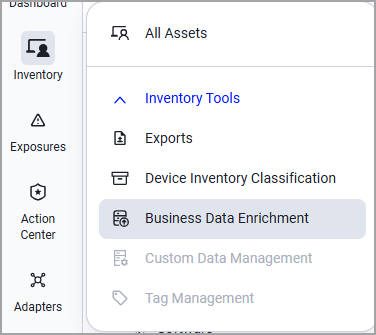
In Axonius New Navigation Experience access:
- From the left navigation menu, select Inventory.
- Under Inventory Tools, select Business Context. The Business Unit - Devices section opens by default.
Required Permissions
To access and perform actions in Business Context, the following permissions are required:
- Business Context - View
- Business Context - Edit
Admins have both permissions by default.
See Managing Roles for information on how to create roles and assign permissions.
Updated 26 days ago