
Mini Orange Identity Provider
Mini Orange Identity Provider is a cloud-based Identity and Access Management (IAM) solution that helps organizations manage and secure their digital identities,
Asset Types Fetched
Users, Groups
Before You Begin
Ports
- TCP port 80/443
Authentication Method
Customer Key and API Key
APIs
Axonius uses the MiniOrange User API.
Permissions
View Users and View Groups permissions are required.
Connecting the Adapter in Axonius
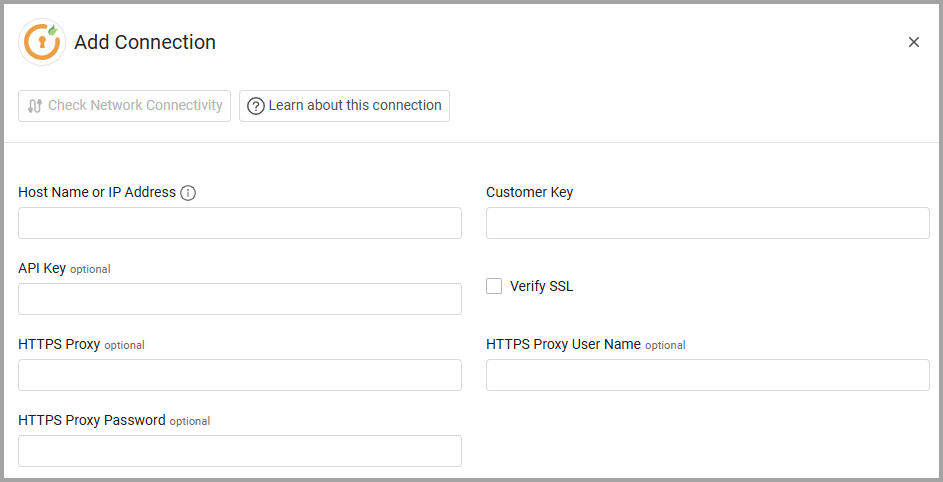
To connect the adapter in Axonius, provide the following parameters:
Required Parameters
-
Host Name or IP Address - The hostname or IP address of the Mini Orange Identity Provider server.
-
Customer Key and API Key - The credentials associated with a user account that has Permissions to fetch assets.
Optional Parameters
-
Verify SSL - Select whether to verify the SSL certificate of the server against the CA database inside of Axonius. For more details, see SSL Trust & CA Settings.
-
HTTPS Proxy - Connect the adapter to a proxy instead of directly connecting it to the domain.
-
HTTPS Proxy User Name - The user name to use when connecting to the value supplied in Host Name or IP Address via the value supplied in HTTPS Proxy.
-
HTTPS Proxy Password - The password to use when connecting to the server using the HTTPS Proxy.
To learn more about common adapter connection parameters and buttons, see Adding a New Adapter Connection.
Updated 10 months ago