
Renaming, Pinning, Moving, Deleting, and Marking Chats as Unread
Use the chat list sidebar to manage your AI Companion conversations — rename them for clarity, pin frequently used ones to the top, move them into folders, or delete ones you no longer need.
To access chat management options, hover over a conversation in the Chats section of the sidebar. A three-dot More menu (ellipsis icon) appears on the right side of the conversation row. Click the three-dot menu to see the following options:
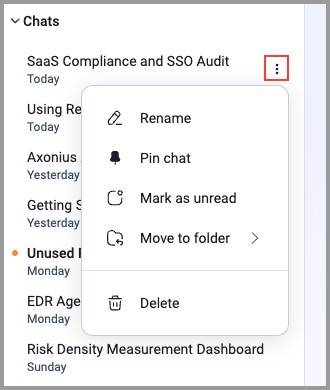
Renaming a Chat
To rename a chat:
- Hover over the chat in the Chats section.
- Click the three-dot menu that appears.
- Click Rename.
- Edit the conversation title in the field that appears.
- Press Enter to save the new name.
Pinning a Chat
Pinning a conversation keeps it at the top of the Chats section for quick access.
To pin a conversation:
- Hover over the conversation in the Chats section.
- Click the three-dot menu that appears.
- Click Pin chat.
The conversation moves to the top of the Chats section and remains there until you unpin it.
To unpin a conversation, open its three-dot menu and click Unpin chat.
Moving a Chat to a Folder
To move a conversation into a folder:
- Hover over the conversation in the Chats section.
- Click the three-dot menu that appears.
- Click Move to folder.
- Select the folder you want to move the conversation to.
The conversation moves from the Chats section into the selected folder. For information on creating folders, see Organizing Chats into Folders.
Mark a Chat as Unread
After viewing a chat, you may want to revisit that chat again later. You can mark a chat as unread to remind yourself to revisit it.
-
Hover over the conversation in the Chats section.
-
Click the three-dot menu that appears.
-
Click Mark as unread.
Deleting a Chat
Deleting a conversation permanently removes it. This action can't be undone.
To delete a conversation:
- Hover over the conversation in the Chats section.
- Click the three-dot menu that appears.
- Click Delete.
- Confirm the deletion if prompted.
The conversation is permanently removed from your chat list.
Updated 7 days ago