
Genetec Security Center
Genetec Security Center is a unified physical security platform that provides access control, video management, and license plate recognition through cardholder, credential, and access-event management.
Use Cases the Adapter Solves
- Improve physical-access visibility: Identify cardholders and their account status in Axonius.
- Review credential information: Review cardholder credentials, including card number, facility code, and status.
- Support access governance: Review cardholders' access rules to help validate physical-access assignments.
Asset Types Fetched
- Users
Data Retrieved through the Adapter
Users - fields such as: Display Name, Email, Account Disabled, Credentials
Before You Begin
Required Ports
- TCP port 4590 (Web SDK)
Authentication Methods
The adapter uses HTTP Basic authentication.
APIs
Axonius uses the Genetec Security Center Web SDK. The following endpoints are called:
GET /report/EntityConfiguration- Retrieves cardholder records.GET /entity/{Guid}- Retrieves the details for each cardholder.
Required Permissions
Confirm the exact permissions required to access the API endpoints listed above with your Genetec Security Center administrator.
Supported From Version
Supported from Axonius version 10.0.1
Connecting the Adapter in Axonius
- Navigate to the Adapter Catalog, search for Genetec Security Center, and select the adapter.
- Click Add Connection.
- Provide the following parameters.
Required Parameters
- Host Name or IP Address - Enter the Security Center server address, including the scheme. Do not include the port, base URI, or endpoint. Example:
https://securitycenter.example.com - Port - Enter the HTTP port configured for the Web-based SDK role. Default: 4590
- Base URI - Enter the base URI configured for the Web-based SDK role, without slashes. Default: WebSdk
- User Name - Enter the Security Center user name used to sign in to the Web SDK.
- Application ID - Enter the Application ID of the SDK certificate in the Security Center license.
- Password - Enter the password for the Security Center user.
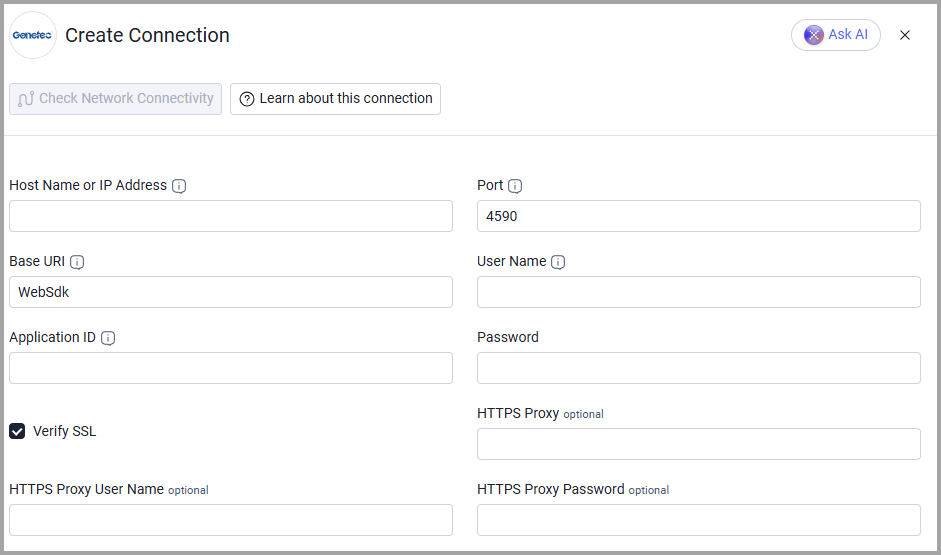
Optional Parameters
- Verify SSL - Select whether to verify the SSL certificate of the server against the CA database inside of Axonius. For more details, see SSL Trust & CA Settings.
- HTTPS Proxy - Connect the adapter to a proxy instead of directly connecting it to the domain.
- HTTPS Proxy User Name - Enter the user name to use when connecting through the HTTPS Proxy.
- HTTPS Proxy Password - Enter the password to use when connecting through the HTTPS Proxy.
To learn more about common adapter connection parameters and buttons, see Adding a New Adapter Connection.
Advanced Settings
Note:
Advanced settings can either apply to all connections for this adapter, or to a specific connection. Refer to Advanced Configuration for Adapters.
To learn more about Adapter Configuration tab advanced settings, see Adapter Advanced Settings.
- Cardholder detail requests in parallel - Set the number of
GET /entity/{Guid}requests sent at the same time. The supported range is 1 through 10; the default is 1.
Updated about 2 hours ago