
Menlo Security
Menlo Security is a cybersecurity solution that offers isolation technology to prevent web-based threats, providing comprehensive protection through secure web gateway, email security, and cloud security capabilities.
Use Cases the Adapter Solves
- User Access Governance: Identifies users with specific security policies applied, including web exceptions, DLP, FWAAS, CASB, MPA access, content inspection exceptions, and bandwidth policies.
- Policy Compliance Monitoring: Tracks and audits security policies assigned to users across the organization.
- Security Posture Assessment: Understands which users have access to specific security controls and exceptions.
Asset Types Fetched
- Users
Data Retrieved through the Adapter
The following data can be fetched by the adapter:
Users: Fields such as: Username (Email), First Name, Last Name, Tenant Admin status.
Before You Begin
Required Ports
- TCP port 443 (HTTPS)
Authentication Methods
Hybrid Authentication - The adapter uses a combination of authentication methods:
- API Key (Bearer Token) - API Key (Bearer token) from the Menlo Security admin portal.
- API Key (X-XSRFToken) - API Key from the Menlo admin portal. Used as X-XSRFToken for user endpoints and as Bearer token for policy endpoints.
APIs
Axonius uses the Menlo Security API. The following endpoints are called:
User Management:
- GET
/api/udb-rest/v2/users
Policy Management:
GET /api/policy/v1/rulesGET /api/policy/v3/rules/web/exceptions/{rev_id}GET /api/policy/v1/rules/dlp/{rev_id}GET /api/policy/v1/rules/fwaas/rules/{rev_id}GET /api/policy/v3/casb/exceptions/{rev_id}GET /api/policy/v1/rules/mpa/access_rules/{rev_id}GET /api/policy/v3/rules/inspection/exceptions/{rev_id}GET /api/policy/v3/rules/bandwidth/{rev_id}
Required Permissions
The API user must have the following permissions in the Menlo Security platform:
Policy Management Permissions
- Read access to web_policy and content_inspection
- Read access to DLP (Data Loss Prevention) dictionaries and rules
- Read access to CASB (Cloud Access Security Broker) apps and profiles
- Read access to FWAAS (Firewall as a Service) rules
- Read access to MPA (Multi-Party Authorization) access rules
- Read access to bandwidth policies
User Management Permissions
- User enumeration - Permission to list users via the
list_usersendpoint. - User Directory & Auth access - Access to user directory and authentication endpoints.
Note: The exact permission names and role requirements should be confirmed with your Menlo Security administrator or Menlo Security support, as detailed API permission documentation may not be publicly available.
Supported From Version
Supported from Axonius version 8.0.15.2
Connecting the Adapter in Axonius
Navigate to the Adapters page, search for Menlo Security, and click on the adapter tile.
Click Add Connection.
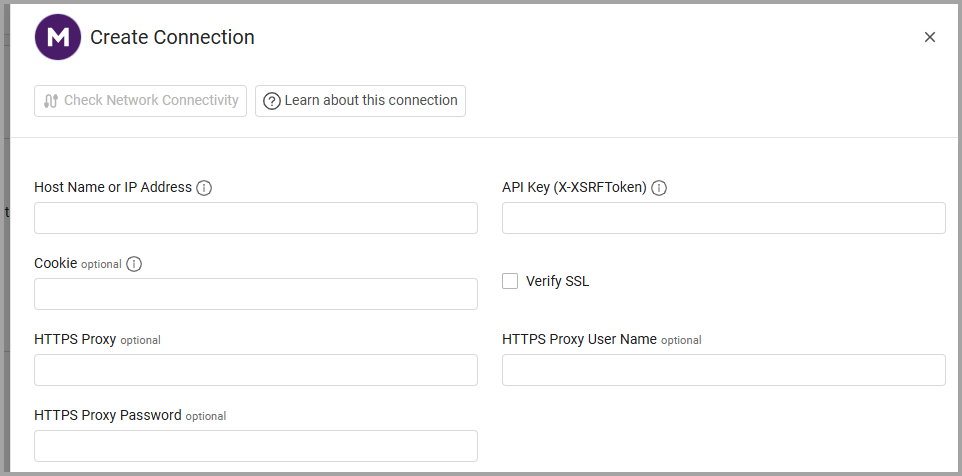
To connect the adapter in Axonius, provide the following parameters:
Required Parameters
- Host Name or IP Address - The base URL of your Menlo Security platform. Should contain a prefix of
http://orhttps://. - API Key (X-XSRFToken) - The API key generated from your Menlo Security admin portal. This key is used as the X-XSRFToken for user endpoints and as a Bearer token for policy endpoints.
Optional Parameters
-
Cookie - Optional cookie value for authentication. It is possible to reuse the X-XSFRToken. If not provided, the API Key is used for authentication.
-
Verify SSL - Select whether to verify the SSL certificate of the server against the CA database inside of Axonius. For more details, see SSL Trust & CA Settings.
-
HTTPS Proxy - Connect the adapter to a proxy instead of directly connecting it to the domain.
-
HTTPS Proxy User Name - The user name to use when connecting to the value supplied in Host Name or IP Address via the value supplied in HTTPS Proxy.
-
HTTPS Proxy Password - The password to use when connecting to the server using the HTTPS Proxy.
Updated 30 days ago