
Nutanix Prism Central
Nutanix delivers hybrid and multicloud management, unified storage, database services, and desktop services to support applications and workloads.
Asset Types Fetched
- Devices, Users, Licenses, SaaS Applications
Before You Begin
Suggested Ports
- 9440
Authentication Method
- User Name/Password
APIs
Axonius uses the Prism Central V3 API.
API v3
POST /api/nutanix/v3/hosts/list- Retrieves hosts (also used to test the connection).POST /api/nutanix/v3/clusters/list- Retrieves clusters.POST /api/nutanix/v3/vms/list- Retrieves VMs.POST /api/nutanix/v3/users/list- Retrieves users.
API v4 (default, enabled by Use API v4)
GET /api/clustermgmt/v4.0/config/hosts- Retrieves hosts (also used to test the connection).GET /api/clustermgmt/v4.0/config/hosts/{extId}/host-nics- Retrieves the network interfaces of each host.GET /api/clustermgmt/v4.0/config/hosts/{extId}- Retrieves a host to resolve host and cluster names for VMs whose host was not in the hosts list.GET /api/clustermgmt/v4.0/config/clusters- Retrieves clusters.GET /api/vmm/v4.0/ahv/config/vms- Retrieves VMs.GET /api/vmm/v4.0/ahv/config/vms/{extId}/disks- Retrieves the disks of each VM. Used only when Fetch VM disks is enabled.GET /api/vmm/v4.0/ahv/config/vms/{extId}/guest-tools- Retrieves the Nutanix Guest Tools details of each VM. Used only when Fetch VM Nutanix Guest Tools is enabled.GET /api/iam/v4.0/authn/users- Retrieves users.GET /api/licensing/v4.0/config/licenses?$expand=consumptionDetails- Retrieves licenses and their per-cluster consumption. Used only when Fetch Licenses is enabled.GET /api/licensing/v4.0/config/features- Retrieves the features each license entitles. Used only when Fetch Licenses is enabled.
Permissions
Consult with your vendor for the exact permissions to fetch the objects.
Supported From Version
Supported from Axonius version 4.7
Connecting the Adapter in Axonius
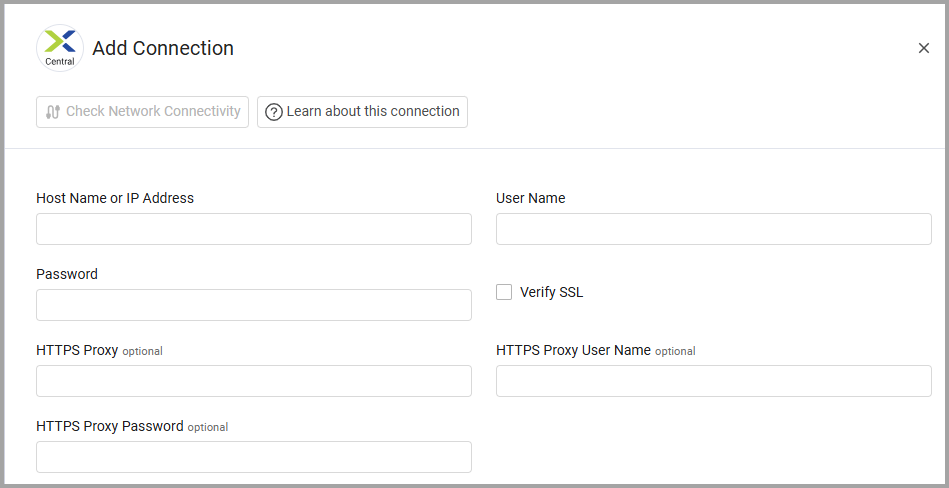
To connect the adapter in Axonius, provide the following parameters:
Required Parameters
-
Host Name or IP Address - The hostname or IP address of the Nutanix Prism Central server. Example IP address format: 198.0.0.1:9440
-
User Name and Password - The credentials for a user account that has permissions to fetch assets.
Optional Parameters
-
Use API v4 (recommended) (default: True) - Select this option to use Nutanix Prism Central API v4 instead of API v3. This is required for fetching Licenses, VM disks, and VM Nutanix Guest Tools.
-
Verify SSL - Select whether to verify the SSL certificate of the server against the CA database inside of Axonius. For more details, see SSL Trust & CA Settings.
-
HTTPS Proxy - Connect the adapter to a proxy instead of directly connecting it to the domain.
-
HTTPS Proxy User Name - The user name to use when connecting to the value supplied in Host Name or IP Address via the value supplied in HTTPS Proxy.
-
HTTPS Proxy Password - The password to use when connecting to the server using the HTTPS Proxy.
To learn more about common adapter connection parameters and buttons, see Adding a New Adapter Connection.
Advanced Settings
Note
Advanced settings can either apply for all connections for this adapter, or you can set different advanced settings and/or different scheduling for a specific connection, refer to Advanced Configuration for Adapters.
To learn more about Adapter Configuration tab advanced settings, see Adapter Advanced Settings.
-
Fetch Licenses (Default:
False) - Select this option to fetch the licenses applied in Prism Central as License assets, including their per-cluster consumption and entitled features.Note
This setting requires:- Enabling Use API v4 when connecting the adapter. The endpoint used is
GET /api/licensing/v4.0/config/licenses?$expand=consumptionDetails - Prism Central 7.3 or later
- Enabling Use API v4 when connecting the adapter. The endpoint used is
-
Fetch VM disks (Default:
False) - Select this option to retrieve disk details for every VM, including disk size, bus type, bus index, and storage container. This setting requires Use API v4 and adds one API request per VM, which can increase fetch time in large environments. -
Fetch VM Nutanix Guest Tools (Default:
False) - Select this option to retrieve Nutanix Guest Tools details for every VM. This setting requires Use API v4 and adds one API request per VM, which can increase fetch time in large environments.
Related Enforcement Actions
Updated 5 days ago