
SAP S/4HANA (On-Prem)
SAP S/4HANA is an ERP suite that offers integrated applications supporting finance, supply chain, and operational data processing across core enterprise workflows.
Use Cases the Adapter Solves
- Identify Business Users with Access to ERP Systems: Gain visibility into which users have access to your SAP S/4HANA environment, enabling better identity governance and access reviews.
- Enforce Compliance Policies for ERP User Accounts: Monitor user validity periods, account status, and role assignments to ensure compliance with internal policies and external regulations.
Asset Types Fetched
- Users
Data Retrieved through the Adapter
Users
- Username, First Name, Last Name
- Email Address, Department
Before You Begin
Required Ports
- TCP port 443 (HTTPS) or custom port as configured in your SAP S/4HANA SOAP service endpoint
Authentication Methods
The adapter authenticates using Basic Authentication over HTTPS to the SAP S/4HANA SOAP web service. The credentials provided (User Name and Password) are used to authenticate against the WSDL endpoint and subsequent SOAP API calls.
APIs
Axonius uses the SAP S/4HANA SOAP API. The following SOAP operations are called:
BusinessUserSimpleByElementsQuery_sync- Retrieves business user information from the SAP S/4HANA system
NoteThe SAP S/4HANA SOAP API is accessed through a WSDL (Web Services Description Language) endpoint. The adapter connects to the QUERYBUSINESSUSERIN web service, which is part of the Identity Management Integration communication scenario (SAP_COM_0093) in SAP S/4HANA Cloud and similar configurations in on-premises deployments.
Required Permissions
The following permissions and configurations are required:
Communication User with Business User Query Access
The communication user (technical user) must have the necessary authorizations to query business user information through the SOAP API:
- Access to the QUERYBUSINESSUSERIN SOAP service endpoint
- Read permissions for business user data
- Access to the communication scenario for Identity Management Integration (typically SAP_COM_0093 or similar in on-premises)
NoteThe exact permission names and authorization objects should be confirmed with your SAP S/4HANA administrator, as these can vary depending on your SAP S/4HANA version (on-premises vs. cloud) and security configuration.
Supported From Version
Supported from Axonius version 9.0.3
Setting Up SAP S/4HANA (On-Prem) to Work with Axonius
To enable Axonius to connect to your SAP S/4HANA on-premises system, you need to configure a communication user and ensure the SOAP web service is accessible:
- Log in to your SAP S/4HANA system with administrative privileges
- Create or identify a communication user (technical user) with access to business user query operations
- Ensure the QUERYBUSINESSUSERIN SOAP service is activated and accessible (typically managed through transaction SOAMANAGER)
- Note the full WSDL URL for the BusinessUserSimpleByElementsQuery service, which typically follows this format:
https://your-sap-system.company.com:8443/sap/bc/srt/xip/sap/querybusinessuserin/120/userinformation/query_dev?wsdl - Verify that the communication user has the necessary authorizations to query business users
- If using HTTPS, ensure that SSL certificates are properly configured or be prepared to disable SSL verification in Axonius
Connecting the Adapter in Axonius
Navigate to the Adapters page, search for SAP S/4HANA (On-Prem), and click on the adapter tile.
Click Add Connection.
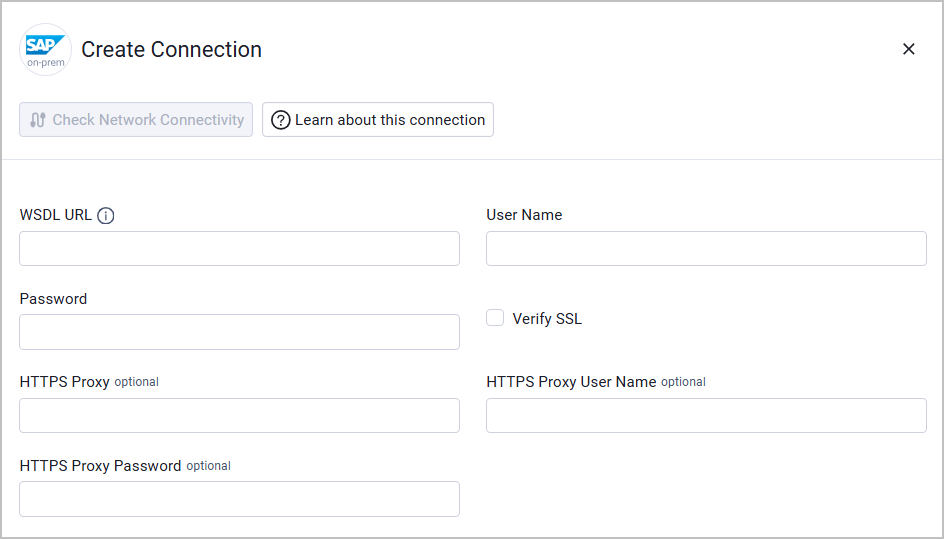
To connect the adapter in Axonius, provide the following parameters:
Required Parameters
- WSDL URL - Full URL to the SAP Business User SOAP service WSDL. Example:
https://my-sap-system.company.com:8443/sap/bc/srt/xip/sap/querybusinessuserin/120/userinformation/query_dev?wsdl - User Name - The username of the communication user (technical user) with access to the SOAP service
- Password - The password for the communication user
Optional Parameters
- Verify SSL - Select whether to verify the SSL certificate of the server against the CA database inside of Axonius. For more details, see SSL Trust & CA Settings.
- HTTPS Proxy - Connect the adapter to a proxy instead of directly connecting it to the domain.
- HTTPS Proxy User Name - The user name to use when connecting to the value supplied in WSDL URL via the value supplied in HTTPS Proxy.
- HTTPS Proxy Password - The password to use when connecting to the server using the HTTPS Proxy.
To learn more about common adapter connection parameters and buttons, see Adding a New Adapter Connection.
Updated 20 days ago