
Dell PowerScale OneFS
Dell PowerScale OneFS is a scale-out network attached storage (NAS) platform that addresses unstructured data needs at the edge, the core, or the cloud.
The Dell PowerScale OneFS adapter enables Axonius to fetch and catalog storage clusters, providing visibility into their inventory details and capacity status.
Asset Types Fetched
- Devices
Before You Begin
Required Ports
- TCP port 443 (HTTPS)
Authentication Methods
- User Name and Password
Required Permissions
The value supplied in User Name must have Read-only permissions in order to fetch assets.
APIs
Axonius uses the PowerScale OneFS API Version 9.5.0.
Supported From Version
Supported from Axonius version 5.0.
Connection Parameters
To connect the adapter in Axonius, provide the following parameters.
Required Parameters
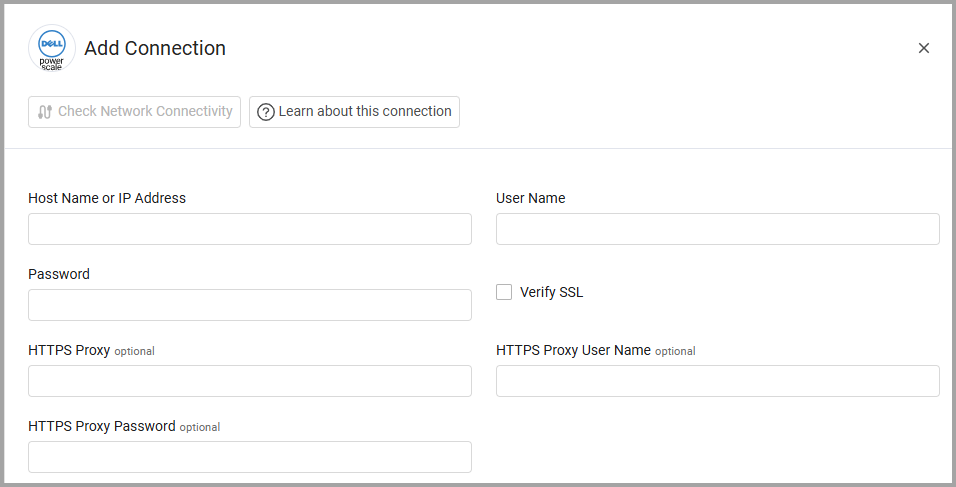
- Host Name or IP Address - Enter the hostname or IP address of the Dell PowerScale OneFS server. The host must be appended with
:8080to successfully connect. - User Name and Password - Enter the credentials for a user account that has the permissions to fetch assets.
Optional Parameters
- Verify SSL - Select whether to verify the SSL certificate of the server against the CA database inside of Axonius. For more details, see SSL Trust & CA Settings.
- HTTPS Proxy - Enter an HTTPS proxy address to connect the adapter to a proxy instead of directly connecting it to the domain.
- HTTPS Proxy User Name - Enter the user name to use when connecting to the value supplied in Host Name or IP Address via the value supplied in HTTPS Proxy.
- HTTPS Proxy Password - Enter the password to use when connecting to the server using the HTTPS Proxy.
To learn about additional optional/common adapter connection parameters, see Adding a New Adapter Connection.
Advanced Settings
Note
- Advanced settings can apply to either all connections of this adapter, or to a specific connection. For more detailed information, see Advanced Configuration for Adapters.
- For more general information about advanced settings, see Adapter Advanced Settings.
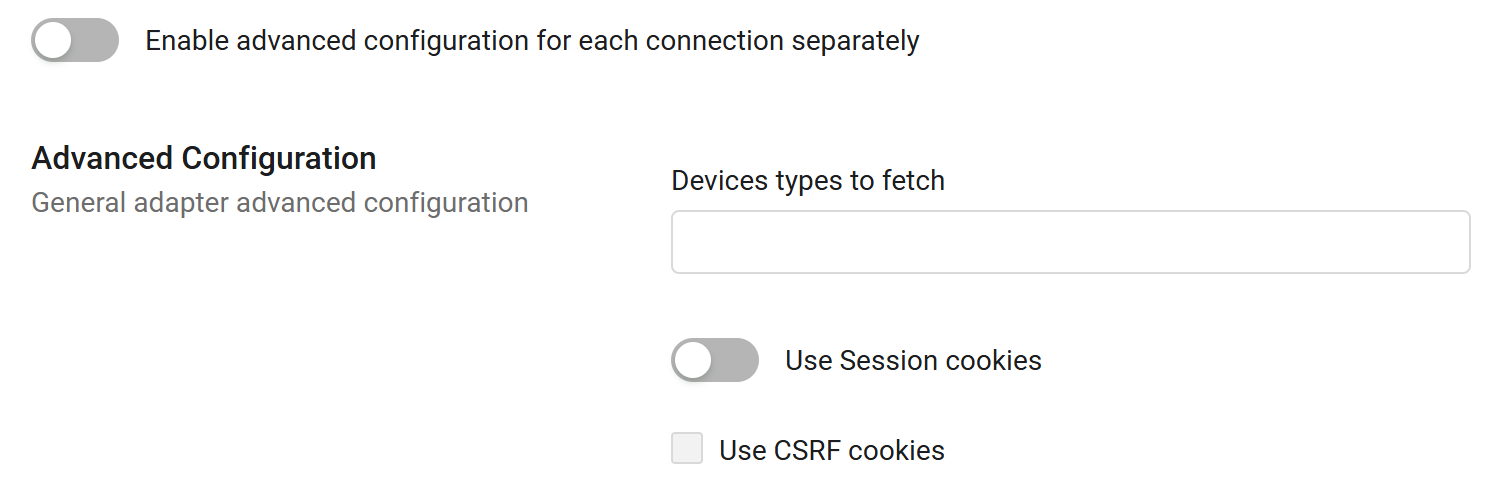
Specific advanced settings that relate to the Dell PowerScale OneFS adapter are shown in the following figure.
-
Devices types to fetch - By default, this adapter fetches devices from the
platform/10/cluster/nodesendpoint. Select additional device types to fetch from the dropdown. -
Use Session cookies - Enable this option to authenticate the session when you send a request through a session cookie. When this setting is enabled, you can select the following option:
- Use CSRF cookies - Select this option to use Cross-Site Request Forgery (CSRF) cookies, used to prevent attacks during API interactions.
Updated 3 days ago