
Reading, Creating, Testing, and Running Workflows
The AI Companion can read, create, run and test workflows.
List your workflows
"Show me all my workflows"
"Which workflows are currently active?"
"Do I have any workflows that run on a CrowdStrike event?"
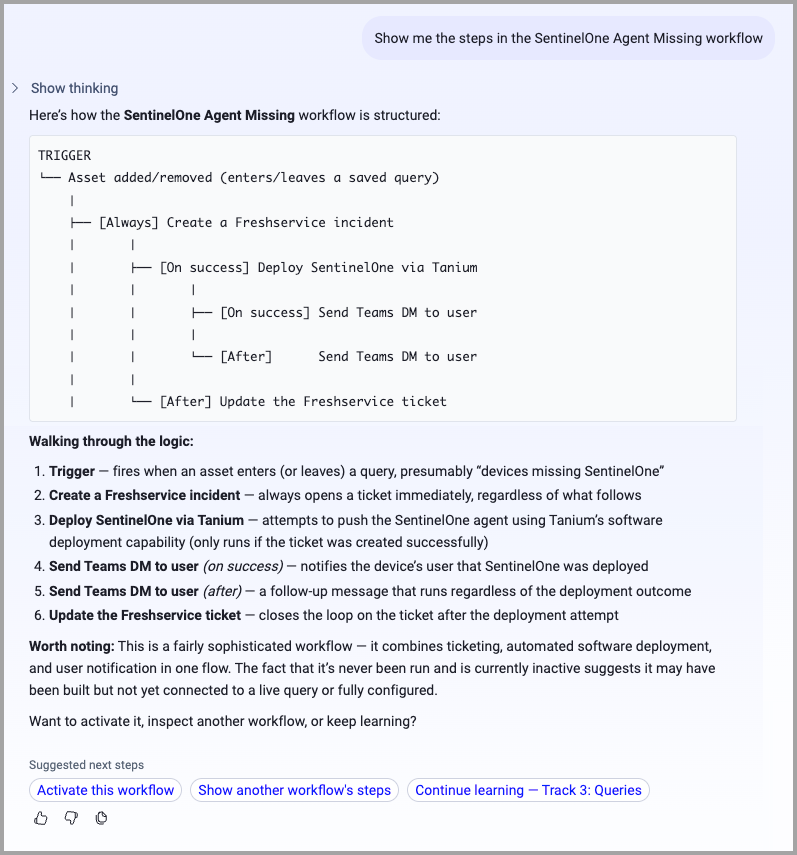
Inspect a workflow's steps
"What does the workflow called 'Isolate Risky Device' do?"
"Show me the steps in my Okta suspension workflow"
Check run history
"Did my 'Tag Stale Devices' workflow run successfully this week?"
"Show me recent failed workflow runs"
"What happened in the last run of my offboarding workflow — which step failed?"
Creating Workflows
Simple workflow (one trigger → one action)
"Create a workflow that tags a device as 'Needs Review' when it leaves my Active Servers query"
"When a user's department field changes, send me an email notification"
"Create a workflow that adds the tag 'New Device' when an asset joins my Recently Discovered query"
Advanced multi-node workflow (branches, delays, approvals)
"Create a workflow: when CrowdStrike raises an alert, send a Slack message to the security channel asking whether to isolate the device, wait 4 hours for a response, and if no one replies escalate by email"
"Build a workflow that emails a device's owner when it goes missing from our EDR coverage, waits 48 hours, then tags it as 'Unresolved' if it still hasn't checked in"
Running and Testing Workflows
Run a workflow now
"Run my 'Weekly Stale Device Tag' workflow now"
"Trigger the offboarding workflow immediately"
Activate or deactivate
"Pause the 'Alert on New Admin' workflow — we're in a maintenance window"
"Re-enable my CrowdStrike isolation workflow"
Test on one asset first (the safe way before a full run)
"Test-run the first step of my tagging workflow on one device before I run it for real"
Setting Remediation Ownership Rules in Bulk
To create Remediation Ownership rules in bulk — one rule per value of an asset field — describe the field and the owner assignment pattern:
- "Create a Remediation Ownership rule for each ServiceNow Support Group so each group owns findings on its devices."
- "Set up one remediation ownership rule per business unit, routing findings to the team named after the unit."
- "Create remediation ownership rules by cloud account, one per account, for all Security Findings."
The agent compiles a scope query for each distinct value of the field you name, creates the saved query, and creates the rule pointing to it. One preview shows the full batch as a table — every rule that would be created, the scope query it uses, and the owner assignment. One confirmation applies all of them.
After the batch runs, ownership is applied to findings by a background enrichment job. With a large batch, owners appear on findings over the following minutes to hours, not immediately.
Investigate Trigger Events
See what events are available as triggers
"What events can trigger a workflow in my environment?"
"Do I have a Jira webhook configured that could trigger a workflow?"
"What Okta events can I use as workflow triggers?"
Showing the Steps of a Workflow
The AI Companion can show you the details of a workflow.
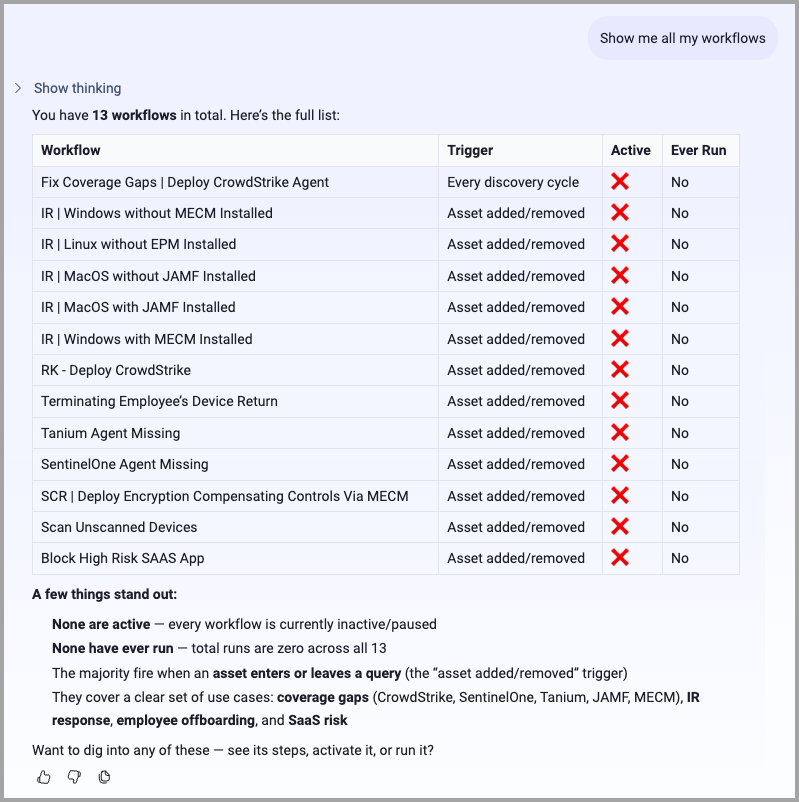
Viewing a List of Workflows
What the AI Companion Cannot Do in Chat
| Capability | Where to go instead |
|---|---|
| Edit a workflow's steps/graph | Workflow builder UI |
| Delete a workflow | Workflow builder UI |
| Duplicate a workflow | Workflow builder UI (disabled this session) |
| Define a new custom webhook event | Workflow builder UI (disabled this session) |
Updated 2 days ago