
Fujitsu ISM
Fujitsu ISM (Infrastructure Manager) is an infrastructure management platform that provides centralized monitoring, firmware lifecycle management, and hardware inventory for Fujitsu servers, storage arrays, and network switches.
Use Cases the Adapter Solves
- Centralize infrastructure visibility: View Fujitsu servers, storage arrays, and network switches with the rest of your asset inventory.
- Monitor hardware health: Review device status, power status, alarm status, and inventory details to help identify infrastructure that needs attention.
- Track infrastructure groups: Use Fujitsu ISM node groups to add operational context to your asset inventory.
Asset Types Fetched
- Devices
- Groups
Data Retrieved through the Adapter
Devices - fields such as: Hostname, Device Model, Device Serial, Node Status
Groups - fields such as: Group Name, Group Type, Node Group ID, Last Updated
Before You Begin
Required Ports
- Port 25566 must be reachable from the Axonius instance to the ISM-VA over HTTPS. If it isn't, check firewall rules.
Authentication Methods
Username and password authentication.
APIs
Axonius uses the Fujitsu ISM API. The following endpoints are called:
POST /ism/api/v2/users/login- Authenticate the configured user.GET /ism/api/v2/nodes- Retrieve nodes.GET /ism/api/v2/nodes/{node_id}/inventory- Retrieve inventory for each node.GET /ism/api/v2/nodegroups- Retrieve node groups.POST /ism/api/v2/users/logout- End the authenticated session.
Required Permissions
The user account must have the ISM Administrator role — a non-admin account will silently return only nodes within the user's assigned group, resulting in incomplete data.
The ISM-VA uses a self-signed certificate by default. The adapter will need either the ISM-VA certificate to be provided, or an option to skip SSL verification — without one of these, the connection will fail.
Supported From Version
Supported from Axonius version 10.0.0
Setting Up Fujitsu ISM to Work with Axonius
Before creating the connection, obtain a Fujitsu ISM user name and password that can access the API endpoints listed above. Confirm required permissions and connectivity details with your Fujitsu ISM administrator.
Connecting the Adapter in Axonius
- Navigate to the Adapter Catalog, search for Fujitsu ISM, and select the adapter.
- Click Add Connection.
- Provide the following parameters.
Required Parameters
- Host Name or IP Address - Enter the Fujitsu ISM host, including the protocol. Example:
https://192.168.1.2 - User Name - Enter the Fujitsu ISM user name used to authenticate to the API. Example:
axonius-service-account - Password - Enter the password for the configured Fujitsu ISM user.
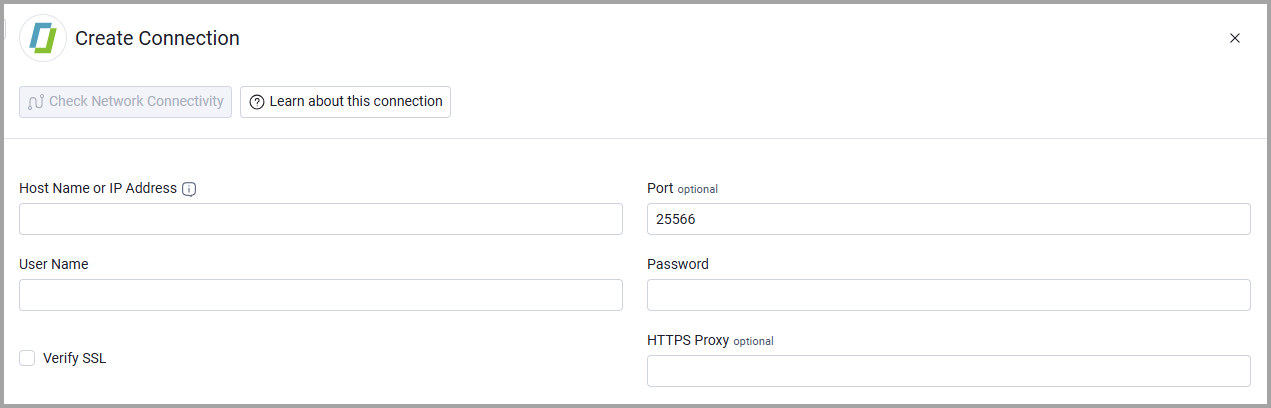
Optional Parameters
- Port - Enter the Fujitsu ISM API port. The default is 25566.
- Verify SSL - Select whether to verify the SSL certificate of the server against the CA database inside of Axonius. For more details, see SSL Trust & CA Settings.
- HTTPS Proxy - Connect the adapter to a proxy instead of directly connecting to the domain.
To learn more about common adapter connection parameters and buttons, see Adding a New Adapter Connection.
Updated 20 days ago