
Out-of-the-Box Risk Score
In some use cases, it is hard to build complex Risk Score models from scratch without guidance. To help you get started, Axonius offers a predefined, out-of-the-box Risk Score which provides distinct, best-practice starting points through OOTB values.
Managing OOTB Risk Scores
OOTB Risk Scores are displayed on the Risk Score Table of each asset type as "Created by - Axonius".

Note
OOTB Risk Scores are currently supported only for Risk Scores per Device or per Security Finding per Device.
There are two types of OOTB Risk Score for each asset type:
- Security Finding - Combines vulnerability-level context with asset-level context, which helps prioritize not only severe CVEs, but severe CVEs on important or exposed assets. The following parameters are considered:
- Axonius Vulnerability Score (AVS): Integration of vulnerability severity.
- Asset Criticality: Linkage to the dedicated Asset Criticality value.
- Internet Exposure: Determined by the Query Wizard field
Is Exposed to the Internet = Yes.This parameter is calculated by evaluating data from multiple sources, including Axonius fields and adapter-specific exposure indicators.
- Asset - Uses the highest open Security Finding Risk Score on the asset as the primary signal, while also accounting for the broader volume of open Security Findings on that asset.
In other words, the Asset Risk Score reflects both the most severe current risk and the additional risk created when multiple findings exist on the same device.
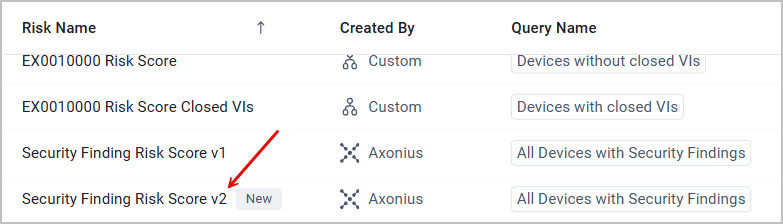
Security Finding Risk Score v2As of Axonius version 10_0_1, a new OOTB Security Finding Risk Score titled "v2" was added to the Risk Score Management page. This score better reflects real-work risk based on the following factors:
- Axonius Vulnerability Score drives 60% of the score (up from 50%).
- Asset Criticality drives 35%, of the score (up from 25%), with a refined Critical/High/Medium/Low scale.
- Internet Exposure drives 5% of the score, and its query was rebuilt to remove false positives.
Users who open the Risk Score page for the first time after being upgraded to 10_0_1 are prompted to view v2 by a dedicated popup dialog. This Risk Score is available in the table in addition to the old one (v1):
Only one Axonius Security Finding Risk Score can be activated at a time - meaning, activating v2 deactivates v1 and vice versa. Nothing is deleted - every existing Risk Score, including v1, stays available and can be reactivated anytime. Scores are recalculated immediately, so some Risk Levels might change, and anything built on them (queries, dashboards, Enforcement Sets) might also look different.
General guidelines:
-
OOTB Risk Scores cannot be renamed or deleted.
-
The score type and calculation parameters of an OOTB Risk Score can be viewed but not edited.
-
You can activate or deactivate OOTB Risk Scores according to your needs, just like custom Risk Scores.
-
The following components can be edited in OOTB Risk Scores (marked in green in the image below):
- The query selected for applying the Risk Score
- Risk Levels

Updated 9 days ago