
Anvilogic
Overview
Anvilogic is a security operations platform that provides detection-as-code and AI-driven triage across SIEMs and data lakes. The Anvilogic adapter enables Axonius to connect to the Anvilogic platform and retrieve relevant security data for asset management and analysis.
Use Cases the Adapter Solves
- Gain visibility into security events and activities managed by Anvilogic.
- Correlate Anvilogic detections with other asset data in Axonius to identify coverage gaps.
- Analyze triage and detection workflows across SIEMs and data lakes for compliance and threat response.
Asset Types Fetched
- Activities
Before You Begin
Ports
- TCP port 443
Authentication Method
Bearer Token authentication using a secret token generated in the Anvilogic platform.
APIs
Anvilogic REST API
Permissions
The following permissions are required:
- Admin role
- EOIs summary listing
- EOIs details access
Supported From Version
Supported from Axonius version 8.0.14
Connecting the Adapter in Axonius
Navigate to the Adapters page, search for Anvilogic, and click on the adapter tile.
Click Add Connection.
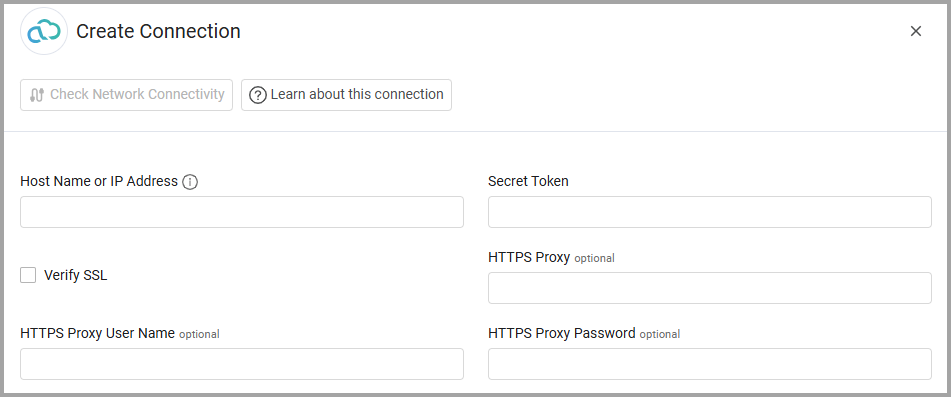
To connect the adapter in Axonius, provide the following parameters:
Required Parameters
- Host Name or IP Address - The hostname or IP address of the Anvilogic server (e.g., secure.anvilogic.com).
- Secret Token - The secret token generated in the Anvilogic platform settings page.
- Connection Label - A name for this connection in Axonius.
Optional Parameters
- Verify SSL - Select whether to verify the SSL certificate of the server against the CA database inside of Axonius. For more details, see SSL Trust & CA Settings.
- HTTPS Proxy - Connect the adapter to a proxy instead of directly connecting it to the domain.
- HTTPS Proxy User Name - The user name to use when connecting to the value supplied in Host Name or IP Address via the value supplied in HTTPS Proxy.
- HTTPS Proxy Password - The password to use when connecting to the server using the HTTPS Proxy.
Select Gateway – Select the Axonius Gateway to use when connecting adapters whose sources are only accessible by an internal network and not from the primary Axonius instance, which may be an Axonius-hosted (SaaS) instance or Customer-hosted (on-premises / private cloud). To use this option, you need to set up an Axonius Gateway.
To learn more about common adapter connection parameters and buttons, see Adding a New Adapter Connection.
Advanced Settings
Note:
Advanced settings can either apply to all connections for this adapter, or to a specific connection. Refer to Advanced Configuration for Adapters.
To learn more about Adapter Configuration tab advanced settings, see Adapter Advanced Settings.
Events - applies context on the following endpoints: Incidents -
Show events past X days (default 30) - Set the number of days back for which to show events from the Incidents endpoint.
Updated 1 day ago