
Fortinet FortiAnalyzer
FortiAnalyzer is a centralized log management and analytics platform that provides log collection, correlation, analysis, and reporting from Fortinet devices and third-party syslog sources for security monitoring and compliance.
Use Cases the Adapter Solves
- Verify Fortinet Device Coverage: Ensures all Fortinet firewalls, switches, and security appliances are sending logs to FortiAnalyzer, helping identify gaps in security monitoring and compliance coverage.
- Monitor Log Collection Status: Track which devices are actively sending logs and when they last reported, enabling proactive identification of devices that may have stopped logging due to configuration issues or connectivity problems.
Asset Types Fetched
- Devices
Data Retrieved through the Adapter
The following data can be fetched by the adapter:
Devices - Fields such as Name, Hostname, Serial Number, Device Model
Before You Begin
Required Ports
TCP port 443 (HTTPS)
Authentication Methods
The adapter supports two authentication methods:
Direct authentication to your on-premises FortiAnalyzer instance using username and password credentials to obtain a session token via JSON-RPC API.
Authentication through FortiCloud for managed FortiAnalyzer instances. This method first obtains an OAuth access token from FortiCloud, then uses it to establish a session with your FortiAnalyzer instance. FortiCloud Authentication is recommended when direct JSON-RPC access to on-premises FortiAnalyzer is restricted or when managing FortiAnalyzer through FortiCloud.
APIs
Axonius uses the FortiAnalyzer JSON-RPC API. The following endpoints are called:
POST /jsonrpcwith/sys/login/user- Authenticate and obtain session tokenPOST /jsonrpcwith/dvmdb/device- Retrieve device information from Device Manager databasePOST /jsonrpcwith/logview/logstats- Retrieve log statistics for each device
Required Permissions
The API user must have the following permissions configured in FortiAnalyzer:
JSON-RPC API access - Enabled for the user account and requires read-write permissions. (for both methods of authentication.
Note:
Since the adapter uses the JSON-RPC protocol, all requests — including those that only retrieve data — are sent using the POST method. Although read-write permissions are required for the API to function correctly, this does not automatically allow changes to be made. Any modifications are still governed by the user profile configuration and its associated restrictions.
For SID Authentication (On-Premises)
Minimum Required Permissions
- Read access to Device Manager - Permission to access
/dvmdb/*endpoints for device enumeration - Read access to Log View - Permission to access
/logview/*endpoints for log statistics - ADOM access - Access to all relevant Administrative Domains (ADOMs) if multiple ADOMs exist
Recommended Role
Read-Only Administrator or a custom role with these permissions.
FortiCloud Authentication
For FortiCloud Authentication
The FortiCloud user must have:
-
Account Owner profile in FortiCloud (different from Super Admin on the on-prem device).
-
IAM profile configured in FortiCloud as described in Fortinet's FortiCloud API portal post.
Write permissions are still required on the FortiAnalyzer side due to how the JSON-RPC API processes requests, even though the adapter only reads data.
Supported From Version
Supported from Axonius version 8.0.15.2
Connecting the Adapter in Axonius
Navigate to the Adapters page, search for Fortinet FortiAnalyzer, and click on the adapter tile.
Click Add Connection.
To connect the adapter in Axonius, provide the following parameters:
Required Parameters
Select the Authentication Method,
SID Authentication (Default): Authenticate directly to on-premises FortiAnalyzer via JSON-RPC
FortiCloud Authentication: Authenticate through FortiCloud for managed instances
- Host Name or IP Address - The base URL of your FortiAnalyzer instance. Include the protocol prefix (http:// or https://). ` Use your on-premises FortiAnalyzer URL
- User Name - The username of the FortiAnalyzer administrator account with JSON-RPC API access and required permissions.
- Password - The password for the FortiAnalyzer administrator account.
- Host Name or IP Address - The base URL of your FortiAnalyzer instance. Include the protocol prefix (http:// or https://). Use your on-premises FortiAnalyzer URL (the adapter will authenticate through FortiCloud but connect to your on-prem instance)
- User Name - FortiCloud account username with Account Owner profile
- Password - Password for the FortiCloud account./
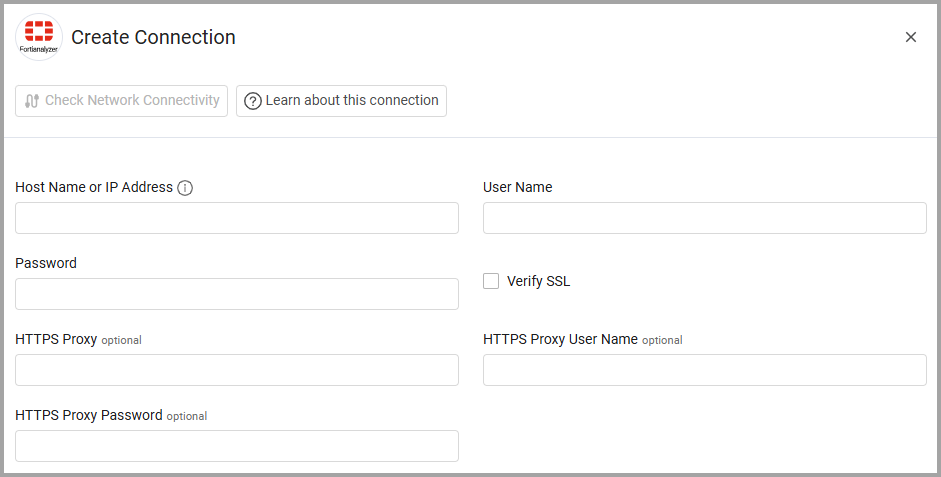
Optional Parameters
- Verify SSL - Select whether to verify the SSL certificate of the server against the CA database inside of Axonius. For more details, see SSL Trust & CA Settings.
- HTTPS Proxy - Connect the adapter to a proxy instead of directly connecting it to the domain.
- HTTPS Proxy User Name - The user name to use when connecting to the value supplied in Host Name or IP Address via the value supplied in HTTPS Proxy.
- HTTPS Proxy Password - The password to use when connecting to the server using the HTTPS Proxy.
-
Select Gateway – Select the Axonius Gateway to use when connecting adapters whose sources are only accessible by an internal network and not from the primary Axonius instance, which may be an Axonius-hosted (SaaS) instance or Customer-hosted (on-premises / private cloud). To use this option, you need to set up an Axonius Gateway.
To learn more about common adapter connection parameters and buttons, see Adding a New Adapter Connection.
Updated 9 days ago