
Cisco - Cycle Interface (Port)
Cisco - Cycle Interface (Port) cycles a network interface by shutting it down and then re-enabling it for:
- Assets returned by the selected query or assets selected on the relevant asset page.
See Creating Enforcement Sets to learn more about adding Enforcement Actions to Enforcement Sets.
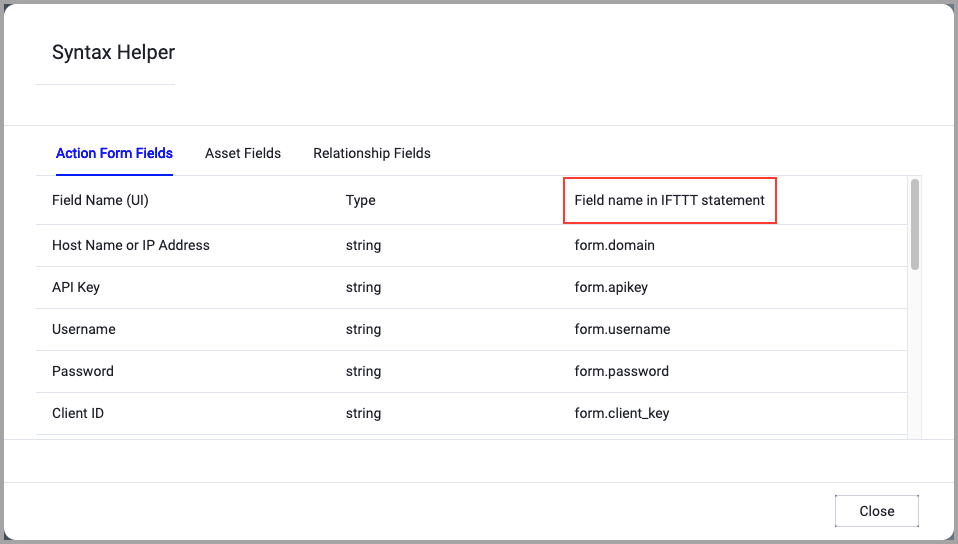
When accessing an enforcement action using the API, you must use the backend form of field names.
Use the Syntax Helper to find the correct name. In the enforcement action, enable Configure Dynamic Values and select Syntax Helper.
Note
- Not all asset types are supported for all Enforcement Actions.
- See Actions supported for Activity Logs, Adapters Fetch History, and Asset Investigation modules.
- See Actions supported for Aggregated Security Findings.
- See Actions supported for Software.
Required Fields
These fields must be configured to run the Enforcement Action.
- Action name - The name of this Enforcement Action. The system sets a default name. You can change the name.
- Configure Dynamic Values (optional) - Toggle on to enter a Dynamic Value statement. See Creating Enforcement Action Dynamic Value Statements to learn more about Dynamic Value statement syntax.
- Use stored credentials from the Cisco adapter - Select this option to use credentials from the adapter connection. By default, the first connection is selected.
-
When you select this option, the Select Adapter Connection drop-down becomes available. Select the adapter connection to use for this Enforcement Action.
-
Note
- To use this option, you must successfully configure a Cisco adapter connection.
-
Compute Node - The Axonius node to use when connecting to the specified host. For more details, see Working with Axonius Compute Nodes.
Additional Fields
These fields are optional.
- Interface Index (ifIndex) - The SNMP interface index of the interface to cycle (for example, 1). Required for SNMP connections. This corresponds to IF-MIB::ifIndex.
- Interface Name - The human-readable name of the interface to cycle (for example, GigabitEthernet1/0/1). Required for SSH connections.
Connection and CredentialsWhen Use stored credentials from the adapter is toggled off, some of the connection fields below are required to create the connection, while other fields are optional.
- Host Name or IP Address - The hostname or IP address of the Cisco device to manage.
- Protocol - The protocol to use for the connection. Options include SNMPv1, SNMPv2c, SNMPv3, SNMPv3 with Fallback, SSH, and Telnet.
- SNMP Read Community - The SNMP community string. Required for SNMPv1 and SNMPv2c connections.
- User Name - The username for authentication. Required for SNMPv3, SSH, and Telnet connections.
- Password - The password for authentication. Required for SSH and Telnet connections.
- SNMPv3 Authentication Passphrase (authKey) - The SNMPv3 authentication passphrase. Required for SNMPv3 connections.
- SNMPv3 Private Passphrase (privKey) - The SNMPv3 privacy passphrase. Required for SNMPv3 connections.
- SNMPv3 Authentication Type (authProtocol) - The SNMPv3 authentication protocol.
- SNMPv3 Privacy Type (privProtocol) - The SNMPv3 privacy protocol.
- SNMPv3 Security Level (level) - The SNMPv3 security level.
- Protocol Port - The port to use for the connection. Defaults to 161 for SNMP and 22 for SSH.
Verify SSL (Optional) (default: enabled) - Selects whether to verify the SSL certificate of the server against the CA database inside of Axonius. For more details, see SSL Trust & CA Settings. This setting is enabled by default on all new adapter settings. If you need to disable SSL verification, make sure you disable this setting.)
HTTPS Proxy (optional) - Connect the adapter to a proxy instead of directly connecting it to the domain.
HTTPS Proxy User Name (optional) - The user name to use when connecting to the server using the HTTPS Proxy.
HTTPS Proxy Password (optional) - The password to use when connecting to the server using the HTTPS Proxy.
Gateway Name - Select the Gateway through which to connect to perform the action.
APIs
For SNMP connections, Axonius uses SNMP SET operations on the IF-MIB::ifAdminStatus object (OID 1.3.6.1.2.1.2.2.1.7).
For SSH connections, Axonius uses the Cisco IOS CLI to run shutdown and no shutdown configuration commands on the specified interface.
Required Ports
Axonius must be able to communicate through the following ports:
- UDP port 161 (SNMP)
- TCP port 22 (SSH)
Required Permissions
The stored credentials, or those provided in Connection and Credentials, must have the following permission(s) to perform this Enforcement Action:
The following permissions and requirements are needed:
- SNMP connections: The SNMP credentials must have write access to the IF-MIB::ifAdminStatus object on the target device.
- SNMPv2c: A community string with read-write access.
- SNMPv3: A user account with authentication and privacy configured, and write access to the interfaces MIB.
- SSH connections: A user account with sufficient privilege to enter configuration mode and run
interfaceconfiguration commands (shutdownandno shutdown).
For more details about other enforcement actions available, see Action Library.
Updated 12 days ago