
DataDome
DataDome is a bot protection platform that provides real-time detection and blocking of online fraud, account takeover, API abuse, and DDoS attacks across websites and mobile applications.
Use Cases the Adapter Solves
- Monitor protection coverage: Review DataDome endpoints and their protection status across your web and mobile applications.
- Review traffic controls: Bring DataDome custom rules into Axonius as firewall assets to help review controls that protect application traffic.
- Track endpoint usage: Review request counts for DataDome endpoints alongside other asset information.
Asset Types Fetched
- Business Applications
- Firewalls
Data Retrieved through the Adapter
Business Applications - fields such as: Name, Domain, Protection Enabled, Requests
Firewalls - fields such as: Name, Enabled, Rule Response, Hits
Before You Begin
Required Ports
TCP port 443 (HTTPS)
Authentication Methods
API key.
APIs
Axonius uses the DataDome Management API. The following endpoints are called:
GET /1.0/endpoints- Retrieves DataDome endpoints.GET /1.0/account/settings- Retrieves account settings that are added to each endpoint record.GET /1.0/account/usage- Retrieves request-count usage for each endpoint.GET /1.1/protection/custom-rules- Retrieves custom rules.
Required Permissions
The API user must have access to the Endpoints and Account usage APIs with at least Editor Role.
Supported From Version
9.0.6
Setting up DataDome to work with Axonius
DataDome uses a dedicated Management API Key for API access. Refer to Terraform provider,
Important: The Management API Key is not enabled by default. You must contact your DataDome Technical Account Manager to enable it. Once enabled, the key is available in the DataDome Dashboard under Management > Integrations
Connecting the Adapter in Axonius
- Navigate to the Adapter Catalog, search for DataDome, and select the adapter.
- Click Add Connection.
- Provide the following parameters.
Required Parameters
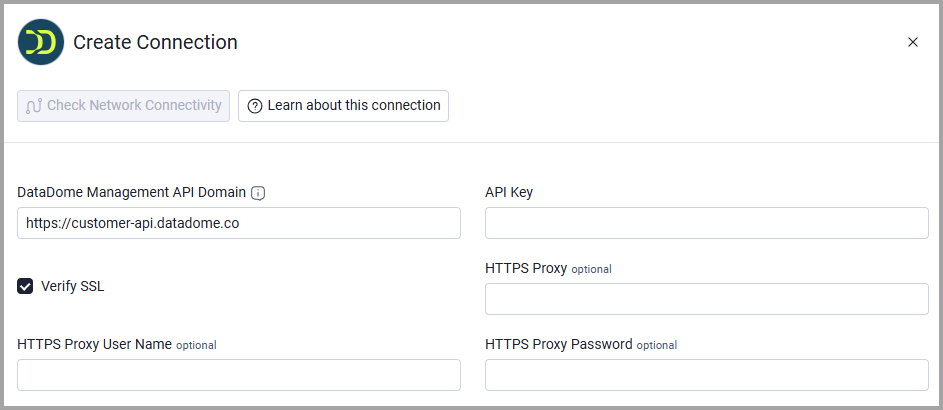
- DataDome Management API Domain - The base domain for the DataDome Management API. Do not add a specific endpoint path. Default:
https://customer-api.datadome.co - API Key - The API key used to authenticate requests to the DataDome Management API.
Optional Parameters
- Verify SSL - Select whether to verify the SSL certificate of the server against the CA database inside of Axonius. For more details, see SSL Trust & CA Settings.
- HTTPS Proxy - Connect the adapter to a proxy instead of directly connecting it to the DataDome Management API domain.
- HTTPS Proxy User Name - The user name to use when connecting to the DataDome Management API domain via the value supplied in HTTPS Proxy.
- HTTPS Proxy Password - The password to use when connecting to the server using the HTTPS Proxy.
To learn more about common adapter connection parameters and buttons, see Adding a New Adapter Connection.
Updated 29 days ago