
Ingestion Rules Post Actions
Post actions are optional operations performed on an entity before it is ingested into Axonius.
Post actions are optional operations performed on an entity (asset) before it is ingested into Axonius. A post action is not required for an Ingestion Rule statement. They are appended to a primary statement using the then keyword. Common use cases include filtering out low-quality data and dropping PII fields.
For primary statement syntax, see Ingestion Rule Statement Reference. For filter operators used in the primary statement, see Ingestion Rules Operators.
Syntax:
{primary statement} then {post action} {post rule values}
Post Actions Summary
| Post Action | Description |
|---|---|
skip_field | Removes specified fields from the entity before ingestion |
remove_values | Removes values from a list field or from a field in a list object |
remove_items | Removes entire items from a list field |
trim_prefix | Removes a specified prefix from a field value |
trim_suffix | Removes a specified suffix from a field value |
trim_regex | Removes a string matching a regex pattern from a field value |
set_value | Updates or creates a field value on an entity during ingestion |
Skip Field (skip_field)
skip_field)Removes the supplied fields from the entity and does not insert them into the database.
device.ad_dc_source == "10.10.11.5" then skip_field ["network_interfaces.ips", "ad_name"]Note
This rule excludes all devices where
ad_dc_sourceis not equal to10.10.11.5. If you want to include ALL entities (assets), but only skip fields on a subset of entities, include the following rule (in conjunction with the OR operator) to ensure that all entities are still ingested from that adapter.device key_exists ["id"]
device.ad_usn_changed starts_with ["91"] then skip_field ["ad_dc_source"]To skip fields on all devices coming from an adapter:
device key_exists ["id"] then skip_field ["physical_location", "qualys_agent_ports"]device key_exists ["id"]ensures all devices are ingested from that adapter.then skip_field ["physical_location", "qualys_agent_ports"]specifies the fields to not ingest.
Remove Values (remove_values)
remove_values)Removes values from a list field or from a field in a list object. Note that if you already fetched these values, they still appear in the asset table for the amount of time set in Delete devices (or users) and other assets that have not been returned from the source in the last X hours. To see only the latest values, create a query in the Query Wizard that shows From Last Fetch = true.
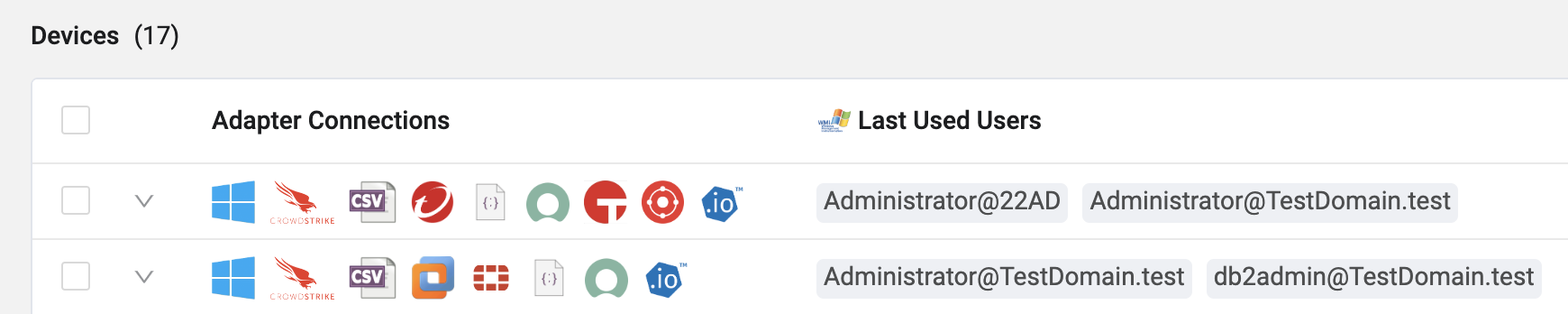
Use remove_values on fields that contain a list of simple objects such as strings (e.g. Last Used Users from WMI) numbers, or on fields that contain a list of complex objects.
Example 1 — Remove values from a list field
device key_exists ["last_used_users"] then remove_values last_used_users starts_with ["Admin"]This rule ingests all devices with a last used user, but only includes last used users that do not start with "Admin".
Example 2 — Remove values from a field in a list object
device key_exists ["id"] then remove_values network_interfaces.mac == "00:00:4f:21:53:af"This rule ingests all devices with an ID, but removes the MAC address from each device that has a network interface with MAC equal to 00:00:4f:21:53:af.
Remove Items (remove_items)
remove_items)Removes entire items from a list field. Some fields contain lists of items — for example, network_interfaces, which contains subfields such as MAC addresses, IP addresses, and so on. If a condition applies to one of the subfields and it evaluates to true, the complete item is removed and not ingested. Use remove_items for lists of complex objects, such as Network Interfaces.

device key_exists ["id"] then remove_items network_interfaces.ip4 in_net ["10.20.0.0/24"]This rule ingests all devices, but removes all associated network interface information for IPs in the 10.20.0.0/24 range.
Trim Prefix/Suffix (trim_prefix | trim_suffix)
trim_prefix | trim_suffix)Removes a specified prefix or suffix from a field value, if it exists.
device key_exists ["id"] then trim_prefix hostname ["domain.local"]device key_exists ["id"] then trim_prefix network_interfaces.ips ["(IP Address)", "IP Prefix"]user key_exists ["id"] then trim_suffix hostname [".com"]Note
If you want to run a post action on only a subset of entities and still ingest all other entities, include the following rule with the OR operator:
device|user key_exists ["id"]
Example use case — Remove employee IDs from an MSSP that conflict with your primary email. The ingestion rules (joined with OR) would look like the following:
user.email ends_with ["@mssp.com"] then skip_field ["employee_id"]

user key_exists ["id"]
Trim Regex (trim_regex)
trim_regex)The trim_regex action removes a specific string or pattern from a field using a regular expression (regex) template.
Note
Ingestion Rules regex operators are case-sensitive. To make a pattern case-insensitive, prefix the regex with
(?i).
Syntax
trim_regex [field] [regex_template]Where:
[field]— The target field from which to remove the string.[regex_template]— The regex pattern that identifies the string to be removed.
Example — Remove a MAC address from the ad_hostname field
Original ad_hostname value: EC2AMAZ-71GIQSO-A4:B7:3C:E9:2F:81
device key_exists ["id"] then trim_regex ad_hostname ["-([A-Fa-f0-9]{2}(:[A-Fa-f0-9]{2}){5})"]Explanation of the regex template -([A-Fa-f0-9]{2}(:[A-Fa-f0-9]{2}){5}):
-— Matches the hyphen that precedes the MAC address.([A-Fa-f0-9]{2})— Matches two hexadecimal digits (0–9, a–f, A–F).(:[A-Fa-f0-9]{2}){5}— Matches a colon followed by two hexadecimal digits, repeated five times.
Result: The action removes the hyphen and the MAC address, leaving ad_hostname as EC2AMAZ-71GIQSO.
Set Value (set_value)
set_value)Use set_value to update or create an attribute value on an entity during ingestion, based on a condition. Common use cases include normalizing values, correcting inconsistent data, and replacing sensitive values with sanitized ones.
Use cases:
- Data normalization — Standardize field values across different adapters (for example, set a consistent
is_managedflag based on conditions). - Field extraction — Extract specific parts of URLs, paths, or identifiers into separate fields for easier querying.
- Data enrichment — Copy important fields to custom metadata fields for easier access or reporting.
- String cleanup — Remove prefixes, suffixes, or unwanted patterns from field values during ingestion.
- Conditional tagging — Set tags or categories based on device or user attributes.
Syntax
<condition> then set_value <target_field> = <source>Where:
<condition>— The ingestion rule condition that must be met (for example,device.os.type == "Windows").<target_field>— The field to set, as a dotted path (for example,os.typeordisplay_name). If the field does not exist, Axonius creates it. If it already exists, Axonius updates it.<source>— The source of the value. This can be:- A static literal — A fixed string (
"Windows"), boolean (TrueorFalse), or integer (443). - A field reference — The value copied from another field on the same entity, specified as a dotted path (for example,
device.ad_name). - A transform — A transformation function applied to a field value. See Transforms below.
- A static literal — A fixed string (
Transforms
Transforms read a field value, modify it, and write the result — optionally to a different field.
| Transform | Description | Example |
|---|---|---|
trim_prefix | Removes a prefix string from the source field value | trim_prefix(device.remote_url, "https://") |
trim_suffix | Removes a suffix string from the source field value | trim_suffix(device.ad_name, "-X") |
trim_regex | Removes text matching a regex pattern from the source value | trim_regex(device.ad_name, "-[0-9]+$") |
regex_extract | Extracts a capture group from the source using a regex pattern | regex_extract(device.remote_url, "https?://([^/]+)", 1) |
regex_replace | Replaces every match of a regular expression with the specified replacement; use \g<1> to reference capture groups | regex_replace(device.hostname, "^([a-z]+)-[0-9]+$", "\g<1>") |
Note
For
regex_extract, the pattern must include a capture group( ... ). The last argument is the capture-group number (default:1). If no match is found, the original value is written unchanged.
Examples
Normalize an OS name:
device.os.type contains ["Microsoft"] then set_value os.type = "Windows"Set a static boolean or integer:
device key_exists ["id"] then set_value is_managed = True
device key_exists ["id"] then set_value port = 443
Copy a value from another field:
device key_exists ["id"] then set_value display_name = device.ad_nameStrip a URL prefix and store the result in a new field:
device.remote_url contains ["http"] then set_value domain = trim_prefix(device.remote_url, "https://")Extract a hostname from a URL into a new field:
device.remote_url key_exists ["id"] then set_value host = regex_extract(device.remote_url, "https?://([^/]+)", 1)Remove the numeric suffix from a hostname and store the result in a new field:
device.hostname key_exists ["id"] then set_value short_hostname = regex_replace(device.hostname, "^([a-z]+)-[0-9]+$", "\g<1>")Note
- The value is set only for entities that match the rule's condition.
- The target field can be inside nested objects or lists. If the target is a list field, the value is stored as a single-item list. When copying from a list field to a scalar target, the first value from the list is used.
- When an existing value is overwritten, the previous value is preserved in a new field named
<field>_original. If the new value equals the existing value, no_originalfield is created.- System and correlation fields (for example,
id) cannot be set.
Performing a Post Action Only if a Field Value Exists or Does Not Exist
Use key_exists and key_not_exists operators in the post action of an ingestion rule so that the post action is performed on the asset only if a value exists or does not exist in the specified field (key).
device key_exists ["id"] then remove_items network_interfaces.ips_v4 key_not_existsThis rule ingests all devices, but removes all network interfaces that do not have a value in ips_v4 (that is, without an IPv4 address).
Related Pages
- Ingestion Rule Statement Reference — Primary statement syntax and components
- Ingestion Rules Operators — All supported filter operators
- Ingestion Rules Examples — Real-world configuration examples
Updated 7 days ago