
CrowdStrike Adaptive Shield
Crowdstrike Adaptive Shield is an AI-powered, fully managed SaaS Security Posture Management (SSPM) solution designed to protect critical SaaS applications.
Use Cases the Adapter Solves
- Monitor SaaS Security Posture: Gain visibility into security risks across connected SaaS applications by monitoring security checks, compliance status, and exposures affecting users and devices.
- Track User Activity and Access: Monitor user behavior, login patterns, and access events across integrated SaaS platforms to detect anomalous activity and privileged access.
- Ensure Device Compliance: Identify devices accessing SaaS applications, track their security status, and ensure they meet organizational compliance requirements.
Asset Types Fetched
- Devices, SaaS Applications, Software, Users, Audit Activities
Data Retrieved through the Adapter
Devices: Fields such as Device Name, Last Seen, Operating System, MAC Address
Users: Fields such as Email Address, First Name, Last Name, Display Name
SaaS Applications: Fields such as Application Name (SaaS Name), Remote ID, Alias, Status
Audit Activities: Fields such as Event Name, Actor Email, Timestamp, Source IP
Before You Begin
Required Ports
- TCP port 443 (HTTPS)
Authentication Methods
OAuth 2.0 Client Credentials
The adapter authenticates using the CrowdStrike Falcon OAuth2 client credentials flow. The adapter uses Client ID and Client Secret
APIs
Axonius uses the CrowdStrike Falcon SaaS Security API. The following endpoints are called:
POST /oauth2/token- Authenticates and retrieves OAuth access tokenGET /saas-security/entities/devices/v3- Retrieves device inventory dataGET /saas-security/entities/system-users/v3- Retrieves system administrator usersGET /saas-security/entities/users/v3- Retrieves user inventory dataGET /saas-security/entities/integrations/v3- Retrieves connected SaaS application configurationsGET /saas-security/entities/monitor/v3- Retrieves user activity and audit events
Required Permissions
Your API client must have the specific scope "SaaS Security (Falcon Shield)"
Yhe following API scopes are required:
SaaS Security: READ
This scope allows the adapter to read device inventory, user data, integrations, and activity monitor events from the CrowdStrike Falcon SaaS Security API.
Supported From Version
Supported from Axonius version 9.0.3
Connecting the Adapter in Axonius
- Navigate to the Adapter Catalog, search for CrowdStrike Adaptive Shield, and select the adapter.
- Click Add Connection.
- Provide the following parameters.
Required Parameters
- Host Name or IP Address - CrowdStrike Falcon base URL. Example:
https://api.crowdstrike.com - Client ID - The OAuth Client ID from the CrowdStrike API client
- Client Secret - The OAuth Client Secret from the CrowdStrike API client
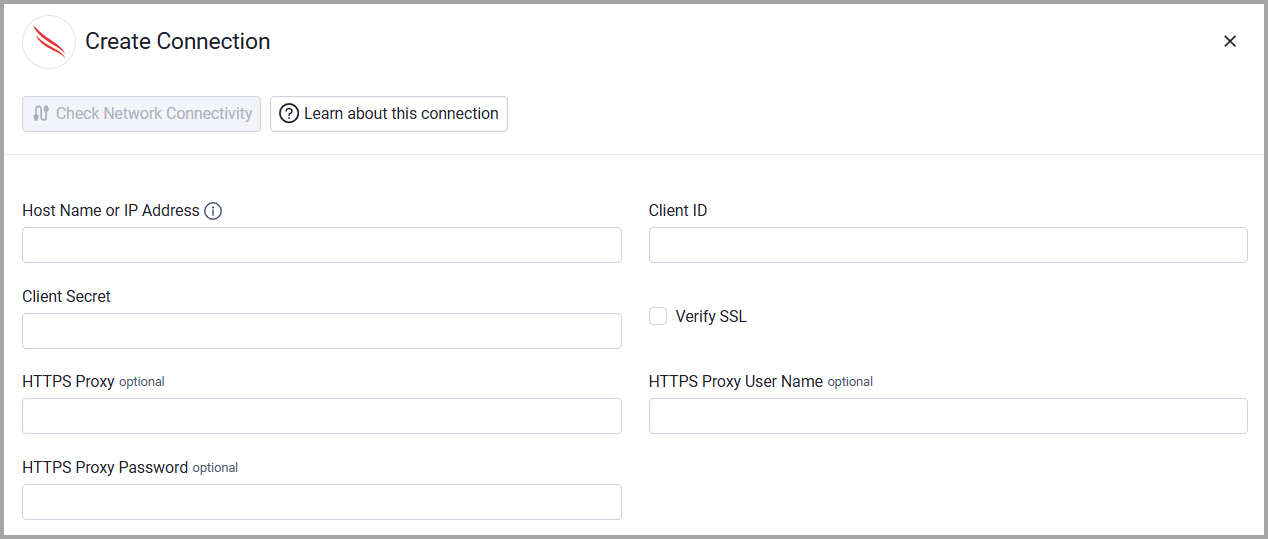
Optional Parameters
- Verify SSL - Select whether to verify the SSL certificate of the server against the CA database inside of Axonius. For more details, see SSL Trust & CA Settings.
- HTTPS Proxy - Connect the adapter to a proxy instead of directly connecting it to the domain.
- HTTPS Proxy User Name - The user name to use when connecting to the value supplied in Host Name or IP Address via the value supplied in HTTPS Proxy.
- HTTPS Proxy Password - The password to use when connecting to the server using the HTTPS Proxy.
To learn more about common adapter connection parameters and buttons, see Adding a New Adapter Connection.
Updated 3 months ago