
StrongDM
StrongDM is a Privileged Access Management platform that delegates access to databases, servers, clusters, websites, and clouds through a proxy network.
Use Cases the Adapter Solves
- Privileged Access Visibility: Track which databases, servers, and infrastructure resources are managed through StrongDM to ensure comprehensive asset visibility across your privileged access management environment.
- Infrastructure Security Governance: Identify all resources protected by StrongDM and monitor their health status to maintain secure access controls and detect potential access gaps.
Asset Types Fetched
- Devices
Data Retrieved through the Adapter
Devices - fields such as: Name, Hostname, Resource Type, Healthy
Before You Begin
Required Ports
- TCP port 443 (gRPC over HTTPS)
Authentication Methods
API Access Key and Secret Authentication
APIs
Axonius uses the StrongDM gRPC API. The following endpoints are called:
resources.list()- Retrieves resources (databases, servers, clusters, websites, or clouds) managed by StrongDM
Required Permissions
The API key must be created with permissions to read resource information. When creating the API key in the StrongDM Admin UI, you can specify the scope of permissions that determine what the API key can access.
Note: The exact permission names should be confirmed with your StrongDM administrator when creating the API key, as permissions are defined during API key creation based on your organizational requirements.
Supported From Version
Supported from Axonius version 9.0.5
Connecting the Adapter in Axonius
- Navigate to the Adapter Catalog, search for StrongDM, and select the adapter.
- Click Add Connection.
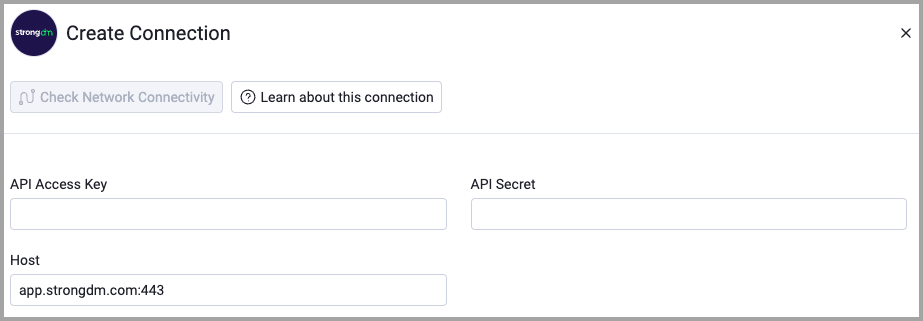
- Provide the following parameters.
Required Parameters
- API Access Key - The API access key generated in the StrongDM Admin UI. Example:
auth-0123abcd - API Secret - The API secret key generated in the StrongDM Admin UI (base64-encoded string)
- Host - StrongDM gRPC host in host:port format. Default:
app.strongdm.com:443
Optional Parameters
- Verify SSL - Select whether to verify the SSL certificate of the server against the CA database inside of Axonius. For more details, see SSL Trust & CA Settings.
- HTTPS Proxy - Connect the adapter to a proxy instead of directly connecting it to the domain.
- HTTPS Proxy User Name - The user name to use when connecting to the value supplied in Host via the value supplied in HTTPS Proxy.
- HTTPS Proxy Password - The password to use when connecting to the server using the HTTPS Proxy.
To learn more about common adapter connection parameters and buttons, see Adding a New Adapter Connection.
Updated about 2 months ago