
Living Security
Living Security is a human risk management platform that provides security awareness training, phishing simulation, and identity risk scoring for workforce identities.
Use Cases the Adapter Solves
- Identify human risk: Use identity risk scores to find workforce identities that need attention.
- Improve identity visibility: Review identity contact details, organizational attributes, and account status in Axonius.
- Support risk-based decisions: Combine workforce identity data with other Axonius asset data for security and governance workflows.
Asset Types Fetched
- Users
Data Retrieved through the Adapter
Users - fields such as: Email Addresses, Display Name, Department, Human Risk Index
Before You Begin
Required Ports
- TCP port 443 (HTTPS)
Authentication Methods
The adapter supports two authentication methods. Select one in Authentication Method.
OAuth 2.0 Client Credentials
The adapter sends the Client ID and Client Secret to the configured OAuth 2.0 Host to obtain an OAuth access token. It uses that token to authenticate API requests.
Unify Events API Token
The adapter sends the configured API Token in the authorization header when it requests data.
APIs
Axonius uses the Living Security API. The following endpoints are called:
POST /oauth2/token- Obtains an OAuth access token when OAuth 2.0 Client Credentials authentication is selected.GET /v1/identities/- Retrieves identities as Users.
Required Permissions
Client Role set to Company Admin
Supported From Version
Supported from Axonius version 10.0.0
Setting Up Living Security to Work with Axonius
Choose one authentication method and obtain its credentials in Living Security:
- For OAuth 2.0 Client Credentials, obtain a Client ID and Client Secret under API Authentication > Public API Clients.
- For a Unify Events API Token, obtain the token under Unify > Settings > API Tokens.
- Keep the credentials available to enter when you add the adapter connection in Axonius.
Connecting the Adapter in Axonius
- Navigate to the Adapter Catalog, search for Living Security, and select the adapter.
- Click Add Connection.
- Provide the following parameters.
Required Parameters
- Host Name or IP Address - Enter the regional Living Security API host, including https://. Use
https://us.api.livingsecurity.comfor US tenants orhttps://eu.api.livingsecurity.comfor EU tenants. Do not add an endpoint path. - Authentication Method - Select OAuth 2.0 Client Credentials or Unify Events API Token.
- Client ID - When using OAuth 2.0 Client Credentials, enter the Client ID from Living Security.
- Client Secret - When using OAuth 2.0 Client Credentials, enter the Client Secret from Living Security.
- OAuth 2.0 Host - When using OAuth 2.0 Client Credentials, enter the regional token host, including https://. Use
https://oauth.us.api.livingsecurity.comfor US tenants orhttps://oauth.eu.api.livingsecurity.comfor EU tenants. - API Token - When using Unify Events API Token, enter the API token from Living Security.
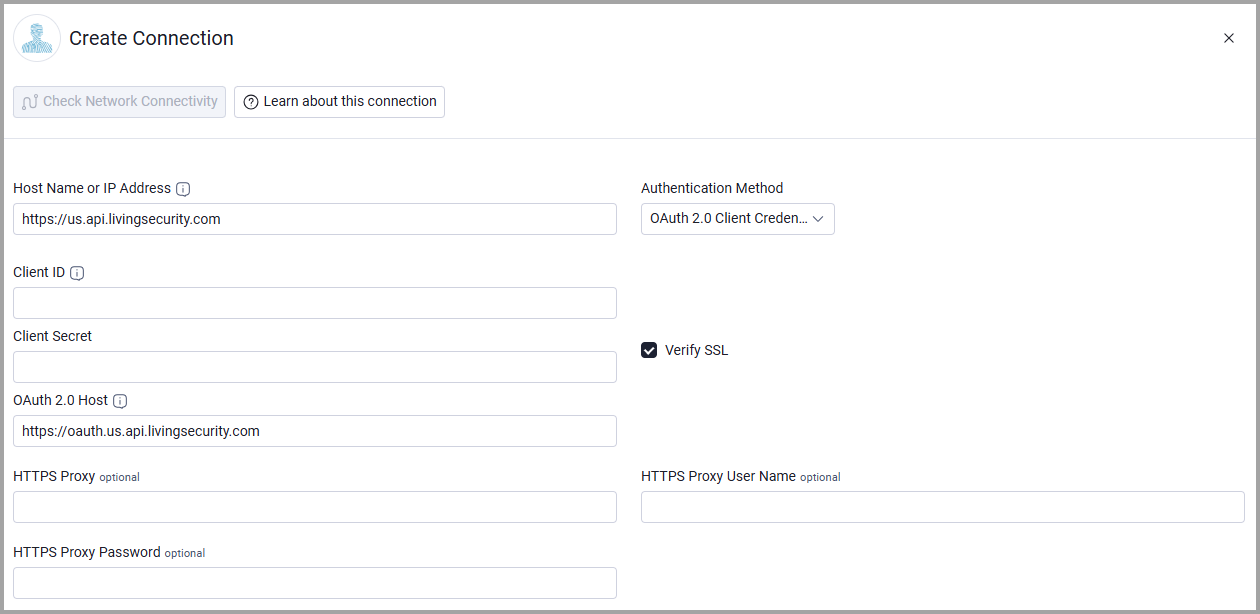
Optional Parameters
- Verify SSL - Select whether to verify the SSL certificate of the server against the CA database inside of Axonius. For more details, see SSL Trust & CA Settings.
- HTTPS Proxy - Connect the adapter to a proxy instead of directly connecting it to the domain.
- HTTPS Proxy User Name - The user name to use when connecting to Host Name or IP Address via the value supplied in HTTPS Proxy.
- HTTPS Proxy Password - The password to use when connecting to the server using the HTTPS Proxy.
To learn more about common adapter connection parameters and buttons, see Adding a New Adapter Connection.
Updated 21 days ago