
Intel 471 Enrichment
Intel 471 Enrichment provides cyber threat intelligence to assess, identify, and manage potential risks.
Notes
- This adapter was previously called Intel 471.
- Starting from Axonius version 10.0.2, the adapter connects to the Intel 471 Verity API instead of the Intel 471 Titan API. If you connected this adapter in an earlier version, edit the connection after you upgrade: check the Host Name or IP Address value, and enter your Intel 471 Verity User Name and Password. The Email Address and API Key parameters no longer exist.
Types of Assets Fetched
This adapter fetches vulnerabilities and enriches them with CVE information. The adapter does not create new assets. It enriches CVEs that Axonius already has, using the Intel 471 vulnerability reports whose name is a CVE ID. The adapter ignores all other reports.
The adapter adds the following fields to a CVE: Product Name, Vendor Name, Type, Risk Level, and Summary. Summary is shown as plain text. A field that has no value in the report remains empty.
Parameters
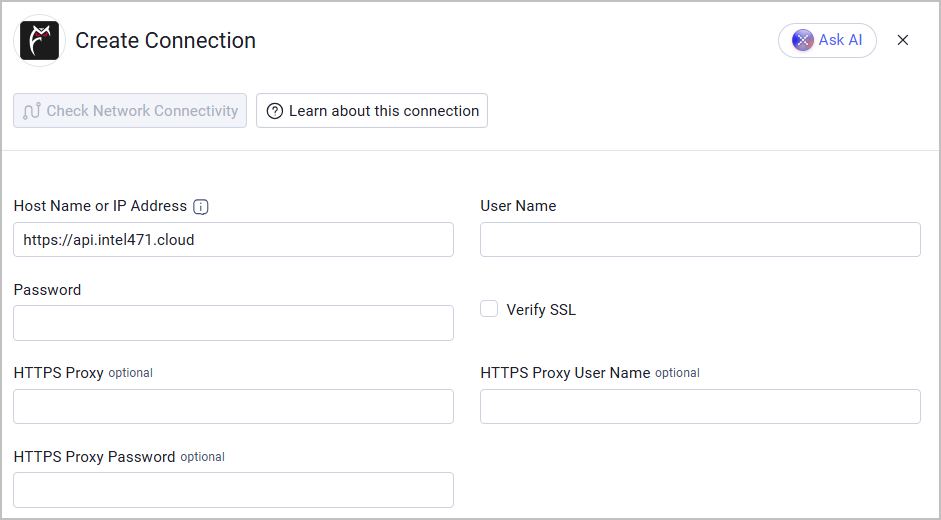
- Host Name or IP Address (required, default:
https://api.intel471.cloud) - The hostname or IP address of the Intel 471 server that Axonius can communicate with. Keep the default value, or enter the API host that Intel 471 gave you. - User Name (required) - The user name of your Intel 471 Verity API credentials.
- Password (required) - The password of your Intel 471 Verity API credentials.
- Verify SSL - Select whether to verify the SSL certificate of the server against the CA database inside of Axonius. For more details, see SSL Trust & CA Settings.
- HTTPS Proxy (optional) - Connect the adapter to a proxy instead of directly connecting it to the domain.
- HTTPS Proxy User Name (optional) - The user name to use when connecting to the value supplied in Host Name or IP Address via the value supplied in HTTPS Proxy.
- HTTPS Proxy Password (optional) - The password to use when connecting to the server using the HTTPS Proxy.
To learn more about common adapter connection parameters and buttons, see Adding a New Adapter Connection.
APIs
Axonius uses the Intel 471 Verity API.
The adapter calls the following endpoint:
GET https://api.intel471.cloud/integrations/intel-report/v1/reports/vulnerability/stream- Gets the vulnerability reports.
Supported From Version
Supported from Axonius version 6.1.
Updated 15 days ago