
Salesforce Marketing Cloud
Salesforce Marketing Cloud is a digital marketing platform that provides email, mobile, social, and advertising automation, journey management, audience segmentation, and campaign analytics.
Use Cases the Adapter Solves
- Review configuration activity: Track Audit Trail events to review configuration changes in Salesforce Marketing Cloud.
- Monitor account access: Review security events such as login attempts, logouts, and password changes.
- Investigate activity: Use activity details to investigate who performed an action and the affected resource.
Asset Types Fetched
- Activities
Data Retrieved through the Adapter
Activities - fields such as: Event ID, Employee Name, Transaction ID, Login Status
Before You Begin
Required Ports
- TCP port 443 (HTTPS)
Authentication Methods
The adapter uses OAuth 2.0 client credentials. Create a Server-to-Server Installed Package API Integration and use its Client ID and Client Secret. The adapter requests an access token from the Authentication Base URI and uses the token to access the REST API.
APIs
Axonius uses the Salesforce Marketing Cloud API. The following endpoints are called:
POST /v2/token- Requests an OAuth 2.0 access token.GET /data/v1/audit/auditEvents- Retrieves Audit Trail configuration-change events.GET /data/v1/audit/securityEvents- Retrieves Audit Trail access events, including login, logout, and password-change events.
Required Permissions
- API Integration (Installed Package) created in Marketing Cloud Setup -> Installed Packages; the creating user needs the Installed Package > Administer permission.
- Server-to-Server OAuth credentials (client_id, client_secret) from the Installed Package, with the Data | Tracking Event | Read scope enabled for Audit Trail data.
- Security Events sessionId and userAgent are only populated for tenants with Advanced Audit Trail enabled.
Supported From Version
Supported from Axonius version 10.0.2
Connecting the Adapter in Axonius
- Navigate to the Adapter Catalog, search for Salesforce Marketing Cloud, and select the adapter.
- Click Add Connection.
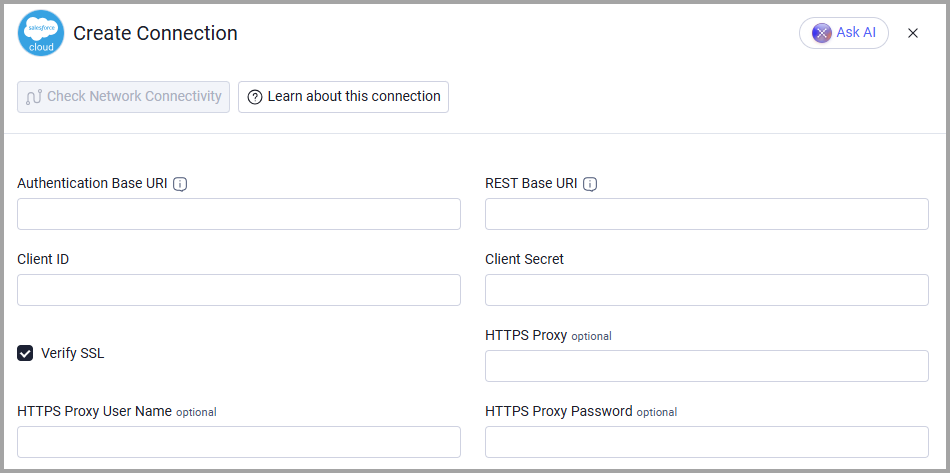
- Provide the following parameters.
Required Parameters
- Authentication Base URI - The Authentication Base URI shown on the API Integration of the Installed Package.
- REST Base URI - The REST Base URI shown on the API Integration of the Installed Package.
- Client ID - The Client ID for the API Integration.
- Client Secret - The Client Secret for the API Integration.
Optional Parameters
- Verify SSL (default: enabled) - Select whether to verify the SSL certificate of the server against the CA database inside of Axonius. For more details, see SSL Trust & CA Settings.
- HTTPS Proxy - Connect the adapter to a proxy instead of directly connecting to Salesforce Marketing Cloud.
- HTTPS Proxy User Name - The user name to use when connecting through HTTPS Proxy.
- HTTPS Proxy Password - The password to use when connecting through HTTPS Proxy.
To learn more about common adapter connection parameters and buttons, see Adding a New Adapter Connection.
Advanced Settings
Note:
Advanced settings can either apply to all connections for this adapter, or to a specific connection. Refer to Advanced Configuration for Adapters.
To learn more about Adapter Configuration tab advanced settings, see Adapter Advanced Settings.
- Fetch Audit Events From the Last X Days (default: 30) - Sets the number of days of Audit Events to retrieve. The minimum value is 1.
- Fetch Security Events From the Last X Days (default: 30) - Sets the number of days of Security Events to retrieve. The minimum value is 1.
Updated 5 days ago