
IBM Maximo - Delete Asset
IBM Maximo - Delete Asset deletes the IBM Maximo asset that belongs to each of the devices returned by the selected query or assets selected on the relevant asset page, or changes the status of the asset instead. The query must return devices that have IBM Maximo adapter data.
See Creating Enforcement Sets to learn more about adding Enforcement Actions to Enforcement Sets.
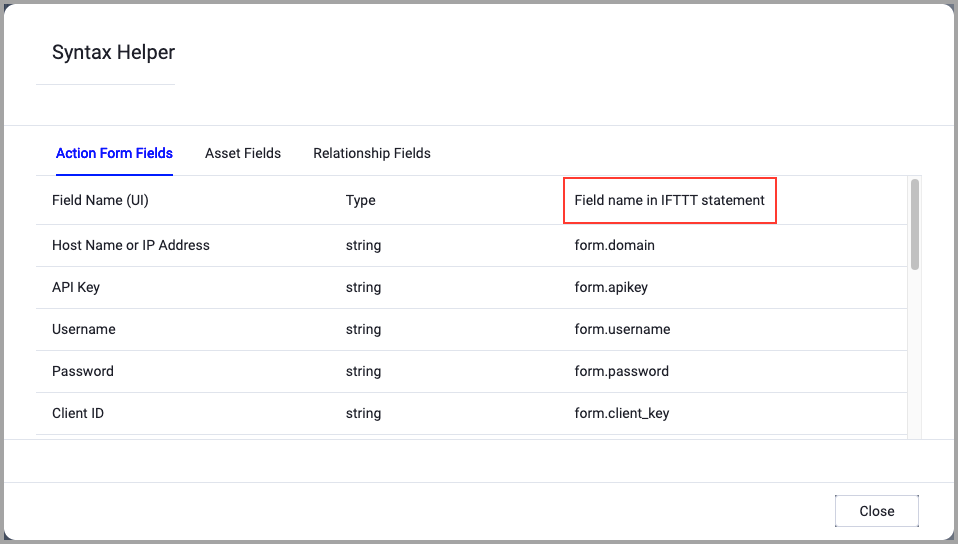
When accessing an enforcement action using the API, you must use the backend form of field names.
Use the Syntax Helper to find the correct name. In the enforcement action, enable Configure Dynamic Values and select Syntax Helper.
Note
- Not all asset types are supported for all Enforcement Actions.
- See Actions supported for Activity Logs, Adapters Fetch History, and Asset Investigation modules.
- See Actions supported for Aggregated Security Findings.
- See Actions supported for Software.
Required Fields
These fields must be configured to run the Enforcement Action.
- Action name - The name of this Enforcement Action. The system sets a default name. You can change the name.
- Configure Dynamic Values (optional) - Toggle on to enter a Dynamic Value statement. See Creating Enforcement Action Dynamic Value Statements to learn more about Dynamic Value statement syntax.
- Use stored credentials from the IBM Maximo adapter - Select this option to use credentials from the adapter connection. By default, the first connection is selected.
-
When you select this option, the Select Adapter Connection drop-down becomes available. Select the adapter connection to use for this Enforcement Action.
-
Note
If you do not select the Use stored credentials from the IBM Maximo adapter option, you must provide the connection parameters below.
-
Compute Node - The Axonius node to use when connecting to the specified host. For more details, see Working with Axonius Compute Nodes.
- Action to Perform - Select what to do with the Maximo asset:
- Delete (default) - Removes the asset from IBM Maximo.
- Change status - Keeps the asset and sets its status.
Additional Fields
These fields are optional.
- Status to Set - The status to set on the asset. This field appears only when Action to Perform is Change status. The default is
DECOMMISSIONED.
Connection and CredentialsWhen Use stored credentials from the adapter is toggled off, some of the connection fields below are required to create the connection, while other fields are optional.
- Host Name or IP Address - The host name or IP address of the IBM Maximo server that Axonius can communicate with via the Required Ports.
- API Key - An API key of a user account that has the Required Permissions. Use either API Key, or User Name and Password.
- User Name and Password - The credentials of a user account that has the Required Permissions. Use either User Name and Password, or API Key.
Verify SSL (Optional) (default: enabled) - Selects whether to verify the SSL certificate of the server against the CA database inside of Axonius. For more details, see SSL Trust & CA Settings. This setting is enabled by default on all new adapter settings. If you need to disable SSL verification, make sure you disable this setting.)
HTTPS Proxy (optional) - Connect the adapter to a proxy instead of directly connecting it to the domain.
HTTPS Proxy User Name (optional) - The user name to use when connecting to the server using the HTTPS Proxy.
HTTPS Proxy Password (optional) - The password to use when connecting to the server using the HTTPS Proxy.
Gateway Name - Select the Gateway through which to connect to perform the action.
Note
- Axonius finds the Maximo asset by the Asset Number and Site ID of the device (IBM Maximo adapter fields).
- A failure on one device does not stop the other devices.
Results
The Enforcement Set run page shows one result for each device:
- Success -
EC Action ibm_maximo_delete_asset ran Successfully on entity <asset id>. For Change status, the message showsibm_maximo_decommission_asset. - Failure -
Failed to run EC Action on entity <asset id> <reason>. The reason is the HTTP error from IBM Maximo, or one of these:Asset not found in Maximo: no asset matches the Asset Number and Site ID of this deviceAsset lookup is ambiguous: <n> Maximo assets match the Asset Number and Site ID of this deviceThis device has no IBM Maximo record with an Asset Number and Site ID, so the asset cannot be looked up. When you select a connection, the message adds "from the selected connection".
APIs
Axonius uses the IBM Maximo REST APIs:
GET {domain}/api/os/mxasset(API Key mode) - Find the asset by asset number and site ID.GET {domain}/oslc/os/mxasset(Basic Auth mode) - Find the asset by asset number and site ID.DELETEthe asset URL - Delete the asset (Action to Perform is Delete).POSTto the asset URL with thex-method-override: PATCHheader - Change the status (Action to Perform is Change status).
Required Ports
Axonius must be able to communicate with the value supplied in Host Name or IP Address via the following ports:
- TCP port 443
Required Permissions
The stored credentials, or those provided in Connection and Credentials, must have the following permission(s) to perform this Enforcement Action:
The IBM Maximo account that Axonius uses, either the user of the API Key or the User Name, must have these permissions on the MXASSET object structure: Read, to find the asset, and Delete, to delete it. To use Change status, the account needs Save instead of Delete. Check and grant these permissions in the security settings of the MXASSET object structure in IBM Maximo.
For more details about other enforcement actions available, see Action Library.
Updated 7 days ago