
Black Duck Polaris
Black Duck Polaris is an application security platform that offers static analysis, software composition analysis, and dynamic testing across application portfolios and projects.
Use Cases the Adapter Solves
- Application Security Posture Management: Discover all applications and their associated security findings (SAST, SCA, DAST) across your organization, enabling security teams to identify high-risk applications and prioritize remediation efforts.
- Vulnerability Tracking and Compliance: Track vulnerabilities, CVEs, and security weaknesses detected in your application portfolio, allowing you to ensure compliance with security policies and meet audit requirements.
Asset Types Fetched
- Vulnerabilities
- SaaS Applications
- Application Resources
- Business Applications
Data Retrieved through the Adapter
Business Applications - fields such as: Name, Short Description, Created At, Updated On
Vulnerabilities - fields such as: CVE ID, CVE Description, CVE Severity, CVE Type
Application Resources - fields such as: Application Resource Type, Name, Description, Created At
Before You Begin
Required Ports
- TCP port 443 (HTTPS)
Authentication Methods
API Token
APIs
Axonius uses the Black Duck Polaris REST API. The following endpoints are called:
GET /api/portfolios/- Retrieves the organization's portfolio (one per organization)GET /api/portfolios/{portfolio_id}/applications- Retrieves applications in the portfolioGET /api/findings/issues- Retrieves security findings (SAST, SCA, DAST results) for each applicationGET /api/portfolios/{portfolio_id}/projects- Retrieves projects in the portfolioGET /api/portfolios/{portfolio_id}/branches- Retrieves branches in the portfolioGET /api/integrations/repos- Retrieves SCM repository integrations
Required Permissions
The API token must have permissions to access the following resources:
- Portfolio Read - Allows reading portfolio information
- Application Read - Allows reading application data
- Findings Read - Allows reading security findings and issues
- Project Read - Allows reading project information
- Branch Read - Allows reading branch information
- Repository Read - Allows reading SCM repository integration data
Note: The exact permission names should be confirmed with your Black Duck Polaris administrator or Black Duck support, as the API documentation is not publicly available.
Supported From Version
Supported from Axonius version 9.0.5
Connecting the Adapter in Axonius
- Navigate to the Adapter Catalog, search for Black Duck Polaris, and select the adapter.
- Click Add Connection.
- Provide the following parameters.
Required Parameters
- Host Name or IP Address - Base URL for the Polaris API. Include the scheme and hostname only. Example:
https://polaris.blackduck.comorhttps://eu.polaris.blackduck.com - API Token - The API token generated in Black Duck Polaris for authenticating API requests.
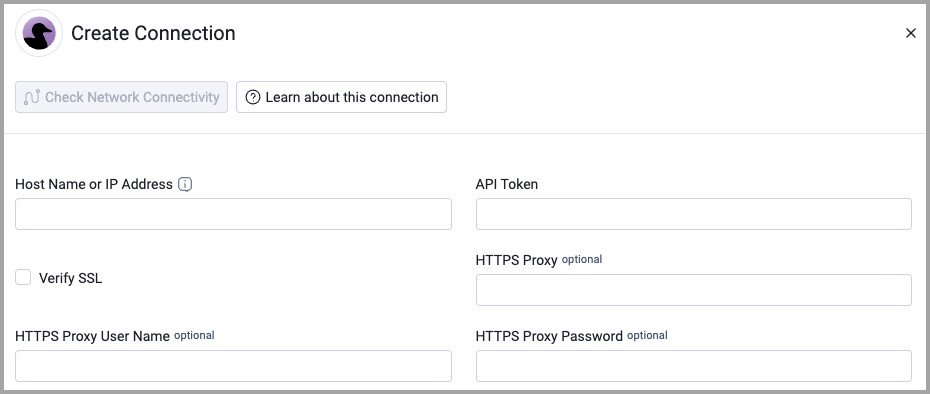
Optional Parameters
- Verify SSL - Select whether to verify the SSL certificate of the server against the CA database inside of Axonius. For more details, see SSL Trust & CA Settings.
- HTTPS Proxy - Connect the adapter to a proxy instead of directly connecting it to the domain.
- HTTPS Proxy User Name - The user name to use when connecting to the value supplied in Host Name or IP Address via the value supplied in HTTPS Proxy.
- HTTPS Proxy Password - The password to use when connecting to the server using the HTTPS Proxy.
To learn more about common adapter connection parameters and buttons, see Adding a New Adapter Connection.
Updated about 2 months ago