
Threat Connect
Threat Connect is a threat intelligence operations platform that provides ingestion, enrichment, automation, orchestration, and cyber risk quantification in a unified workflow.
Asset Types Fetched
This adapter doesn't fetch any assets as it only enriches data for existing CVEs.
Use Cases the Adapter Solves
Use the Threat Connect adapter in Axonius queries to find devices with specific CVEs such as:
- Devices with a specific CVE
- Devices with high CVSS scores
- Devices with CISA KEV vulnerabilities (Aggregated Security Findings in Axonius)
- Devices with vulnerabilities requiring immediate action
Data Retrieved by the Adapter
Data enriched for Aggregated Security Findings includes fields such as CVE Description, CVE Synopsis, CISA Known Exploited Vulnerabilities: Product, CISA Known Exploited Vulnerabilities: Date Added to Catalog, CVSS V2 Vector, and more.
Before You Begin
Authentication Methods
The Threat Connect adapter supports two authentication methods:
- API Token - Uses a TC-Token header for authentication
- HMAC (Access ID and Secret Key) - Uses HMAC-SHA256 signed requests
Note
The API Token method is recommended for simplicity. HMAC authentication provides additional security through request signing.
APIs
Axonius uses the Threat Connect Rest API. The following endpoint is called:
GET /v3/groups- Retrieves vulnerability groups with unified view data. Refer to the API docs for more information.
Permissions
The following permissions are required for the Threat Connect API user for both authentication methods:
- The API user must have a System role of Api User or Exchange Admin.
- A user an Api User role can access all ThreatConnect v2 and v3 API endpoints, with the exception of the v3 API TC Exchange™ administration endpoints.
- A user with an Exchange Admin role can use all ThreatConnect v2 and v3 API endpoints, including the v3 API TC Exchange administration endpoints.
- The API user must have read access to Vulnerability Groups in the Organization.
- The API user can have any Organization role (Standard User, Sharing User, Organization Administrator, or App Developer) as long as they have read access to the Vulnerability Groups.
For more information on Threat Connect user roles and permissions, refer to the Threat Connect documentation on Managing User Accounts and Threat Connect System Roles and Permissions.
Connecting the Adapter in Axonius
- Navigate to the Adapters page, search for Threat Connect, and click on the adapter tile.
- Click Add Connection.
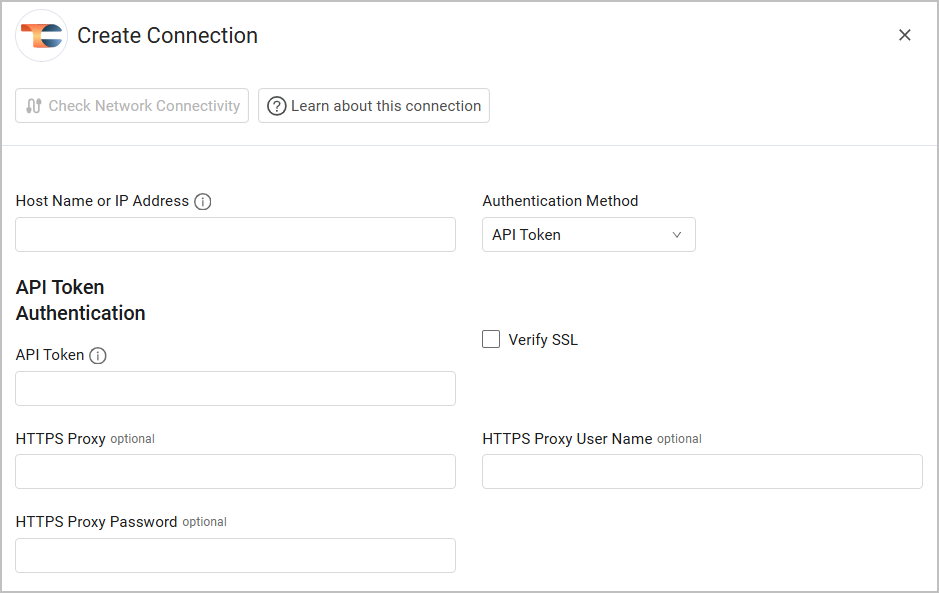
- To connect the adapter in Axonius, provide the following parameters:
Required Parameters
-
Host Name or IP Address - the base URL of your Threat Connect instance. Example:
https://app.threatconnect.comorhttps://companyabc.threatconnect.com -
Authentication Method - Select between API Token (default, recommended) or Access ID and Secret Key (HMAC).
Required parameters for API Token Authentication:
- API Token - To generate a token, in Threat Connect, go to Organization Settings > API User Administration. See more detailed instructions in the Threat Connect documentation.
Required parameters for HMAC Authentication:
-
Access ID - The Access ID of your API user account.
-
Secret Key - The Secret Key used to sign API requests with HMAC-SHA256.
See more detailed instructions in the Threat Connect documentation.
Optional Parameters
- Verify SSL - Select whether to verify the SSL certificate of the server against the CA database inside of Axonius. For more details, see SSL Trust & CA Settings.
- HTTPS Proxy - Connect the adapter to a proxy instead of directly connecting it to the domain.
- HTTPS Proxy User Name - The user name to use when connecting via the HTTPS Proxy.
- HTTPS Proxy Password - The password to use when connecting to the server using the HTTPS Proxy.
To learn more about common adapter connection parameters and buttons, see Adding a New Adapter Connection.
Updated 15 days ago