
Element Security
Element Security is a platform that provides continuous threat-exposure management to discover internet-facing assets, validate exploitable exposures, and guide remediation of risks.
The Element Security adapter enables Axonius to fetch and catalog internet-facing assets, providing visibility into their exposure status and associated security risks.
Asset Types Fetched
- Devices, Aggregated Security Findings, SaaS Applications, Domains & URLs, Object Storage, Certificates
Data Retrieved through the Adapter
- Assets and Devices - IP addresses, hostnames, device status, and technologies.
- Web Infrastructure - Domains, subdomains, and base URLs.
- Certificates - Certificate names, creation dates, and status.
- Cloud Resources - Cloud storage objects (buckets), descriptions, and status.
- Security Alerts - Security Findings including Severity, CVSS scores, remediation steps, and alert descriptions.
Before You Begin
Required Ports
- TCP port 443 (HTTPS)
Authentication Methods
Axonius uses an API key that is sent as a Bearer Token in the authorization header of API requests.
Required Permissions
The account generating the API key must have permission to view assets and alerts within the Element Security console.
APIs
Axonius uses the Element Security API to retrieve asset data.
Note
Public documentation for the Element Security API may not be available. Please contact Element Security support for specific API details.
Generating the API Key
- Log in to the Element Security console.
- Navigate to the Settings or Integrations menu (specific location may vary).
- Generate a new API Key (Bearer Token) and copy it for use in the Axonius configuration.
Supported from Version
This adapter is supported from Axonius version 8.0.5.
Connection Parameters
To connect the adapter in Axonius, provide the following parameters.
Required Parameters
-
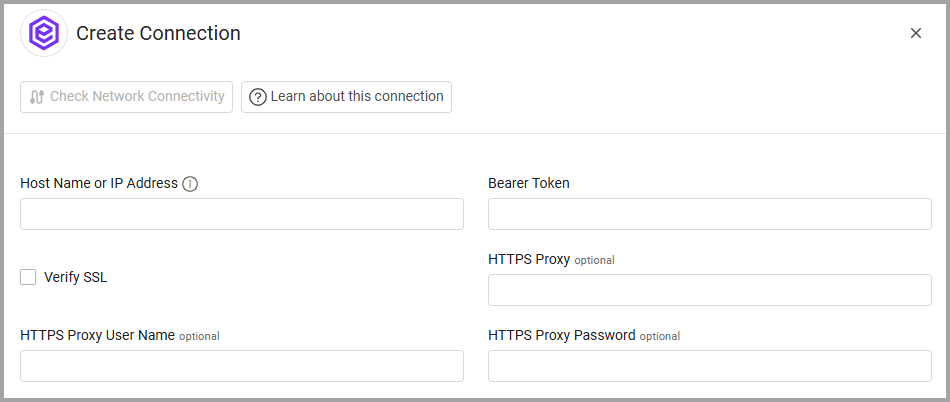
Host Name or IP Address - Enter the hostname or IP address of the Element Security instance that Axonius can communicate with via the Required Ports.
-
Bearer Token - Enter the Bearer Token generated from the Element Security console.
Optional Parameters
-
Verify SSL - Select whether to verify the SSL certificate of the server against the CA database inside of Axonius. For more details, see SSL Trust & CA Settings.
-
HTTPS Proxy - Enter an HTTPS proxy address to connect the adapter to a proxy instead of directly connecting it to the domain.
-
HTTPS Proxy User Name - Enter the user name to use when connecting to the value supplied in Host Name or IP Address via the value supplied in HTTPS Proxy.
-
HTTPS Proxy Password - Enter the password to use when connecting to the server using the HTTPS Proxy.
To learn about additional optional/common adapter connection parameters, see Adding a New Adapter Connection.
Updated 1 day ago