
Delinea Server Suite
Delinea Server Suite is an IT management solution that provides access control, privilege management, and auditing services for managing Windows, Linux, and UNIX systems.
The Delinea Server Suite adapter enables Axonius to fetch and catalog devices and their zone memberships, ensuring comprehensive visibility into your privileged access management and server infrastructure.
Asset Types Fetched
- Devices
- Groups
Data Retrieved through the Adapter
- Devices - Hostname, computer name, and associated zone memberships.
- Groups - Delinea Zones cataloged as user groups.
Before You Begin
Required Ports
- TCP port 5986 (WinRM over HTTPS)
Authentication Methods
- Windows Authentication (via WinRM)
Required Permissions
The user account used for the connection must meet the following requirements:
- Domain User - The account must be a valid Active Directory Domain User.
- Read Access - The account must have Read permissions delegated on the Delinea/Centrify Zone and Computer objects stored in Active Directory.
- PowerShell Execution - The account must have permissions to execute PowerShell scripts on the host machine defined in the connection settings.
Required Software
The server Axonius connects to (target host) must have the Delinea PowerShell Access Module (Centrify.DirectControl.PowerShell) installed and accessible.
APIs
Axonius uses the Delinea Server Suite PowerShell module to retrieve asset data.
The adapter uses the following PowerShell cmdlets:
Set-CdmCredential- Establishes the Centrify AD session with explicit credentialsGet-CdmManagedComputer- Retrieves managed devicesGet-CdmGroup- Retrieves Delinea zones (groups)
Supported from Version
This adapter is supported from Axonius version 8.0.7.
Connection Parameters
To connect the adapter in Axonius, provide the following parameters.
Required Parameters
- Host Name or IP Address - Enter the hostname or IP address of the server where the Delinea PowerShell module is installed (for example:
delinea-mgmt.corp.local). - Port - Enter the WinRM port (default: 5986).
- User Name and Password - Enter the credentials for the domain account.
- Active Directory Domain - Enter the Active Directory domain name to use with a PowerShell script for this adapter.
- JEA Configuration Name (default:
Microsoft.PowerShell) - Keep the default or enter a different Just Enough Administration (JEA) configuration name to use for the PowerShell session.
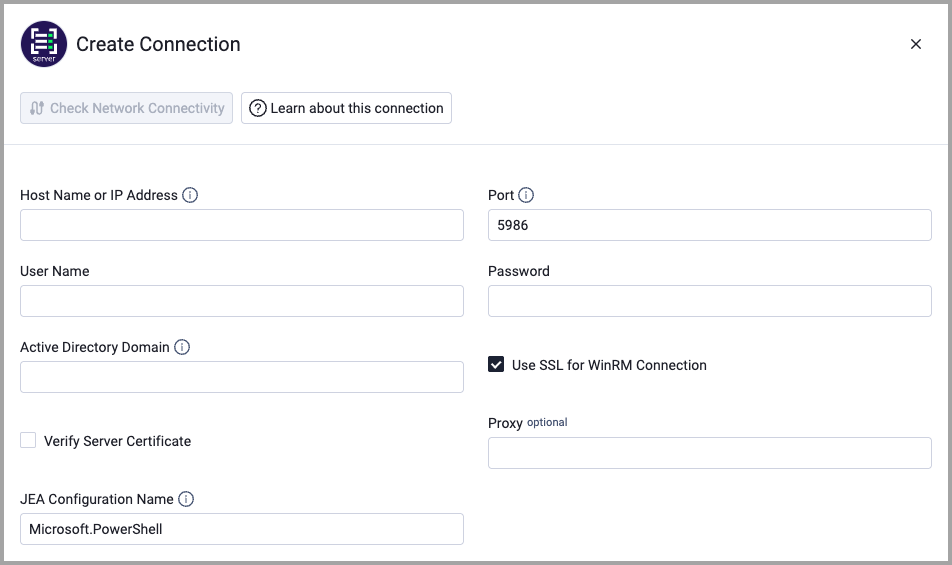
Optional Parameters
- Use SSL for WinRM Connection (default: true) - Select whether to encrypt the WinRM connection using SSL.
- Verify Server Certificate (default: false ) - Select whether to verify the SSL certificate of the server against the CA database inside of Axonius. For more details, see SSL Trust & CA Settings.
- Proxy (default: false) - Enter a proxy address to connect the adapter to a proxy instead of directly connecting it to the domain.
To learn about additional optional/common adapter connection parameters, see Adding a New Adapter Connection.
Updated 19 days ago