
CrowdStrike Falcon - Add Network to Network Scanner
CrowdStrike Falcon - Add Network to Network Scanner creates CrowdStrike Falcon network scan networks from configured CIDR ranges or the private IPv4 addresses of selected assets. It supports manual scanner assignment or zone-based scanner assignment and skips subnets that already exist in CrowdStrike Falcon.
- Assets returned by the selected query or assets selected on the relevant asset page.
See Creating Enforcement Sets to learn more about adding Enforcement Actions to Enforcement Sets.
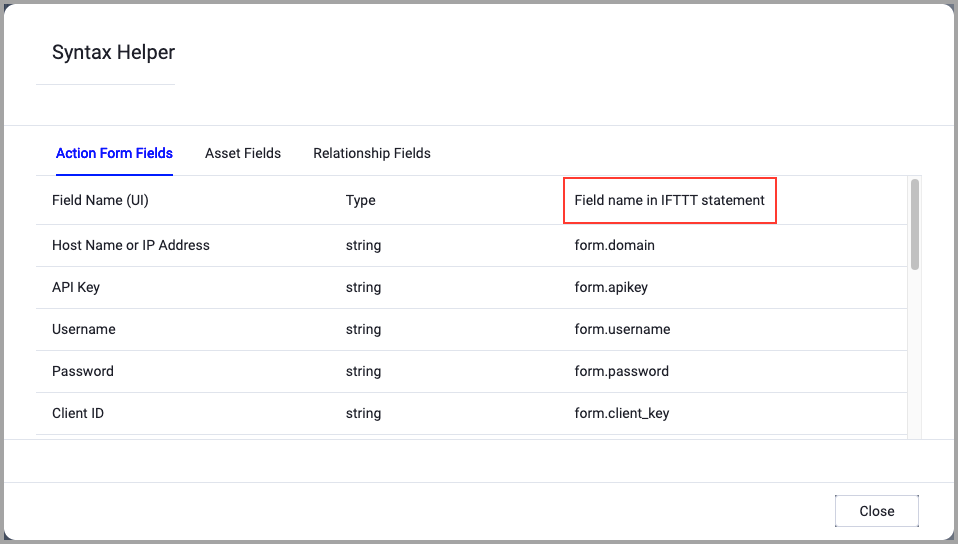
When accessing an enforcement action using the API, you must use the backend form of field names.
Use the Syntax Helper to find the correct name. In the enforcement action, enable Configure Dynamic Values and select Syntax Helper.
Note
- Not all asset types are supported for all Enforcement Actions.
- See Actions supported for Activity Logs, Adapters Fetch History, and Asset Investigation modules.
- See Actions supported for Aggregated Security Findings.
- See Actions supported for Software.
Required Fields
These fields must be configured to run the Enforcement Action.
- Action name - The name of this Enforcement Action. The system sets a default name. You can change the name.
- Configure Dynamic Values (optional) - Toggle on to enter a Dynamic Value statement. See Creating Enforcement Action Dynamic Value Statements to learn more about Dynamic Value statement syntax.
- CrowdStrike adapter connection - Select the stored CrowdStrike Falcon adapter connection to use. This action does not accept inline credentials.
- Network Name - Enter the name prefix for the network scan networks. The action creates one network per CIDR and names it
<Network Name> - <CIDR>. - CIDR Source - Select From Configuration (Static List) to supply CIDR ranges, or From Assets (IP Addresses) to derive ranges from the selected assets' private IPv4 addresses.
- Zone ID - Enter the CrowdStrike Falcon zone ID to assign to each network.
- CIDR Ranges - Required when CIDR Source is From Configuration (Static List). Enter one or more CIDR ranges.
When you select this option, the Select Adapter Connection drop-down becomes available. Select the adapter connection to use for this Enforcement Action.
Additional Fields
These fields are optional.
- Subnet Prefix Length - Available when CIDR Source is From Assets (IP Addresses). Sets the network size for each private IPv4 address. The default is
24; supported values are16through32. - Scanner IDs - Enter scanner IDs to assign scanners manually. If you leave this field empty, CrowdStrike Falcon uses the scanners assigned to the specified zone.
When you select From Assets (IP Addresses), the action creates a network for each distinct private IPv4 address range found on the selected assets' network interfaces. It excludes public, loopback, link-local, and IPv6 addresses.
Connection Settings
Connection and CredentialsWhen Use stored credentials from the adapter is toggled off, some of the connection fields below are required to create the connection, while other fields are optional.
- Select a stored CrowdStrike Falcon adapter connection. This action does not accept inline credentials.
Gateway Name - Select the Gateway through which to connect to perform the action.
APIs
Axonius uses the CrowdStrike Falcon Network Scanning API:
GET /netscan/queries/networks/v1to retrieve existing network IDs.GET /netscan/entities/networks/v1to retrieve existing network details.POST /netscan/entities/networks/v1to create network scan networks.
Required Ports
Axonius must be able to communicate via the following ports:
- TCP port 443 (HTTPS) — confirm the exact port with your CrowdStrike Falcon administrator.
Required Permissions
The stored credentials, or those provided in Connection and Credentials, must have the following permission(s) to perform this Enforcement Action:
The following permissions and requirements are needed:
- Network Scanning: Read - Allows the action to retrieve existing CrowdStrike Falcon network scan networks and avoid creating duplicate subnets.
- Network Scanning: Write - Allows the action to create CrowdStrike Falcon network scan networks.
- Select a stored CrowdStrike Falcon adapter connection; the action uses that connection and does not accept inline credentials.
Note: Confirm the exact permission names and scopes with your CrowdStrike Falcon administrator or CrowdStrike Falcon API documentation.
To learn more about Enforcement Actions, see Enforcement Actions.
Updated 8 days ago