
Abion
Abion is a cybersecurity platform that offers solutions for managing and securing digital assets, including DNS zones, domains, and organizational management.
Use Cases the Adapter Solves
- DNS Infrastructure Visibility: Discover and track all DNS zones and domains managed through Abion to ensure complete visibility of your DNS infrastructure and identify shadow DNS assets.
- Domain Lifecycle Management: Monitor domain expiry dates, renewal status, and transfer dates to prevent service disruptions and ensure timely renewals.
Asset Types Fetched
- Domains & URLs, Organizational Units
Data Retrieved through the Adapter
The data retrieved through the adapter includes
Domains & URLs - Fields such as DNS zones and domains, organization information, DNS type, Record type, hosts, contacts
Organizational Units - Fields such as Organisation name, description, Parent organisation ID
Before You Begin
Required Ports
- TCP port 443 (HTTPS)
Authentication Methods
API Key Authentication
APIs
Axonius uses the Abion Core API v1. The following endpoints are called:
GET /v1/zones- Fetches DNS zonesGET /v1/zones/{id}- Fetches DNS records for a specific zoneGET /v1/domains- Fetches domain informationGET /v1/organisations- Fetches organizational units
Required Permissions
To create and manage API key users, your account must have both User Admin and API Admin roles.
The API user must be set with the following roles:
- API User
- Order View
- Certificate Admin View
- DNS Admin View
- Domain Admin View
Note: The exact permission names should be confirmed with your Abion administrator or Abion support, as detailed API documentation may require customer access.
Supported From Version
Supported from Axonius version 8.0.21
Connecting the Adapter in Axonius
Navigate to the Adapters page, search for Abion, and click on the adapter tile.
Click Add Connection.
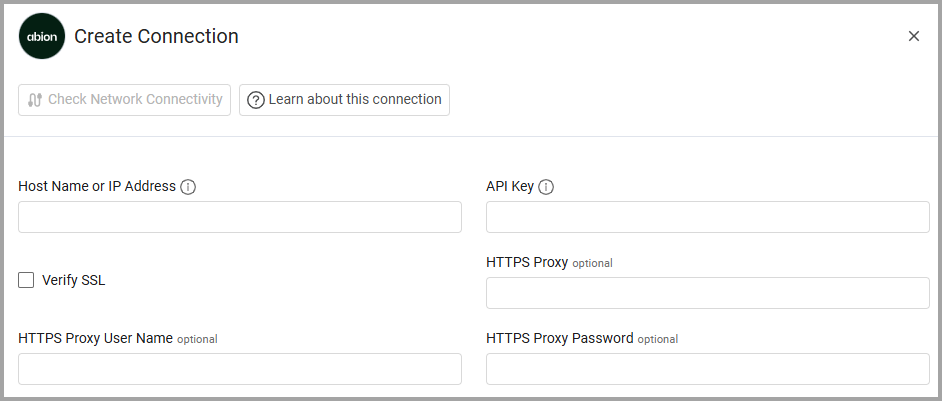
To connect the adapter in Axonius, provide the following parameters:
Required Parameters
- Host Name or IP Address - Base URL of the Abion API. Example:
https://api.abion.com - API Key - The API key generated from your Abion account. This is sent as the
X-API-KEYrequest header.
Optional Parameters
- Verify SSL - Select whether to verify the SSL certificate of the server against the CA database inside of Axonius. For more details, see SSL Trust & CA Settings.
- HTTPS Proxy - Connect the adapter to a proxy instead of directly connecting it to the domain.
- HTTPS Proxy User Name - The user name to use when connecting to the value supplied in Host Name or IP Address via the value supplied in HTTPS Proxy.
- HTTPS Proxy Password - The password to use when connecting to the server using the HTTPS Proxy.
To learn more about common adapter connection parameters and buttons, see Adding a New Adapter Connection.
Updated 20 days ago