
Ubiquiti Networks UniFi Cloud Controller
The UniFi Cloud Controller is a wireless network management software solution for managing multiple wireless networks using a web browser via the Cloud.
Types of Assets Fetched
This adapter fetches the following types of assets:
- Devices
Parameters
-
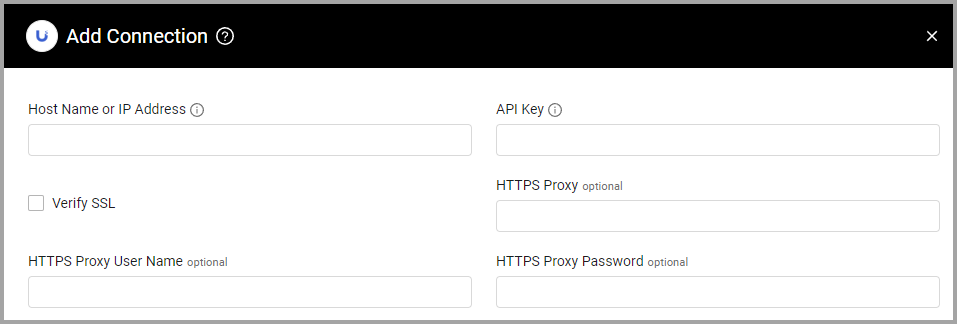
Host Name or IP Address (required) - The hostname or IP address of the UniFi Cloud Controller server that Axonius can communicate with via the Required Ports.
-
API Key (required) - An API Key associated with a user account that has permissions to fetch assets. For information about how to obtain the API Key, see Getting Started.
-
Verify SSL - Select whether to verify the SSL certificate of the server against the CA database inside of Axonius. For more details, see SSL Trust & CA Settings.
-
HTTPS Proxy (optional) - Connect the adapter to a proxy instead of directly connecting it to the domain.
-
HTTPS Proxy User Name (optional) - The user name to use when connecting to the value supplied in Host Name or IP Address via the value supplied in HTTPS Proxy.
-
HTTPS Proxy Password (optional) - The password to use when connecting to the server using the HTTPS Proxy.
To learn more about common adapter connection parameters and buttons, see Adding a New Adapter Connection.
APIs
Axonius uses the UniFi API.
The following endpoints are called:
GET /ea/hostsGET /ea/devicesGET /ea/sitesGET /v1/connector/consoles/{host_id}/proxy/network/integration/v1/sites(only if Fetch Devices of sub-type client from Clients is enabled)GET /v1/connector/consoles/{host_id}/proxy/network/integration/v1/sites/{site_id}/clients(only if Fetch Devices of sub-type client from Clients is enabled)
Required Ports
Axonius must be able to communicate with the value supplied in Host Name or IP Address via the following ports:
- TCP port 443
Advanced Settings
Note:
- Advanced settings can apply to either all connections of this adapter, or to a specific connection. For more detailed information, see Advanced Configuration for Adapters.
- For more general information about advanced settings, see Adapter Advanced Settings.
- Fetch adopted network devices as their own assets (default: disabled) - Select this option to fetch each network device adopted by a UniFi console (such as a switch, access point, or gateway) as its own Device asset.
- Fetch Devices of sub-type client from Clients (default: disabled) - Select this option to fetch the clients connected to UniFi sites as Device assets. Only clients that are connected when the fetch runs are fetched.
Supported From Version
Supported from Axonius version 6.1.38.2
Updated 7 days ago