
Tanium Comply
Tanium Comply conducts vulnerability and compliance assessments against operating systems, applications, security configurations, and policies.
Asset Types Fetched
- Devices, Aggregated Security Findings, Software, SaaS Applications
Before You Begin
APIs
Axonius uses Tanium Gateway.
Required Ports
- TCP port 80/443
Required Permissions
- ReadOnly permissions
Connecting the Adapter in Axonius
Required Parameters
-
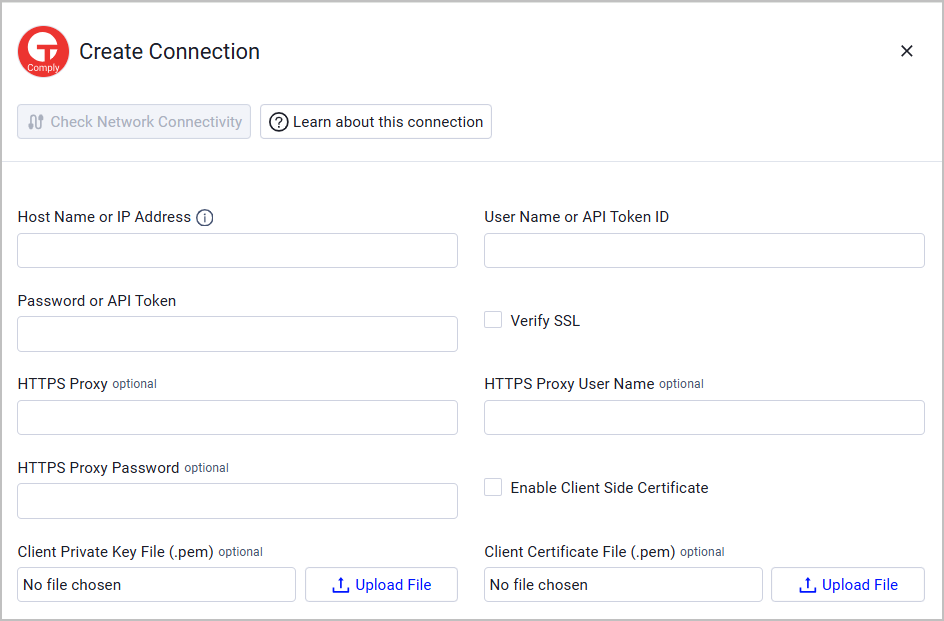
Host Name or IP Address (required) - The hostname or IP address of the Tanium Comply server that Axonius can communicate with via the Required Ports.
-
User Name or API Token ID - The credentials for a user account that has the Required Permissions to fetch assets. If an API token is being used for authentication, this must be the ID of the API token. The Token ID column in Tanium may be hidden.
-
Password or API Token - The credentials for a user account that has the Required Permissions to fetch assets. If an API token is being used for authentication, this must be the API token string.
More information on API Tokens
- When connecting to a Tanium Cloud instance, an API token must be used.
- When creating an API token in Tanium, the default value for "Expire in Days" is 7. It is recommended to set this value to the maximum allowed value of 365.
- See the Tanium Documentation on Managing API tokens for more information.
Optional Parameters
-
Enable Client Side Certificate - Check this option to authenticate to Tanium servers using client certificates, meeting advanced security requirements for organizations that enforce mutual TLS authentication. When this is enabled, provide the following:
- Client Private Key File (.pem) - Upload the client private key file in PEM format.
- Client Certificate File (.pem) - Upload the client certificate file in PEM format.
Notes
- Certificates are securely stored in Axonius and used only for authenticating to Tanium servers.
- The system validates the certificates while establishing the connection to prevent misconfiguration. If the certificate and private key do not match, or missing, or parsed incorrectly, you will receive an appropriate error message.
-
Verify SSL - Select whether to verify the SSL certificate of the server against the CA database inside of Axonius. For more details, see SSL Trust & CA Settings.
-
HTTPS Proxy (optional) - Connect the adapter to a proxy instead of directly connecting it to the domain.
-
HTTPS Proxy User Name (optional) - The user name to use when connecting to the value supplied in Host Name or IP Address via the value supplied in HTTPS Proxy.
-
HTTPS Proxy Password (optional) - The password to use when connecting to the server using the HTTPS Proxy.
To learn more about common adapter connection parameters and buttons, see Adding a New Adapter Connection.
Advanced Settings
Note
Advanced settings can either apply to all connections for this adapter, or to a specific connection. Refer to Advanced Configuration for Adapters.
- Fetch installed software - Select this option to fetch installed software.
- Fetch driver details - Select this option to fetch driver details.
- Fetch custom tags - Select to fetch custom tags assigned to devices in Tanium Comply.
- Fetch open ports from the "Listen Ports" sensor - Select this option to fetch Local Port values from the Listen Ports sensor and add them to Devices' open-port data.
- Fetch discover data (e.g., open ports) - Select this option to pull a list of open ports from Tanium's Discover module and parse it into the device's Open Ports field.
- Fetch vulnerabilities last seen in the last X days (optional) - Enter the number of days back to fetch vulnerabilities (Aggregated Security Findings). When set, the adapter fetches only vulnerabilities that were last found within the specified time period. When left blank, all vulnerabilities are fetched.
- Fetch only endpoints seen in the last X days - Select this option to limit fetch to endpoints seen by Tanium during the specified number of days, and exclude their older endpoint records and findings. Use this setting when you want to exclude stale Tanium endpoints and their findings from collection. If you enter 0, the filter is not applied.
- Fetch extended CVE fields from the Gateway (default: disabled) - Select this option to fetch more CVE data from the Tanium Gateway: the CVSS v3 severity, the CVSS v3 temporal score, and the CISA KEV details. This option requires a Tanium Gateway schema from December 2025 or later. On an older Gateway, the fetch shows a warning and continues without these fields.
- Fetch CVE metadata from the Comply REST API (on-prem only) (default: disabled) - Select this option to fetch the full CVE metadata from the Comply REST API of a Tanium on-prem server. This option is not available on Tanium Cloud. The user of the API token must have the Comply Report Reviewer role, and the Axonius IP address must be in the Trusted IPs list of the API token. If the API does not respond, the fetch shows a warning with the cause and continues with the Gateway fields only.
When both options are cleared, the fetch and the Security Finding data do not change. When the Gateway and the Comply REST API both return a value for the same field, Axonius uses the Comply REST API value.
Security Finding fields filled by these options
Existing Security Finding fields that the new data fills: CVSS V2 Score, CVSS V3 Score, CVSS V4 Score (and their Score String fields), CVSS V3 Vector, EPSS (CVE ID, Score, Percentile, and Severity), CWE ID, Has CISA KEV Exploit, and Vulnerability Remediation (the remediation text and the solution link).
New Tanium fields in each Security Finding:
- Tanium MITRE ATT&CK Techniques - A table with ID, Name, Domain, and Date Added.
- Tanium Exploits - A table with Name, Type, Maturity, Availability, Source, and Date Added.
- Tanium Ransomware - A table with Name and Date Added.
- Tanium Botnets - A table with Name and Date Added.
- Tanium CISA KEV - Vendor, Product, Vulnerability Name, Short Description, Required Action, Notes, Date Added, and Due Date.
- Tanium Max Maturity, Tanium Detection Criteria, Tanium Affected Products, Tanium CVE References, Tanium CVSS V2 Vector, Tanium CVSS V4 Vector, and Tanium CVSS V3 Temporal Score.
A field that Tanium returns with no value is not added. CVE Severity still comes from the Gateway CVSS v2 severity. If that value is not a valid severity (for example, when the CVE is unscored), Axonius uses the CVSS v3 severity, and then the severity from the Comply REST API.
Note
To learn more about Adapter Configuration tab advanced settings, see Adapter Advanced Settings.
Version Matrix
This adapter was only tested with the versions marked as supported, but may work with other versions. Contact Axonius Support if you have a version that is not listed, which is not functioning as expected.
| Version | Supported | Notes |
|---|---|---|
| Tanium Comply V2.11 | Yes | -- |
Note
Some Tanium data may only be available with certain versions of Tanium and Tanium API.
Supported From Version
Supported from Axonius version 5.0
Updated 7 days ago