
Red Hat OpenShift Container
Red Hat OpenShift is a Kubernetes container platform that allows developers and operators to manage cloud-native applications throughout the DevOps cycle, for any cloud.
Use Cases the Adapter Solves
Connecting Axonius to Red Hat OpenShift enables you to:
- Discover Container Infrastructure - Identify all OpenShift nodes, pods, and containers running in your environment to maintain complete visibility into your containerized workloads
- Track Container Deployments - Monitor which applications are deployed as containers and correlate them with traditional infrastructure to understand your hybrid environment
Asset Types Fetched
This adapter fetches the following types of assets:
- Devices, Containers, Compute Images, Users, Network Services, Compute Services, Organizational Units
Data Retrieved through the Adapter
The following data can be fetched by the adapter:
Devices (Nodes) - Fields such as Node names, IP addresses, operating system information, Kubernetes version, container runtime details
Containers (Pods) - Fields such as Pod names, namespaces, labels, annotations, Container images
Before You Begin
Required Ports
Axonius must be able to communicate with the value supplied in Host Name or IP Address via the following ports:
- TCP port 443 (HTTPS) - OpenShift API Server
- TCP port 6443 (HTTPS) - Kubernetes API Server (alternative port for some deployments)
Authentication Methods
- API Token Authentication
API Endpoints Used
Axonius uses the Red Hat OpenShift Container Platform API. The adapter makes the following API calls to the OpenShift/Kubernetes API:
| Endpoint | Method | Purpose |
|---|---|---|
GET /api/v1/nodes | GET | Fetch all cluster nodes (devices) |
GET /api/v1/pods | GET | Fetch all pods across all namespaces (containers) |
GET /api/v1/namespaces | GET | Fetch namespaces (Organizational Units). Requires Fetch Namespaces. |
GET /api/v1/services | GET | Fetch services (Network Services). Requires Fetch Services. |
GET /api/v1/serviceaccounts | GET | Fetch service accounts (Users). Requires Fetch Service Accounts. |
GET /apis/apps/v1/deployments | GET | Fetch deployments (Compute Services). Requires Fetch Deployments. |
GET /apis/route.openshift.io/v1/routes | GET | Fetch routes (Network Services). Requires Fetch Routes. |
GET /apis/config.openshift.io/v1/infrastructures | GET | Fetch cluster infrastructure (Compute Services). Requires Fetch Cluster Infrastructure. |
Note: Pod fetching can be disabled via the "Include Pods in Device Data" advanced setting.
Required Permissions
The API Token must be associated with a service account that has the following permissions:
Required Kubernetes Resources and Verbs
The adapter requires read-only access to the following Kubernetes resources:
| Resource | API Group | Required Verbs | Purpose |
|---|---|---|---|
| nodes | "" (core) | get, list | Discover and fetch node information (infrastructure devices) |
| pods | "" (core) | get, list | Discover and fetch pod information (containers running on nodes) |
| namespaces | "" (core) | get, list | Fetch namespaces. Required only when Fetch Namespaces is selected. |
| services | "" (core) | get, list | Fetch services. Required only when Fetch Services is selected. |
| serviceaccounts | "" (core) | get, list | Fetch service accounts. Required only when Fetch Service Accounts is selected. |
| deployments | apps | get, list | Fetch deployments. Required only when Fetch Deployments is selected. |
| routes | route.openshift.io | get, list | Fetch routes. Required only when Fetch Routes is selected. |
| infrastructures | config.openshift.io | get, list | Fetch cluster infrastructure. Required only when Fetch Cluster Infrastructure is selected. |
If the configured account cannot access one of these optional resources, the adapter skips that data source and continues fetching the others.
What the Adapter Does NOT Require:
- ❌
watchverb (no real-time monitoring) - ❌
create,update,delete,patchverbs (read-only integration) - ❌ Access to
secrets,configmaps, or other sensitive resources - ❌ Access to
replicasetsor other workload resources - ❌ Namespace-specific permissions (uses cluster-wide access)
Note
These permissions can be granted using a ClusterRole with
get,list, andwatchverbs for the resources listed above. For instructions on creating a service account and generating an API token, see Setting Up OpenShift to Work with Axonius.
Supported From Version
Supported from Axonius version 4.5
Setting Up OpenShift to Work with Axonius
Recommended Approach: Custom ClusterRole (Least Privilege)
Instead of using the broad cluster-reader role, we recommend creating a custom ClusterRole with only the minimum necessary permissions.
Step 1: Create Custom ClusterRole
apiVersion: rbac.authorization.k8s.io/v1
kind: ClusterRole
metadata:
  name: axonius-openshift-reader
rules:
- apiGroups: [""]
  resources:
    - nodes
    - pods
    - namespaces
    - services
    - serviceaccounts
  verbs:
    - get
    - list
- apiGroups: ["apps"]
  resources:
    - deployments
  verbs:
    - get
    - list
- apiGroups: ["route.openshift.io"]
  resources:
    - routes
  verbs:
    - get
    - list
- apiGroups: ["config.openshift.io"]
  resources:
    - infrastructures
  verbs:
    - get
    - list
Include only the resources for the data sources you plan to fetch.
Step 2: Create Service Account
oc create serviceaccount axonius-sa -n defaultStep 3: Bind Custom Role to Service Account
oc create clusterrolebinding axonius-binding \
  --clusterrole=axonius-openshift-reader \
  --serviceaccount=default:axonius-sa
Step 4: Get API Token
# For OpenShift 4.11+
oc create token axonius-sa -n default --duration=8760h

# For older versions
oc serviceaccounts get-token axonius-sa -n default
Connecting the Adapter in Axonius
Navigate to the Adapters page, search for Red Hat OpenShift Container, and click on the adapter tile.
Click Add Connection.
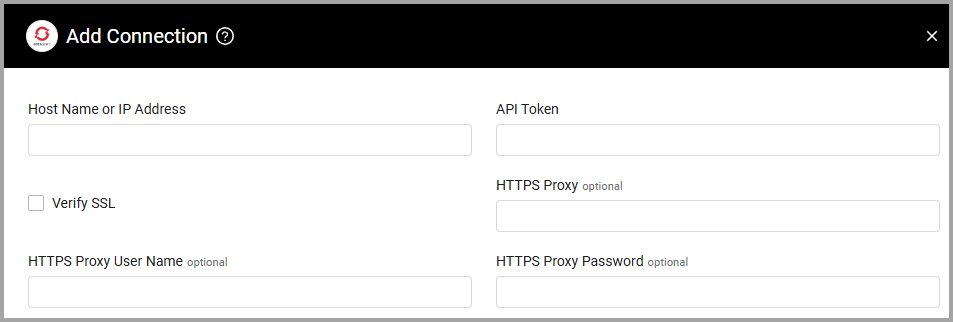
To connect the adapter in Axonius, provide the following parameters:
Required Parameters
-
Host Name or IP Address (required) - The hostname or IP address of the Red Hat OpenShift Container API server. Example:
https://api.openshift.example.com:6443 -
API Token (required) - An API Token associated with a service account that has the Required Permissions to fetch assets.
Optional Parameters
-
Verify SSL - Select whether to verify the SSL certificate of the server against the CA database inside of Axonius. For more details, see SSL Trust & CA Settings.
-
HTTPS Proxy (optional) - Connect the adapter to a proxy instead of directly connecting it to the domain.
-
HTTPS Proxy User Name (optional) - The user name to use when connecting to the value supplied in Host Name or IP Address via the value supplied in HTTPS Proxy.
-
HTTPS Proxy Password (optional) - The password to use when connecting to the server using the HTTPS Proxy.
To learn more about common adapter connection parameters and buttons, see Adding a New Adapter Connection.
Advanced Settings
Note
Advanced settings can either apply to all connections for this adapter, or to a specific connection. Refer to Advanced Configuration for Adapters.
- Include Pods in device data - Select this option to enrich devices (nodes) with their pods data. When enabled, each node will include detailed information about all pods running on that node.
- Fetch Namespaces (default: false) - Select this option to fetch namespaces from
api/v1/namespacesas Organizational Units assets. - Fetch Services (default: false) - Select this option to fetch services from
api/v1/servicesas Network Services assets. - Fetch Service Accounts (default: false) - Select this option to fetch service accounts from
api/v1/serviceaccountsas Users assets. Service accounts are identified as service accounts and use their namespace-qualified Kubernetes identity as the user name. - Fetch Deployments (default: false) - Select this option to fetch deployments from
apis/apps/v1/deploymentsas Compute Services assets. - Fetch Routes (default: false) - Select this option to fetch routes from
apis/route.openshift.io/v1/routesas Network Services assets. - Fetch Cluster Infrastructure (default: false) - Select this option to fetch cluster infrastructure from
apis/config.openshift.io/v1/infrastructuresas Compute Services assets.
Note
To learn more about Adapter Configuration tab advanced settings, see Adapter Advanced Settings.
Updated 7 days ago