
Cycode
Cycode is an application security posture management platform that provides static code analysis, secret detection, dependency scanning, CI/CD pipeline protection, and risk-based vulnerability prioritization across the software development lifecycle.
Use Cases the Adapter Solves
- Prioritize repository risk: Review repository findings and their severity, risk score, and status to focus remediation work.
- Track software supply-chain exposure: Identify repository findings from dependency scanning, static analysis, infrastructure-as-code scanning, and secret detection.
- Review access to the platform: Bring Cycode member details into Axonius to support access and account reviews.
Asset Types Fetched
- SaaS Applications
- Application Resources
- Users
- Aggregated Security Findings
Data Retrieved through the Adapter
Application Resources - fields such as: Application Resource ID, Repository URL, Parent, Source Application
Users - fields such as: Email, Display Name, Roles, MFA Enrolled
Aggregated Security Findings - fields such as: CVE ID, Vendor Severity, Vulnerability Status, Risk Rating
Before You Begin
Required Ports
- TCP port 443 (HTTPS)
Authentication Methods
The adapter uses API token authentication. It sends the configured API Token as a Bearer token in requests to the Cycode API.
APIs
Axonius uses the Cycode API. The following endpoints are called:
GET /v4/projects- Retrieves projects used to retrieve repository assets.GET /v4/projects/assets/paged- Retrieves repository assets for each project.GET /v4/violations- Retrieves violations associated with repositories.GET /v4/members- Retrieves members.
Required Permissions
You need a Service account with a read role on violations, projects and members (role names are tenant-defined; an empty projects list on the token grants tenant-wide access, otherwise only listed projects are visible)
Confirm the exact permissions required to access the API endpoints listed above with your Cycode administrator.
Supported From Version
Supported from Axonius version 10.0.2
Connecting the Adapter in Axonius
- Navigate to the Adapter Catalog, search for Cycode, and select the adapter.
- Click Add Connection.
- Provide the following parameters.
Required Parameters
- Host Name or IP Address - The base domain for the Cycode API. Use
https://api.cycode.comfor US tenants orhttps://api.eu.cycode.comfor EU tenants. Do not include a specific API endpoint. - API Token - The Cycode API token used to authenticate requests.
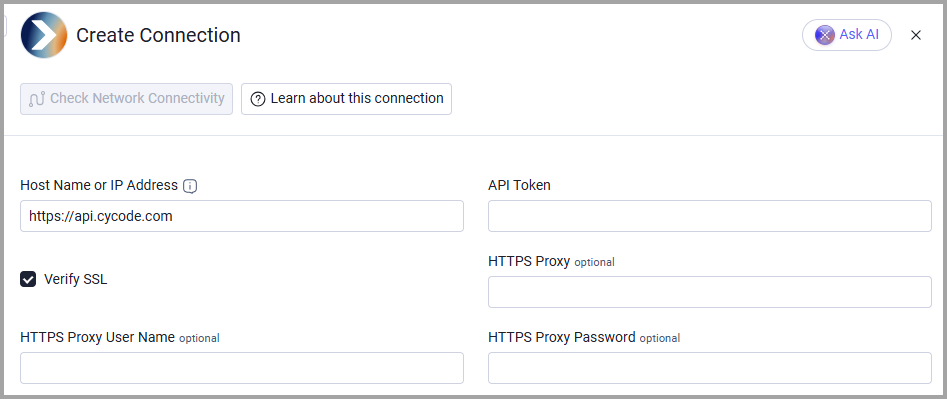
Optional Parameters
- Verify SSL - Select whether to verify the SSL certificate of the server against the CA database inside of Axonius. For more details, see SSL Trust & CA Settings.
- HTTPS Proxy - Connect the adapter to a proxy instead of directly connecting it to the value supplied in Host Name or IP Address.
- HTTPS Proxy User Name - The user name to use when connecting to the value supplied in Host Name or IP Address via the value supplied in HTTPS Proxy.
- HTTPS Proxy Password - The password to use when connecting to the server using the HTTPS Proxy.
To learn more about common adapter connection parameters and buttons, see Adding a New Adapter Connection.
Advanced Settings
Note:
Advanced settings can either apply to all connections for this adapter, or to a specific connection. Refer to Advanced Configuration for Adapters.
To learn more about Adapter Configuration tab advanced settings, see Adapter Advanced Settings.
- Fetch Violations With Status - Select the violation statuses to fetch. Leave this setting empty to fetch all statuses. The default is Open.
- Fetch Violations With Severity - Select the violation severities to fetch. Leave this setting empty to fetch all severities.
- Fetch Violations With Category - Select the violation categories to fetch. Leave this setting empty to fetch all categories.
Updated 6 days ago