
CrowdStrike Falcon LogScale
CrowdStrike Falcon LogScale is a log management and observability platform that provides high-performance streaming ingestion, indexing, and search of machine-generated log data.
Use Cases the Adapter Solves
- Improve asset visibility: Use LogScale query results to bring device and user records into Axonius.
- Review installed software: Associate software returned by LogScale queries with the matching device.
- Centralize query-based inventory: Use the same LogScale repository to collect inventory data over a selected query time window.
Asset Types Fetched
- Devices
- Users
- Software
- SaaS Applications
Data Retrieved through the Adapter
Devices - fields such as: Hostname, Device Name, Serial Number, Operating System
Users - fields such as: Username, Email Address, Display Name, Domain
Software - fields such as: Name, Version, Vendor, matching Hostname
Before You Begin
Required Ports
- TCP port 443 (HTTPS)
Authentication Methods
The adapter uses API token authentication
APIs
Axonius uses the CrowdStrike Falcon LogScale API. The following endpoints are called:
GET /graphql- Tests the connection by listing repositories.POST /api/v1/repositories/{repository}/queryjobs- Creates a query job for device, user, or software queries.GET /api/v1/repositories/{repository}/queryjobs/{job_id}- Retrieves query-job results.
Required Permissions
- A LogScale account with read/query access to the target repository or view
- An API token — Repository/View API Token scoped to the repositories being queried is recommended (least privilege). A Personal API Token works but is broader in scope.
- The token must have query (read) permission on the repository — ingest-only tokens will not work
- For GraphQL repository listing: the token must have at least read access at the organization or repository level
Confirm the exact permission name shown in your LogScale version with your CrowdStrike Falcon LogScale administrator.
Supported From Version
Supported from Axonius version 10.0.2
Setting Up CrowdStrike Falcon LogScale to Work with Axonius
- Obtain the base address for the CrowdStrike Falcon LogScale instance, including its
http://orhttps://prefix and without a trailing path. - Obtain an API token that can access the target repository and query-job API endpoints.
- Identify the repository that contains the data to query.
- Create HQL queries for devices, users, and, if needed, software. Software-query results must include a hostname that matches the hostname returned by a device query.
Connecting the Adapter in Axonius
- Navigate to the Adapter Catalog, search for CrowdStrike Falcon LogScale, and select the adapter.
- Click Add Connection.
- Provide the following parameters.
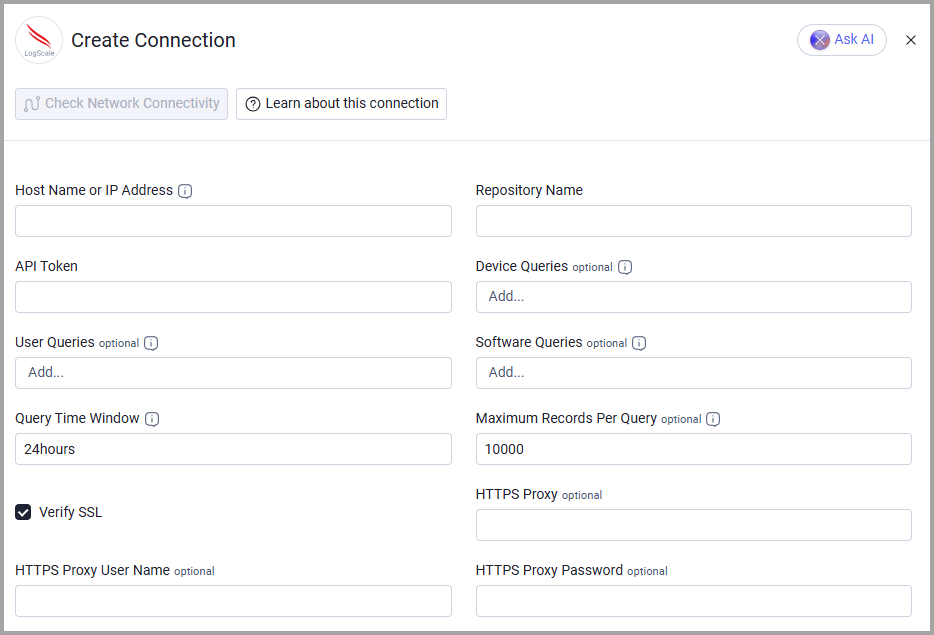
Required Parameters
- Host Name or IP Address - The base address of the CrowdStrike Falcon LogScale instance, including the
http://orhttps://prefix and without a trailing path. - Repository Name - The LogScale repository that contains the data to query. Example:
security-events - API Token - The API token used to authenticate LogScale API requests.
- Query Time Window - The start value sent with each query job. Example:
24hours
Optional Parameters
- Device Queries - HQL queries whose results become Axonius device records.
- User Queries - HQL queries whose results become Axonius user records.
- Software Queries - HQL queries whose results are associated with a device's installed software when hostnames match.
- Maximum Records Per Query - The maximum number of events read from each completed query job. The default is 10000.
- Verify SSL - Select whether to verify the SSL certificate of the server against the CA database inside of Axonius. For more details, see SSL Trust & CA Settings.
- HTTPS Proxy - Connect the adapter to a proxy instead of directly connecting to the value supplied in Host Name or IP Address.
- HTTPS Proxy User Name - The user name to use when connecting to the value supplied in Host Name or IP Address via the value supplied in HTTPS Proxy.
- HTTPS Proxy Password - The password to use when connecting to the server using the HTTPS Proxy.
To learn more about common adapter connection parameters and buttons, see Adding a New Adapter Connection.
Updated 5 days ago