
Cisco DCNM
Cisco Data Center Network Manager (DCNM) is a network management solution for next generation data centers.
Types of Assets Fetched
This adapter fetches the following types of assets:
- Devices, Network Devices
Parameters
-
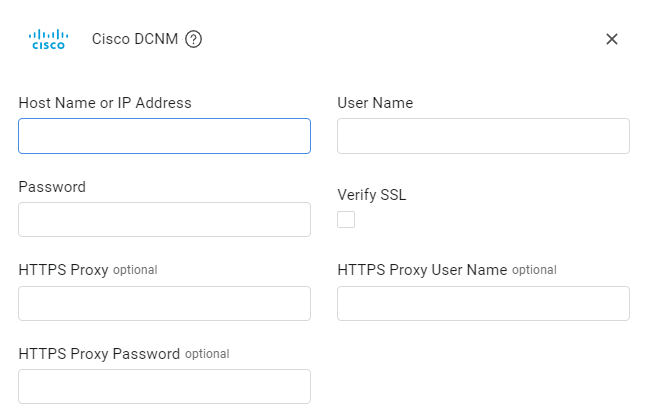
Host Name or IP Address (required) - The hostname or IP address of the Cisco DCNM server that Axonius can communicate with via the Required Ports.
-
User Name and Password (required) - The credentials for a user account that has the Required Permissions to fetch assets.
-
Verify SSL - Select whether to verify the SSL certificate of the server against the CA database inside of Axonius. For more details, see SSL Trust & CA Settings.
-
HTTPS Proxy (optional) - Connect the adapter to a proxy instead of directly connecting it to the domain.
-
HTTPS Proxy User Name (optional) - The user name to use when connecting to the value supplied in Host Name or IP Address via the value supplied in HTTPS Proxy.
-
HTTPS Proxy Password (optional) - The password to use when connecting to the server using the HTTPS Proxy.
-
Poll the switches discovered by Cisco DCNM (required, default: disabled) - Select this option to connect to each switch that Cisco DCNM discovers over SSH, with the switch credentials below, and create device assets from its ARP, MAC address, CDP, and LLDP tables. Polling a large number of switches is slow. Use Switch roles to poll and Fabrics to poll to split the switches across adapter connections. When this option is enabled, the following settings are displayed:
- Switch Connection Protocol (default: SSH) - The protocol used to poll the switches that Cisco DCNM manages.
- Switch User Name and Switch Password (required when polling is enabled) - The credentials of a user that the switches accept.
- Switch SSH Port (default: 22) - The SSH port of the switches.
- Create assets from ARP tables (default: enabled) - Select this option to create device assets from the ARP tables of the switches.
- Switch roles to poll (optional) - The switch roles to poll, for example
leaforborder. The values are not case sensitive. Leave empty to poll every role. - Fabrics to poll (optional) - The fabrics to poll. The values are not case sensitive. Leave empty to poll every fabric.
- Number of switches to poll in parallel (default: 10) - The number of switches to poll at the same time, from 1 to 20. Each switch opens several SSH sessions, so raise this value only if the switches and your TACACS or RADIUS server can handle the concurrent logins.
- SSH connect and login timeout (seconds) (default: 5) - How long to wait for the SSH connection and login of each switch, from 1 to 60 seconds. Before polling, up to 10 switches are tried one at a time until one accepts the login. Polling stops after 3 rejected logins, or when no switch accepts the login. A timeout counts as a failure, not as a rejected login.
Note:
The HTTPS Proxy settings apply only to the connection to Cisco DCNM. They do not apply to the SSH connections to the switches.
To learn more about common adapter connection parameters and buttons, see Adding a New Adapter Connection.
APIs
Axonius uses the Cisco DCNM REST API
Required Ports
Axonius must be able to communicate with the value supplied in Host Name or IP Address via the following ports:
- TCP port 443
If Poll the switches discovered by Cisco DCNM is enabled, Axonius must also be able to communicate with the switches that Cisco DCNM discovers via the port set in Switch SSH Port (by default, TCP port 22).
Required Permissions
The value supplied in User Name must have read permissions in order to fetch assets.
Supported From Version
Supported from Axonius version 5.0
Updated 7 days ago