
AKIPS
AKIPS is a secure on-prem, multi-vendor network-monitoring system for the enterprise market.
Use Cases the Adapter Solves
- Network Device Inventory Visibility: Automatically pull network devices monitored by AKIPS (routers, switches, interfaces) into the Axonius asset inventory, giving security and IT teams a complete, up-to-date view of network infrastructure without manual exports.
- Unified Asset Coverage Across Monitoring Tools: Correlate AKIPS-discovered network assets with data from other sources in Axonius to identify gaps — devices that appear in AKIPS but are missing from other management systems, or vice versa.
- Continuous Network Asset Hygiene: Use Axonius queries and enforcement actions against AKIPS data to detect unmanaged or out-of-compliance network devices, supporting audit readiness and reducing blind spots in network visibility.
Types of Assets Fetched
This adapter fetches the following types of assets:
- Devices
Data Retrieved through the Adapter
Devices - fields such as: Device Name, Hostname, Description, Physical Location, I
Before You Begin
Required Ports
- TCP port 80/443
Authentication Methods
AKIPS authenticates using a username and password associated with an AKIPS user account. The password is required; the username is optional and used when required by the AKIPS instance.
APIs
Axonius uses the AKIPS API reference guide. The following endpoint is called:
GET /api-db- Fetches device data by querying a specific attribute field. Called once per attribute to retrieve the full device inventory, including IPv4 address, IPv6 address, MAC address, device model, serial number, software version, physical location, hostname, description, and uptime.
Required Permissions
The value supplied in Password (and User Name when required by the AKIPS instance) must have Read permissions in order to fetch assets.
Supported From Version
Supported from Axonius version 5.0
Connecting the Adapter in Axonius
- Navigate to the Adapter Catalog, search for AKIPS, and select the adapter.
- Click Add Connection.
- Provide the following parameters.
Required Parameters
-
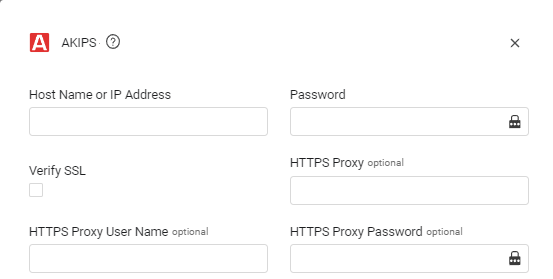
Host Name or IP Address - The hostname or IP address of the AKIPS server that Axonius can communicate with via the Required Ports.
-
Password - The password for a user account that has the Required Permissions to fetch assets.
-
Verify SSL - Select whether to verify the SSL certificate of the server against the CA database inside of Axonius. For more details, see SSL Trust & CA Settings.
Optional Parameters
-
User Name - The user name for a user account that has the Required Permissions to fetch assets.
-
HTTPS Proxy - Connect the adapter to a proxy instead of directly connecting it to the domain.
-
HTTPS Proxy User Name - The user name to use when connecting to the value supplied in Host Name or IP Address via the value supplied in HTTPS Proxy.
-
HTTPS Proxy Password - The password to use when connecting to the server using the HTTPS Proxy.
To learn more about common adapter connection parameters and buttons, see Adding a New Adapter Connection.
Updated 22 days ago