
Zentral
Zentral is an endpoint visibility and management platform that provides device inventory, compliance monitoring, and binary authorization for Apple, Linux, and Android endpoints.
Use Cases the Adapter Solves
- Improve endpoint visibility: Bring Zentral device inventory into Axonius to view managed Apple, Linux, and Android endpoints alongside other assets.
- Review device management coverage: Compare managed devices and their assigned users with the rest of your asset inventory.
Asset Types Fetched
- Devices
- Users
Data Retrieved through the Adapter
Devices - fields such as: Device Name, Serial Number, Device Model, Operating System
Users - fields such as: User ID, Username, Email
Before You Begin
Required Ports
- TCP port 443 (HTTPS).
Authentication Methods
API token authentication.
APIs
Axonius uses the Zentral API. The following endpoint is called:
GET /api/mdm/devices/- Retrieves device inventory and associated user information.
Required Permissions
The API token must be authorized to retrieve device data from the Zentral API.
PBAC action required: MDM::Action::"viewEnrolledDevice" - the service account must be granted this action.
Supported From Version
Supported from Axonius version 9.0.6
Connecting the Adapter in Axonius
- Navigate to the Adapter Catalog, search for Zentral, and select the adapter.
- Click Add Connection.
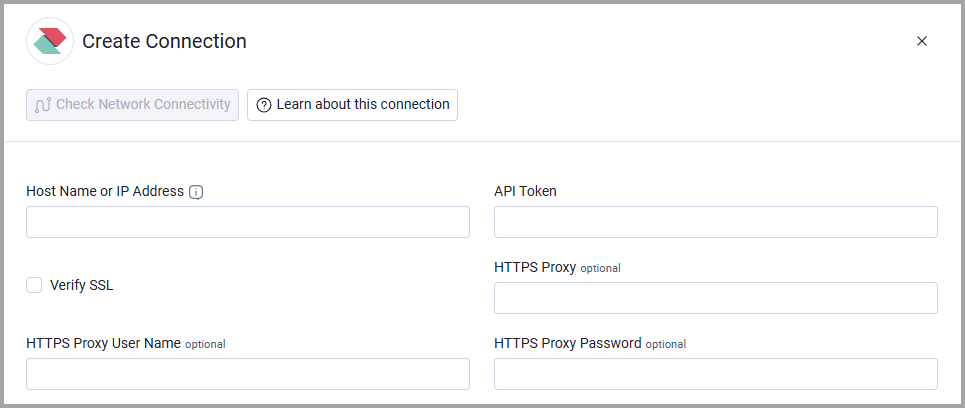
- Provide the following parameters.
Required Parameters
- Host Name or IP Address - Enter the base domain for the Zentral API, including
http://orhttps://. Do not append an API endpoint. Example:https://your-zentral-host/ - API Token - Enter the API token used to authenticate to Zentral.
Optional Parameters
- Verify SSL - Select whether to verify the SSL certificate of the server against the CA database inside of Axonius. For more details, see SSL Trust & CA Settings.
- HTTPS Proxy - Connect the adapter to a proxy instead of directly connecting to the Host Name or IP Address.
- HTTPS Proxy User Name - Enter the user name used to connect to the HTTPS Proxy.
- HTTPS Proxy Password - Enter the password used to connect to the HTTPS Proxy.
To learn more about common adapter connection parameters and buttons, see Adding a New Adapter Connection.
Updated about 2 months ago