
United Security Providers
United Security Providers is a Managed Security Services provider.
Types of Assets Fetched
This adapter fetches the following types of assets:
- Devices
Parameters
-
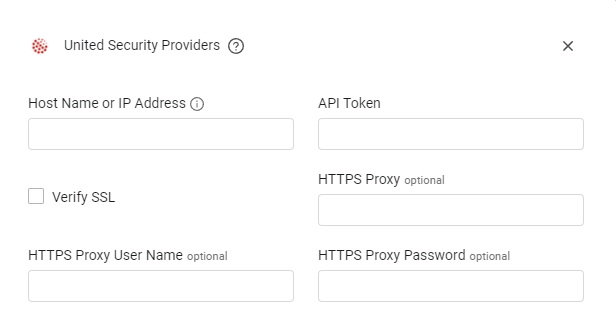
Host Name or IP Address (required) - The hostname or IP address of the United Security Providers server.
-
API Token (required) - An API Token associated with a user account that has the Required Permissions to fetch assets.
-
Verify SSL - Select whether to verify the SSL certificate of the server against the CA database inside of Axonius. For more details, see SSL Trust & CA Settings.
-
HTTPS Proxy (optional) - Connect the adapter to a proxy instead of directly connecting it to the domain.
-
HTTPS Proxy User Name (optional) - The user name to use when connecting to the value supplied in Host Name or IP Address via the value supplied in HTTPS Proxy.
-
HTTPS Proxy Password (optional) - The password to use when connecting to the server using the HTTPS Proxy.
To learn more about common adapter connection parameters and buttons, see Adding a New Adapter Connection.
Advanced Settings
Note:
- Advanced settings can apply to either all connections of this adapter, or to a specific connection. For more detailed information, see Advanced Configuration for Adapters.
- For more general information about advanced settings, see Adapter Advanced Settings.
- Parser Config - Click on
>to open the following setting:- Use network device name as Asset Name when client name is empty (default: false) - Select this option to use the name of the switch or router that an endpoint is connected to as its Asset Name when the endpoint has no client name. When this option is cleared, endpoints without a client name have no Asset Name.
APIs
Axonius uses the USP NAS REST API.
Required Permissions
A user with the user role ‘REST API’ can create an authentication-token in their user profile page. For more information, refer to the USP NAS REST API documentation.
Supported From Version
Supported from Axonius version 6.0
Updated 4 days ago