
UiPath
UiPath is a robotic process automation (RPA) platform for building, deploying and managing software robots that automate business processes.
Use Cases the Adapter Solves
- Monitor UiPath users: Review UiPath usernames, email addresses, roles, and active status alongside other user data.
- Assess account security settings: Check password, authentication, session, and IP-access settings when application-settings fetching is enabled.
- Support access governance: Identify inactive users and review the roles assigned to UiPath users and robots.
Asset Types Fetched
- Users, Application Settings
| Data Source | API Endpoint | Axonius Asset Type |
|---|---|---|
| Users | GET /{organization_name}/{tenant_name}/orchestrator_/odata/Users | Users |
| Password policy | GET /{organization_name}/identity_/api/Setting/password-policy | Application Settings |
| Authentication settings | GET /{organization_name}/identity_/api/Setting/authentication | Application Settings |
| IP network settings | GET /{organization_name}/identity_/api/IpNetwork | Application Settings |
Data Retrieved through the Adapter
- Users - fields such as: Username, Email Address, Display Name, User Type
- Application Settings - fields such as: Password History, Multi-Factor Authentication, Session Idle Timeout, Access Control by IP
Before You Begin
Authentication Methods
The adapter uses OAuth 2.0 Client Credentials.
APIs
Axonius uses the UiPath API. The following endpoints are called:
POST /identity_/connect/token- Obtains an OAuth 2.0 access token.GET /{organization_name}/{tenant_name}/orchestrator_/odata/Users- Retrieves users.GET /{organization_name}/identity_/api/Setting/password-policy- Retrieves password-policy settings when application settings fetch is enabled.GET /{organization_name}/identity_/api/Setting/authentication- Retrieves authentication settings when application settings fetch is enabled.GET /{organization_name}/identity_/api/IpNetwork- Retrieves IP network settings when application settings fetch is enabled.
Required Permissions
Register a confidential External Application with these OAuth scopes:
- OR.Users.Read - Allows the adapter to retrieve Users
- PM.Setting.Read - Allows the adapter to retrieve Application Settings
Supported From Version
Supported from Axonius version 9.0.7
Setting Up UiPath to Work with Axonius
- Sign in to UiPath Automation Cloud.
- Go to Admin > External Applications.
- Register a confidential External Application with the
OR.Users.ReadandPM.Setting.Readscopes. - Copy the application's ID and secret for the adapter connection.
Connecting the Adapter in Axonius
- Navigate to the Adapter Catalog, search for UiPath, and select the adapter.
- Click Add Connection.
- Provide the following parameters:
Required Parameters
- UiPath Automation Cloud Domain - Base domain for the UiPath Automation Cloud instance. Do not include a specific endpoint. Example:
https://cloud.uipath.com - Organization Name - The organization URL slug in Automation Cloud. Example:
https://cloud.uipath.com/<organization_name> - Tenant Name - The Orchestrator tenant name. Example:
DefaultTenant - External Application ID - App ID for the confidential External Application registered in Automation Cloud.
- External Application Secret - Secret for the confidential External Application.
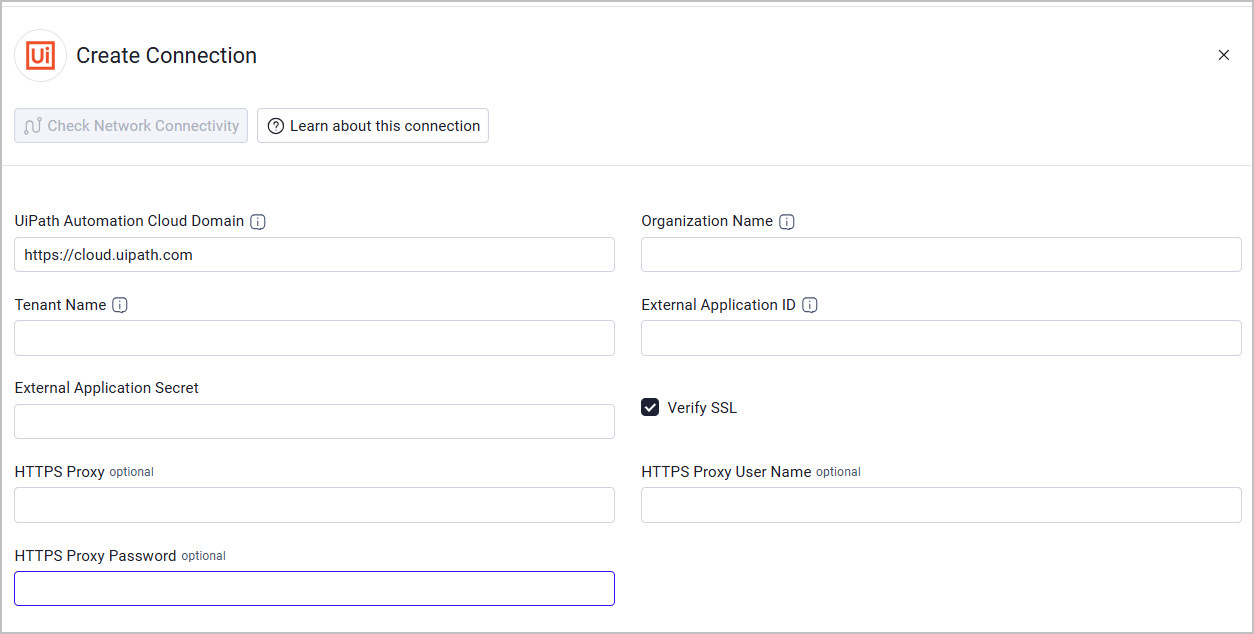
Optional Parameters
- Verify SSL - Select whether to verify the SSL certificate of the server against the CA database inside of Axonius. For more details, see SSL Trust & CA Settings.
- HTTPS Proxy - Connect the adapter to a proxy instead of directly connecting to UiPath Automation Cloud.
- HTTPS Proxy User Name - The user name to use when connecting through HTTPS Proxy.
- HTTPS Proxy Password - The password to use when connecting through HTTPS Proxy.
To learn more about common adapter connection parameters and buttons, see Adding a New Adapter Connection.
Advanced Settings
Note:
Advanced settings can either apply to all connections for this adapter, or to a specific connection. Refer to Advanced Configuration for Adapters.
To learn more about Adapter Configuration tab advanced settings, see Adapter Advanced Settings.
Fetch Application Settings - Select this option to fetch UiPath application settings. This option is disabled by default. When enabled, the adapter retrieves password-policy, authentication, and IP network settings.
Updated 14 days ago