
Twilio
Twilio is a customer engagement platform that offers programmable communication solutions.
Use Cases the Adapter Solves
- Twilio Account Inventory: Maintain a complete inventory of Twilio accounts and sub-accounts in Axonius, enabling security teams to identify unused or unknown accounts across the organization.
- IAM Credential Visibility: Surface AWS credentials and public keys associated with Twilio accounts in Axonius, providing visibility into credential sprawl and supporting least-privilege reviews.
Types of Assets Fetched
This adapter fetches the following types of assets:
- Accounts/Tenants
Data Retrieved through the Adapter
Accounts/Tenants - fields such as: Account SID, Friendly Name, Status, Account Type
Before You Begin
Required Ports
Axonius must be able to communicate with the value supplied in Host Name or IP Address via the following ports:
- 443
Authentication Methods
The Twilio adapter uses Basic HTTP authentication. The Account SID is used as the username and the Authentication Token is used as the password.
APIs
Axonius uses the following Twilio REST APIs:
- Twilio Accounts API —
GET /2010-04-01/Accounts.json - Twilio AWS Credentials API —
GET /v1/Credentials/AWS(uses the IAM Domain configured in the connection parameters) - Twilio Public Keys API —
GET /v1/Credentials/PublicKeys(uses the IAM Domain configured in the connection parameters)
Required Permissions
The Account SID and Authentication Token used must have permission to access the Twilio Account API and IAM Credentials API. For more details, see REST API: Credentials.
The AWS Credentials and Public Keys endpoints require the following Twilio IAM permissions:
twilio/iam/credentials-aws/list— required to retrieve AWS credentials.twilio/iam/public-keys/list— required to retrieve public keys.
Notes
- Grant these permissions in the Twilio Console. If you cannot grant them, disable the AWS Credentials and PublicKeys API endpoints.
- The permission names might not align with your environment - confirm the exact permissions and scopes with your Twilio administrator.
Supported From Version
Supported from Axonius version 6.1.30.0
Connecting the Adapter in Axonius
- Navigate to the Adapter Catalog, search for Twilio, and select the adapter.
- Click Add Connection.
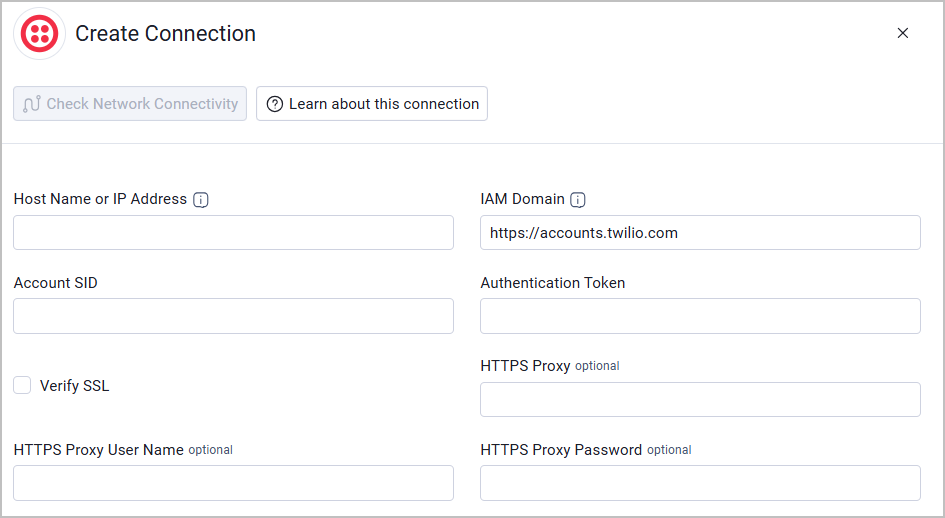
- Provide the following parameters.
Required Parameters
-
Host Name or IP Address - The base URL of the Twilio API, including the protocol prefix (for example,
https://api.twilio.com). Do not include a path after the domain. -
IAM Domain - Enter the base domain for the Twilio IAM API used by the AWS Credentials and PublicKeys API endpoints. Example:
https://accounts.twilio.com -
Account SID - The Account SID used to authenticate with the Twilio API.
-
Authentication Token - The Authentication Token associated with the Account SID. For more details, see REST API: Credentials.
-
Verify SSL - Select whether to verify the SSL certificate of the server against the CA database inside of Axonius. For more details, see SSL Trust & CA Settings.
Optional Parameters
-
HTTPS Proxy - Connect the adapter to a proxy instead of directly connecting it to the domain.
-
HTTPS Proxy User Name - The user name to use when connecting to the value supplied in Host Name or IP Address via the value supplied in HTTPS Proxy.
-
HTTPS Proxy Password - The password to use when connecting to the server using the HTTPS Proxy.
To learn more about common adapter connection parameters and buttons, see Adding a New Adapter Connection.
Advanced Settings
Note:
- Advanced settings can apply to either all connections of this adapter, or to a specific connection. For more detailed information, see Advanced Configuration for Adapters.
- For more general information about advanced settings, see Adapter Advanced Settings.
Fetch Accounts of sub-type account from List Accounts - Select this option to fetch Twilio account information, including account details, status, and ownership data. When enabled, the adapter retrieves account data from the Twilio Accounts API.
Updated 11 days ago