
Sysdig - Secure
Sysdig is a monitoring, troubleshooting, cost-optimization, and alerting suite for containers, cloud, and Kubernetes environments.
Use Cases the Adapter Solves
- Vulnerability Detection Across Hosts and Containers: Identify hosts and containers with known CVEs using runtime scan results to prioritize remediation efforts across the environment.
- Runtime Security Monitoring: Track runtime security policy violations and scan results for containerized workloads running in Kubernetes and cloud environments.
- Cloud Security Posture Management: Ensure cloud resources comply with security benchmarks by collecting CSPM inventory data across hosts and namespaces.
Asset Types Fetched
- Devices, Aggregated Security Findings, Users, Software, SaaS Applications, Compute Services
Before You Begin
Ports
- TCP port 443
Authentication Method
- Token
APIs
Axonius uses the Sysdig Secure API. The following endpoints are called:
Devices
- GET
/api/cspm/v1/inventory/resources(filter:type = "Host") - GET
/api/scanning/runtime/v2/workflows/results(filter:asset.type = "host") - GET
/secure/vulnerability/v1/results/{result_id} - GET
/api/scanning/runtime/v2/workflows/results(filter:asset.type = "container") - GET
/secure/vulnerability/v1/results/{result_id} - GET
/secure/inventory/v1/resources(filter:type = "Host") - GET
/secure/inventory/v1/resources/{resource_hash} - GET
/secure/vulnerability/v1/runtime-results(filter:asset.type = "host") - GET
/secure/vulnerability/v1/results/{result_id}
Compute Services
- GET
/api/cspm/v1/inventory/resources(filter:type = "namespace") - GET
/secure/vulnerability/v1/{pipeline-results|registry-results|runtime-results} - GET
/secure/vulnerability/v1/results/{result_id} - GET
/api/scanning/runtime/v2/workflows/results(filter:asset.type = "container") - GET
/secure/vulnerability/v1/results/{result_id}
Users
GET /platform/v1/usersGET /platform/v1/users/USER_ID
Permissions
The following permissions are required:
Administrator Role (Recommended)
Assign the user account associated with the API token an Admin role in Sysdig Secure for the simplest setup.
Custom Role (Minimum Permissions)
If using a custom role, the following permissions are required:
- Search / Inventory (read) — Required to access the Inventory and CSPM endpoints
- Vulnerability Management (read) — Required to access runtime vulnerability scan results and result details
- User Management (read) — Required to fetch user accounts
For more details, see the Sysdig API documentation and Global Service Accounts.
Supported From Version
Supported from Axonius version 6.1.27.0
Connecting the Adapter in Axonius
To connect the adapter in Axonius, provide the following parameters:
Required Parameters
-
Host Name or IP Address (default:
https://app.sysdigcloud.com) - The hostname or IP address of the Sysdig Secure server. -
Token - The credentials for a user account that has permission to fetch assets.
-
Client Type - Select the type of client.
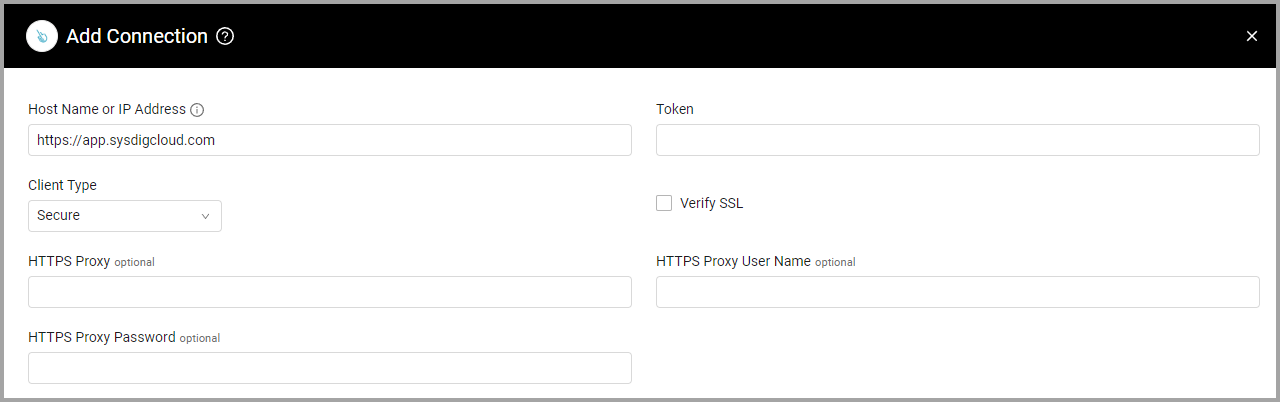
Optional Parameters
-
Verify SSL - Select whether to verify the SSL certificate of the server against the CA database inside of Axonius. For more details, see SSL Trust & CA Settings.
-
HTTPS Proxy - Connect the adapter to a proxy instead of directly connecting it to the domain.
-
HTTPS Proxy User Name - The user name to use when connecting to the value supplied in Host Name or IP Address via the value supplied in HTTPS Proxy.
-
HTTPS Proxy Password - The password to use when connecting to the server using the HTTPS Proxy.
To learn more about common adapter connection parameters and buttons, see Adding a New Adapter Connection.
Advanced Settings
Note:Advanced settings can either apply to all connections for this adapter, or to a specific connection. Refer to Advanced Configuration for Adapters.
- Fetch Devices of sub type host from Inventory Hosts Endpoint - Enable to fetch Hosts (Devices) from the public Inventory Hosts endpoint. When this is enabled, the following setting also becomes available:
- Inventory Host Fields - Select the fields you want to add to Hosts (Devices) assets.
- Fetch Devices of sub type workflow_host from Workflows Hosts Endpoint- Enable to fetch Hosts from the private Workflow Hosts endpoint. When this is enabled, the following setting also becomes available:
- Enrich Workflows Hosts Endpoint with Workflow Host Details Endpoint -When enabled, for each host fetched from the Workflows Hosts Endpoint, Axonius makes an additional call to retrieve full vulnerability scan result details for that host. This uses a private Sysdig API endpoint. Enable this only if your environment supports private endpoint access.
- Enrich Workflows Hosts Endpoint with List Container Results Endpoint - Enable to add container vulnerability information to Workflow Hosts. When this is enabled, the following setting also becomes available:
- Enrich List Container Results Endpoint with Get Container Details Endpoint - Enable to enrich each container (listed in the previous setting) with its details.
- Fetch Devices of sub-type Public Inventory Host from Inventory Hosts Endpoint (Public endpoint) - Enable to fetch host inventory data using Sysdig's public Inventory API v1. This setting is disabled by default.
- Enrich Inventory Hosts Endpoint (Public endpoint) with Inventory Host Details Endpoint (Public endpoint) When enabled, for each host fetched from the public Inventory Hosts Endpoint, Axonius makes an additional call to the public Inventory Host Details Endpoint to retrieve detailed resource information per host.
- Fetch Devices of sub-type Public Runtime Host from Runtime Results Endpoint (Public endpoint) When enabled, Axonius fetches host devices from the public Runtime Results Endpoint. This is an alternative to the private Workflows Hosts Endpoint and is recommended for environments that rely only on public Sysdig API endpoints.
- Runtime Results Endpoint (Public endpoint) - Enable to fetch runtime vulnerability scan results using Sysdig's public Vulnerability API v1. This setting is disabled by default.
- Fetch ComputeServices of sub type namespace from Namespaces Endpoint - Enable to fetch Namespaces (Compute Services) from the Namespaces endpoint. When this is enabled, the following settings also become available:
- Inventory Namespace Fields - Select the fields you want to add to Namespaces (Compute Services).
- Enrich Namespaces Endpoint with Results Endpoint - Enable to add vulnerability information to Namespaces (Compute Services).
- Enrich Results Endpoint with Result Details Endpoint - Enable to fetch Vulnerabilities for Compute Services (Containers). This setting is required in addition to Enrich Namespaces Endpoint with Results Endpoint in order to fetch Vulnerabilities for Containers fetched from the Namespaces endpoint.
- Fetch ComputeServices of sub type workflow_container from Workflows Containers - Enable to fetch Containers (Compute Services) from the Containers endpoint. When this is enabled, the following setting also becomes available:
- Enrich Workflows Containers with Result Details Endpoint - Enable to add vulnerability information to Containers (Compute Services).
- Fetch Users from User Details Endpoint - Enable this option to fetch users.
Note
To learn more about Adapter Configuration tab advanced settings, see Adapter Advanced Settings.
Updated 19 days ago