
NetSPI Resolve
NetSPI Resolve is a penetration testing management platform that provides vulnerability findings correlation, asset tracking, and remediation risk scoring for attack surface management.
Use Cases the Adapter Solves
- Track attack-surface assets: Bring NetSPI Resolve asset records into Axonius to improve device visibility.
- Review vulnerability risk: Use collected risk-score data to help prioritize assets for remediation.
- Support remediation planning: Compare asset ownership, compliance, and location data with other device information in Axonius.
Asset Types Fetched
- Devices
Data Retrieved through the Adapter
Devices - fields such as: Hostname, Device Name, Serial Number, Risk Score
Before You Begin
Required Ports
- HTTPS access to the value supplied in Host Name or IP Address. The default value is
https://resolve.netspi.com
Authentication Methods
API Token Authentication
The adapter sends the configured API token as a token authorization header when it searches for assets.
APIs
Axonius uses the NetSPI Resolve API. The following endpoint is called:
POST /api/v1/assets/search- Searches for assets and retrieves the returned asset records.
Required Permissions
Configure an API token that is authorized to search assets with POST /api/v1/assets/search.
NetSPI Resolve API documentation requires customer login. Verify with your NetSPI Resolve administrator what access level the API token user account requires to retrieve asset data from the /api/v1/assets/search endpoint. The token must have sufficient access to view all assets you want Axonius to discover.
Supported From Version
Supported from Axonius Version 9.0.7
Connecting the Adapter in Axonius
- Navigate to the Adapter Catalog, search for NetSPI Resolve, and select the adapter.
- Click Add Connection.
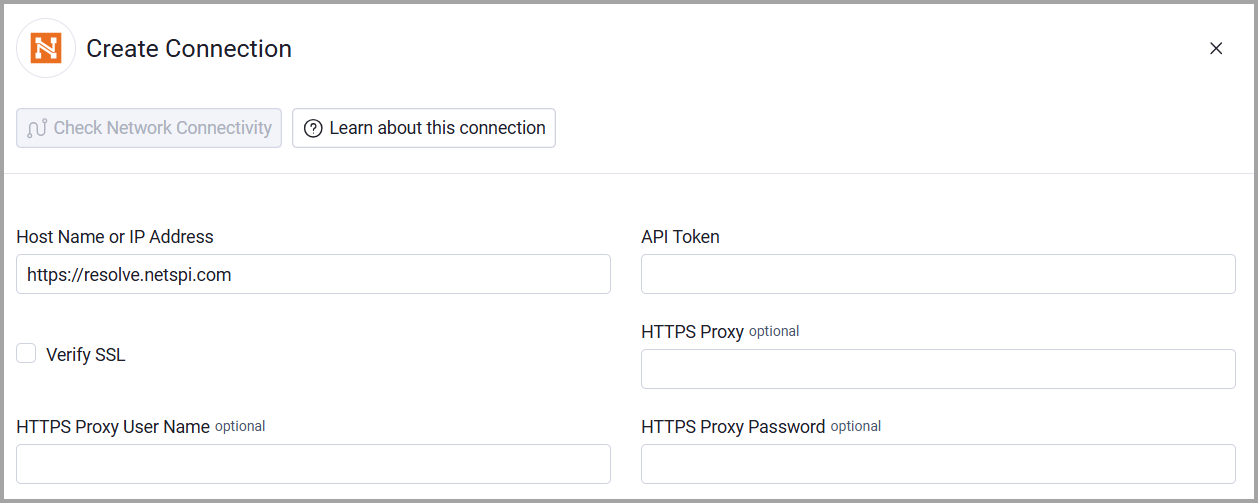
- Provide the following parameters.
Required Parameters
- Host Name or IP Address - The NetSPI Resolve host address. default: https://resolve.netspi.com
- API Token - The token used to authenticate asset-search requests.
Optional Parameters
- Verify SSL - Select whether to verify the SSL certificate of the server against the CA database inside of Axonius. For more details, see SSL Trust & CA Settings.
- HTTPS Proxy - Connect the adapter to a proxy instead of directly connecting it to the value supplied in Host Name or IP Address.
- HTTPS Proxy User Name - The user name to use when connecting to the value supplied in Host Name or IP Address via the value supplied in HTTPS Proxy.
- HTTPS Proxy Password - The password to use when connecting to the server using the HTTPS Proxy.
To learn more about common adapter connection parameters and buttons, see Adding a New Adapter Connection.
Updated about 1 month ago